
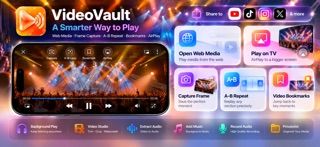
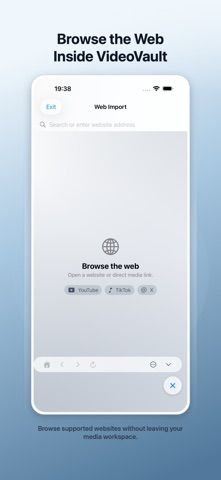
VideoVault combines local media playback with a set of editing and review tools. Import video or audio from Photos or Files, organize it in one place, and continue playback in the background or with the screen locked. The Video Studio can trim and crop clips, prepare vertical formats, add text or logo overlays, hide selected areas, add background music, adjust audio levels, and export optimized videos. Player tools include frame capture, A-B repeat, bookmarks, and web import. The app starts free, while Pro unlocks advanced playback, web import, bookmarks, and more export options. Monthly, yearly, and lifetime Pro plans are offered; eligible new monthly subscribers may receive a seven-day trial, and current prices are shown in the purchase flow. It is a mobile utility for local media rather than a replacement for a full desktop editor.

VideoVault: Video Audio Editor
A mobile video and audio toolkit for trimming, playback, overlays, imports, and media organization.
Overview
A closer look at VideoVault: Video Audio Editor.
A closer look
App screenshots
Choose with confidence
The useful details.
What it does
- Import media from Photos or Files and organize it in one place
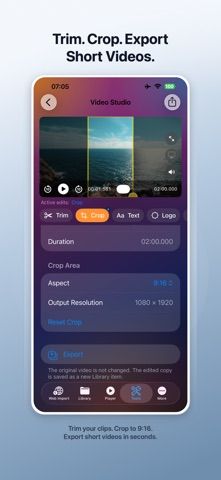
- Trim or crop clips and prepare vertical formats
- Add text, logos, music, and audio-level adjustments
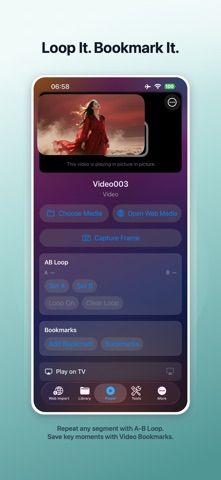
- Capture frames, set A-B repeats, and bookmark video with Pro
A good fit for
- Creators making quick edits or preparing social video on a phone
- People who want playback, review, and basic editing tools together
Worth knowing
- Advanced playback, imports, bookmarks, and exports require Pro; complex editing may be easier in desktop software.
Frequently asked questions
Answers based on the app’s official listing and reviewed information.
What is VideoVault: Video Audio Editor used for?
A mobile video and audio toolkit for trimming, playback, overlays, imports, and media organization.
What can you do with VideoVault: Video Audio Editor?
Import media from Photos or Files and organize it in one place Trim or crop clips and prepare vertical formats Add text, logos, music, and audio-level adjustments Capture frames, set A-B repeats, and bookmark video with Pro
Who is VideoVault: Video Audio Editor designed for?
Creators making quick edits or preparing social video on a phone People who want playback, review, and basic editing tools together
What should you know before downloading VideoVault: Video Audio Editor?
Advanced playback, imports, bookmarks, and exports require Pro; complex editing may be easier in desktop software.
Does VideoVault: Video Audio Editor include paid features?
The developer says VideoVault starts free. Pro has monthly and yearly plans; eligible new monthly subscribers may receive a seven-day trial. Current prices are shown before purchase.
Which platforms support VideoVault: Video Audio Editor?
Greatooly's reviewed app information lists iOS.
Researched from official sources; this is not a hands-on review. Last checked 2026-11-04.
Keep exploring
More apps that might be a good fit.

Dreamy Room: AI Room Design
Dreamy Room uses a photo of a real room to generate AI interior concepts in styles, colors, and furnishing directions you can compare.

Roomture: AI Interior Design
Roomture redesigns interior, exterior and garden photos with AI, then lets users compare, refine and save design ideas.

Verde: AI Backyard Design Plan
Verde turns photos of gardens, balconies, and rooms into AI redesigns that account for existing structures and practical dimensions.