
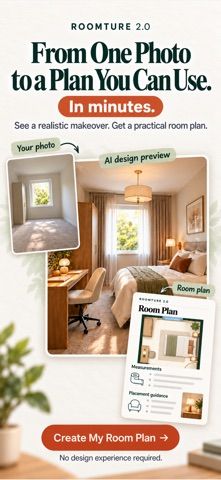
Roomture uses a photo of a room, exterior, or garden to create AI redesign concepts. The current listing describes nine workflows, including interior, exterior, and garden styles, layout changes, paint and flooring previews, applying a reference image, replacing an object, and clearing clutter. Users can compare before and after, adjust colors and materials, and save or share results. New accounts receive four designs without a subscription. Roomture Pro advertises up to 50 redesigns every 12 hours, a higher-quality model for the first 30 designs each day, no watermark, and priority processing. The App Store lists several US subscription price points and one-time packs: $3.99 weekly, $9.99 or $29.99 monthly, and $239.99 annually, plus design and room purchases from $0.99 to $29.99. Photos are uploaded for AI processing, according to the developer, and are not used for model training or sold. The app requires iOS 15 or later and is listed for iPhone.

Roomture: AI Interior Design
Roomture redesigns interior, exterior and garden photos with AI, then lets users compare, refine and save design ideas.
Overview
A closer look at Roomture: AI Interior Design.
A closer look
App screenshots

Choose with confidence
The useful details.
What it does
- Redesign indoor rooms, home exteriors, and gardens from a selected photo using multiple visual styles.
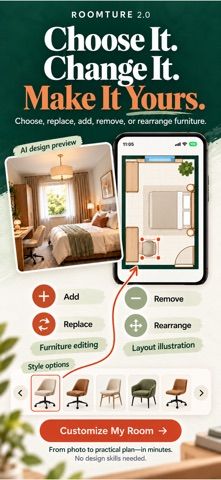
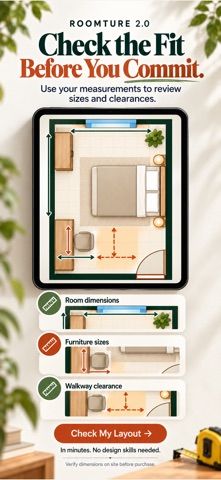
- Try alternate layouts, wall colors, floor materials, reference styles, object replacements, and cleanup.
- Compare a generated result with the original photo using a before-and-after slider.
- Save or share designs and continue refining a result; new accounts receive four free designs.
A good fit for
- People exploring interior, exterior, or garden ideas before choosing a renovation or decor direction.
- Users who want to preview alternate layouts, finishes, or furniture choices from a photo.
Worth knowing
- Requires iOS 15 or later and is listed for iPhone. Selected photos are uploaded to the service for AI processing.
- New accounts include four free designs. The US App Store lists Pro at $3.99 weekly, $9.99 or $29.99 monthly, or $239.99 yearly, plus one-time room and design purchases priced from $0.99 to $29.99.
Frequently asked questions
Answers based on the app’s official listing and reviewed information.
What is Roomture: AI Interior Design used for?
Roomture redesigns interior, exterior and garden photos with AI, then lets users compare, refine and save design ideas.
What can you do with Roomture: AI Interior Design?
Redesign indoor rooms, home exteriors, and gardens from a selected photo using multiple visual styles. Try alternate layouts, wall colors, floor materials, reference styles, object replacements, and cleanup. Compare a generated result with the original photo using a before-and-after slider. Save or share designs and continue refining a result; new accounts receive four free designs.
Who is Roomture: AI Interior Design designed for?
People exploring interior, exterior, or garden ideas before choosing a renovation or decor direction. Users who want to preview alternate layouts, finishes, or furniture choices from a photo.
What should you know before downloading Roomture: AI Interior Design?
Requires iOS 15 or later and is listed for iPhone. Selected photos are uploaded to the service for AI processing. New accounts include four free designs. The US App Store lists Pro at $3.99 weekly, $9.99 or $29.99 monthly, or $239.99 yearly, plus one-time room and design purchases priced from $0.99 to $29.99.
What does Roomture: AI Interior Design cost?
Free download; new accounts include four designs without a subscription. Roomture Pro offers higher design limits, a higher-quality model for the first 30 designs each day, watermark-free results, and priority processing. US App Store listings include $3.99 weekly, $9.99 and $29.99 monthly, and $239.99 annual options. The US App Store lists one-time image and design purchases: Extra Designs Pack $0.99, Extra Images $3.99 or $9.99, Single Room Plan $9.99, Extra Room $5.99, and Whole Home Pack $29.99.
Which platforms support Roomture: AI Interior Design?
Greatooly's reviewed app information lists iOS.
Researched from official sources; this is not a hands-on review. Last checked 2026-11-10.
Keep exploring
More apps that might be a good fit.

Dreamy Room: AI Room Design
Dreamy Room uses a photo of a real room to generate AI interior concepts in styles, colors, and furnishing directions you can compare.

Verde: AI Backyard Design Plan
Verde turns photos of gardens, balconies, and rooms into AI redesigns that account for existing structures and practical dimensions.

RoomMakeover: AI Room Design
RoomMakeover previews AI interior-design ideas from room photos, with style controls, credit packs, and Pro plans.