
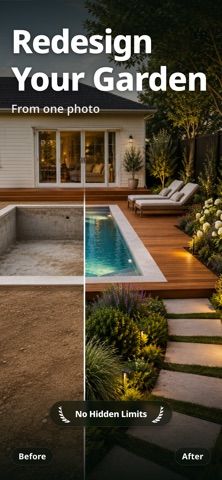
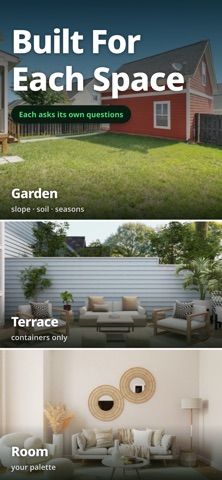
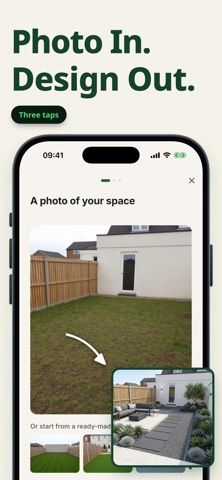
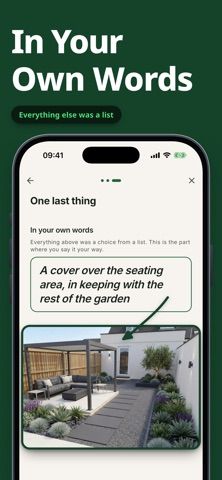
Verde helps homeowners and renters visualize a redesign for a garden, terrace, balcony, or room from a photo. It generates a concept intended to account for the existing slope, fence, trees, light, and dimensions rather than simply applying a visual filter. The app distinguishes garden spaces with soil from terraces or paved areas where plants need containers, and can include ideas intended to be built or discussed with a landscaper. Verde offers three designs free before asking the user to pay, with no account or location permission required. After the free designs, Verde Plus provides a stated number of designs per month, plant and materials lists, and unlimited edits on saved projects. The US App Store lists $7.99 weekly or $49.99 yearly; the purchase screen shows the plan’s design allowance before payment. Verde requires iOS 15 or later on iPhone or iPad. Generated plans are visual concepts, so check local conditions and measurements before purchasing materials or starting construction.

Verde: AI Backyard Design Plan
Verde turns photos of gardens, balconies, and rooms into AI redesigns that account for existing structures and practical dimensions.
Overview
A closer look at Verde: AI Backyard Design Plan.
A closer look
App screenshots
Choose with confidence
The useful details.
What it does
- Generate a redesign from a photo of a garden, terrace, balcony, or room.
- Create concepts that consider existing dimensions, slopes, fences, trees, and lighting.
- Separate ground gardens from terraces or paved spaces that need container planting.
- Start with three designs free, then view the plan’s exact price and monthly design allowance before purchasing.
A good fit for
- Homeowners and renters comparing landscape ideas before consulting a contractor or buying materials.
- People planning a garden, balcony, or terrace update who want a visual concept from a real photo.
Worth knowing
- The free tier includes three designs; Verde Plus is listed at $7.99 weekly or $49.99 yearly in the US App Store.
- The number of designs in a paid plan is shown at checkout and can vary by selected offer.
- Generated concepts should be checked against local climate, measurements, building rules, and plant suitability before implementation.
Frequently asked questions
Answers based on the app’s official listing and reviewed information.
What is Verde: AI Backyard Design Plan used for?
Verde turns photos of gardens, balconies, and rooms into AI redesigns that account for existing structures and practical dimensions.
What can you do with Verde: AI Backyard Design Plan?
Generate a redesign from a photo of a garden, terrace, balcony, or room. Create concepts that consider existing dimensions, slopes, fences, trees, and lighting. Separate ground gardens from terraces or paved spaces that need container planting. Start with three designs free, then view the plan’s exact price and monthly design allowance before purchasing.
Who is Verde: AI Backyard Design Plan designed for?
Homeowners and renters comparing landscape ideas before consulting a contractor or buying materials. People planning a garden, balcony, or terrace update who want a visual concept from a real photo.
What should you know before downloading Verde: AI Backyard Design Plan?
The free tier includes three designs; Verde Plus is listed at $7.99 weekly or $49.99 yearly in the US App Store. The number of designs in a paid plan is shown at checkout and can vary by selected offer. Generated concepts should be checked against local climate, measurements, building rules, and plant suitability before implementation.
What does Verde: AI Backyard Design Plan cost?
Free to download. Three generated designs are free to try; no account or location permission is required. Verde Plus is listed at $7.99 weekly or $49.99 yearly in the US App Store. It includes a stated monthly design allowance, plant and materials lists, and unlimited edits on saved projects; exact allowance is shown before purchase.
Which platforms support Verde: AI Backyard Design Plan?
Greatooly's reviewed app information lists iOS.
Researched from official sources; this is not a hands-on review. Last checked 2026-11-10.
Keep exploring
More apps that might be a good fit.

Dreamy Room: AI Room Design
Dreamy Room uses a photo of a real room to generate AI interior concepts in styles, colors, and furnishing directions you can compare.

Roomture: AI Interior Design
Roomture redesigns interior, exterior and garden photos with AI, then lets users compare, refine and save design ideas.

RoomMakeover: AI Room Design
RoomMakeover previews AI interior-design ideas from room photos, with style controls, credit packs, and Pro plans.