
Dreamy Room turns a photo of an existing space into an interior-design concept. Choose a bedroom, living room, kitchen, bathroom, office, dining area, or apartment, select a design style, and view a generated variation before deciding what to change. The app offers looks such as modern, minimalist, Scandinavian, Japandi, bohemian, industrial, farmhouse, and cozy, with different colors, layouts, lighting, materials, and decor. It is useful for exploring visual directions before purchasing furniture or starting a renovation, but generated images are inspiration rather than architectural plans. The US App Store lists monthly subscriptions at $4.99 for Lite, $9.99 for Plus, and $19.99 for Pro, plus one-time AI credit packs from $1.99 to $19.99. Dreamy Room supports iPhone and iPad and requires iOS 13 or later.

Dreamy Room: AI Room Design
Dreamy Room uses a photo of a real room to generate AI interior concepts in styles, colors, and furnishing directions you can compare.
Overview
A closer look at Dreamy Room: AI Room Design.
A closer look
App screenshots
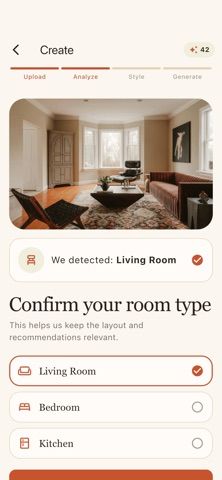
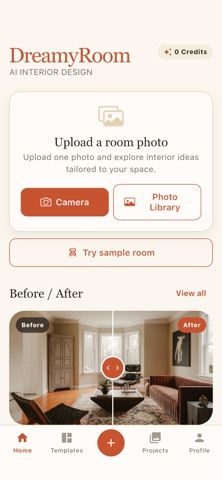
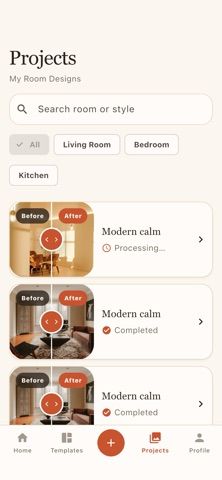
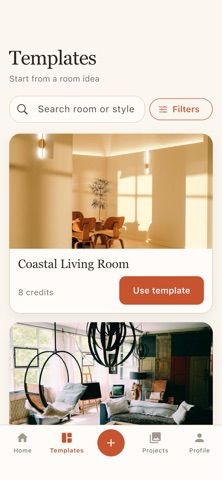
Choose with confidence
The useful details.
What it does
- Upload a photo of a real room and generate an AI redesign concept based on that space.
- Explore multiple room types and styles, including modern, Japandi, Scandinavian, farmhouse, and bohemian.
- Compare visual directions for furniture, colors, layouts, lighting, materials, and decor before redecorating.
- Use monthly plans or one-time AI credit packs to access additional image generation.
A good fit for
- Homeowners and renters who want quick visual inspiration for refreshing a room.
- People comparing decor styles or color directions before buying furniture or planning a renovation.
Worth knowing
- Requires iOS 13 or later and supports iPhone and iPad. Room photos are submitted for AI design generation; generated concepts can differ from real dimensions, products, construction constraints, and final results.
- US App Store monthly plans are Lite $4.99, Plus $9.99, and Pro $19.99. One-time credit packs are listed at $1.99, $4.99, $9.99, and $19.99; check the in-app purchase screen for current credit amounts and regional prices.
Frequently asked questions
Answers based on the app’s official listing and reviewed information.
What is Dreamy Room: AI Room Design used for?
Dreamy Room uses a photo of a real room to generate AI interior concepts in styles, colors, and furnishing directions you can compare.
What can you do with Dreamy Room: AI Room Design?
Upload a photo of a real room and generate an AI redesign concept based on that space. Explore multiple room types and styles, including modern, Japandi, Scandinavian, farmhouse, and bohemian. Compare visual directions for furniture, colors, layouts, lighting, materials, and decor before redecorating. Use monthly plans or one-time AI credit packs to access additional image generation.
Who is Dreamy Room: AI Room Design designed for?
Homeowners and renters who want quick visual inspiration for refreshing a room. People comparing decor styles or color directions before buying furniture or planning a renovation.
What should you know before downloading Dreamy Room: AI Room Design?
Requires iOS 13 or later and supports iPhone and iPad. Room photos are submitted for AI design generation; generated concepts can differ from real dimensions, products, construction constraints, and final results. US App Store monthly plans are Lite $4.99, Plus $9.99, and Pro $19.99. One-time credit packs are listed at $1.99, $4.99, $9.99, and $19.99; check the in-app purchase screen for current credit amounts and regional prices.
What does Dreamy Room: AI Room Design cost?
Free to download. US App Store monthly plans: DreamyRoom Lite $4.99/month, Plus $9.99/month, and Pro $19.99/month. One-time AI credit packs are listed in the US App Store at $1.99, $4.99, $9.99, and $19.99. Credit amounts and availability may vary by storefront.
Which platforms support Dreamy Room: AI Room Design?
Greatooly's reviewed app information lists iOS.
Researched from official sources; this is not a hands-on review. Last checked 2026-11-10.
Keep exploring
More apps that might be a good fit.

Roomture: AI Interior Design
Roomture redesigns interior, exterior and garden photos with AI, then lets users compare, refine and save design ideas.

Verde: AI Backyard Design Plan
Verde turns photos of gardens, balconies, and rooms into AI redesigns that account for existing structures and practical dimensions.

RoomMakeover: AI Room Design
RoomMakeover previews AI interior-design ideas from room photos, with style controls, credit packs, and Pro plans.