
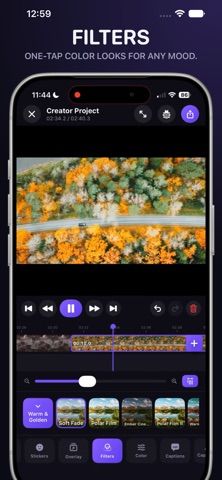
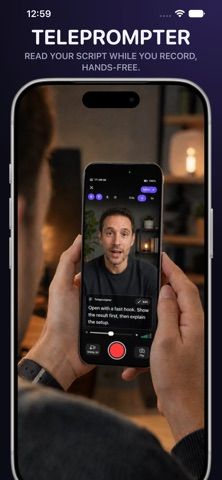
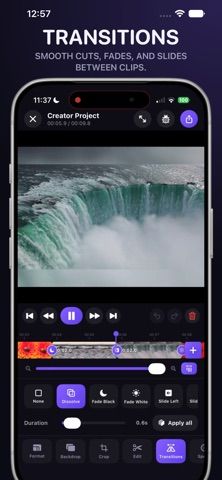
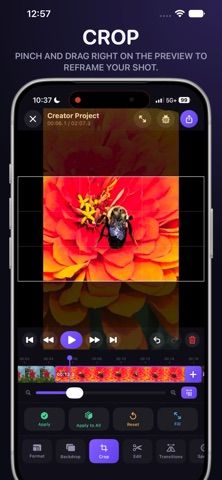
VEMA is an iPhone video studio for recording, editing, captioning, and exporting social content in one project. Its creator camera records multi-clip footage with countdown and speed controls, while a timeline supports trimming, scene reordering, transitions, speed ramps, cropping, and reframing. The app can generate captions with on-device speech recognition, style words with animated effects, blur detected faces, and add music, voiceover, stickers, or overlays. It also includes picture-in-picture reaction layouts and a thumbnail editor. VEMA is free to download. The developer describes an optional one-time purchase to remove advertising and the export watermark, with no subscription required. The broad feature set suits short-form creators, though the listing does not promise professional desktop-level finishing or compatibility with every social platform's changing specifications.

Video Editor - VEMA
A phone-first video editor with multi-clip recording, animated captions, face blur, filters, and reaction-video layouts.
Overview
A closer look at Video Editor - VEMA.
A closer look
App screenshots
Choose with confidence
The useful details.
What it does
- Record multi-clip video directly into an editable project
- Edit on a timeline with trimming, transitions, speed changes, and reframing
- Generate and style timed captions and automatically blur detected faces
- Add audio, voiceover, overlays, reaction layouts, and thumbnails
A good fit for
- Creators making Reels, Shorts, tutorials, reactions, and product videos on iPhone
- People who want captions and basic editing without moving footage to a desktop
Worth knowing
- The free export includes a watermark and advertising; removing them requires a one-time purchase.
Frequently asked questions
Answers based on the app’s official listing and reviewed information.
What is Video Editor - VEMA used for?
A phone-first video editor with multi-clip recording, animated captions, face blur, filters, and reaction-video layouts.
What can you do with Video Editor - VEMA?
Record multi-clip video directly into an editable project Edit on a timeline with trimming, transitions, speed changes, and reframing Generate and style timed captions and automatically blur detected faces Add audio, voiceover, overlays, reaction layouts, and thumbnails
Who is Video Editor - VEMA designed for?
Creators making Reels, Shorts, tutorials, reactions, and product videos on iPhone People who want captions and basic editing without moving footage to a desktop
What should you know before downloading Video Editor - VEMA?
The free export includes a watermark and advertising; removing them requires a one-time purchase.
Does Video Editor - VEMA include paid features?
The app is free to download with advertising and an export watermark. An optional one-time purchase removes advertising and the VEMA export watermark; the developer says no subscription is required.
Which platforms support Video Editor - VEMA?
Greatooly's reviewed app information lists iOS.
Researched from official sources; this is not a hands-on review. Last checked 2026-11-04.
Keep exploring
More apps that might be a good fit.

Dreamy Room: AI Room Design
Dreamy Room uses a photo of a real room to generate AI interior concepts in styles, colors, and furnishing directions you can compare.

Roomture: AI Interior Design
Roomture redesigns interior, exterior and garden photos with AI, then lets users compare, refine and save design ideas.

Verde: AI Backyard Design Plan
Verde turns photos of gardens, balconies, and rooms into AI redesigns that account for existing structures and practical dimensions.