
TopMod 3D is a specialized mesh-modeling tool for creating intricate surfaces with handles, holes, and other topological forms. The app is designed for direct manipulation on iPhone and iPad, though the developer says it works best on iPad. Finished meshes can be exported as OBJ files for use in other 3D software or pipelines. This focus on mathematical and topological form makes it distinct from general room design or simple 3D model viewers. The App Store description is brief and does not explain pricing, tutorials, supported file import, or compatibility with particular desktop tools. Users should test a small model and export before using it for production work or assuming another application will accept the geometry as expected.
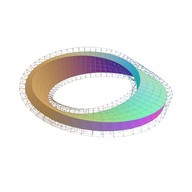
TopMod 3D: Design Software
A topological 3D mesh modeling app for sculpting complex surfaces and exporting OBJ files on Apple devices.
By John BriscellaReleased 2026/06/16App Store rating 5.0 (3)Official store informationPublished 2026/11/04Checked 2026-11-04
Overview
A closer look at TopMod 3D: Design Software.
A closer look
App screenshots
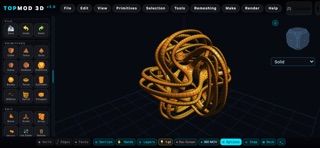
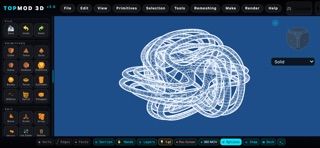
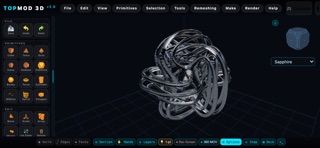

Choose with confidence
The useful details.
What it does
- Builds complex 3D surfaces and manifold geometry through direct modeling.
- Supports sculpting and exporting models as OBJ files.
- Runs on iPhone and iPad, with the developer recommending iPad for the best experience.
A good fit for
- 3D artists interested in topological and mathematical surface modeling.
- iPad users who want to create OBJ meshes away from a desktop.
Worth knowing
- The listing provides few details about tutorials, import formats, or pricing; verify OBJ compatibility with the intended 3D pipeline.
Frequently asked questions
Answers based on the app’s official listing and reviewed information.
What is TopMod 3D: Design Software used for?
A topological 3D mesh modeling app for sculpting complex surfaces and exporting OBJ files on Apple devices.
What can you do with TopMod 3D: Design Software?
Builds complex 3D surfaces and manifold geometry through direct modeling. Supports sculpting and exporting models as OBJ files. Runs on iPhone and iPad, with the developer recommending iPad for the best experience.
Who is TopMod 3D: Design Software designed for?
3D artists interested in topological and mathematical surface modeling. iPad users who want to create OBJ meshes away from a desktop.
What should you know before downloading TopMod 3D: Design Software?
The listing provides few details about tutorials, import formats, or pricing; verify OBJ compatibility with the intended 3D pipeline.
Does TopMod 3D: Design Software include paid features?
The reviewed listing does not confirm current in-app purchase options.
Which platforms support TopMod 3D: Design Software?
Greatooly's reviewed app information lists iOS.
Researched from official sources; this is not a hands-on review. Last checked 2026-11-04.
Keep exploring
More apps that might be a good fit.

Dreamy Room: AI Room Design
Dreamy Room uses a photo of a real room to generate AI interior concepts in styles, colors, and furnishing directions you can compare.

Roomture: AI Interior Design
Roomture redesigns interior, exterior and garden photos with AI, then lets users compare, refine and save design ideas.

Verde: AI Backyard Design Plan
Verde turns photos of gardens, balconies, and rooms into AI redesigns that account for existing structures and practical dimensions.