
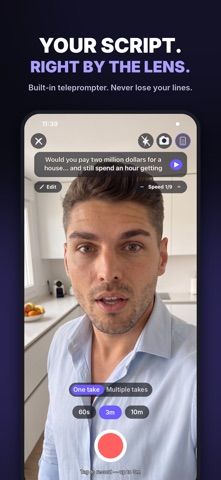
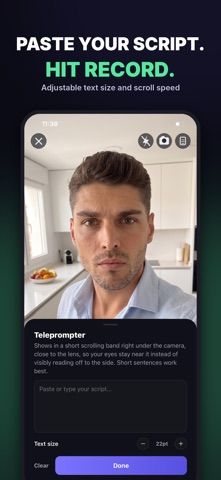
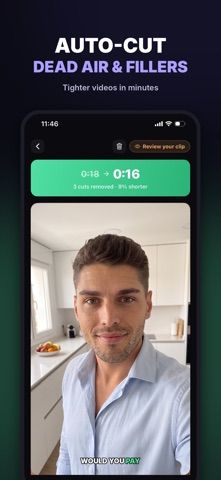
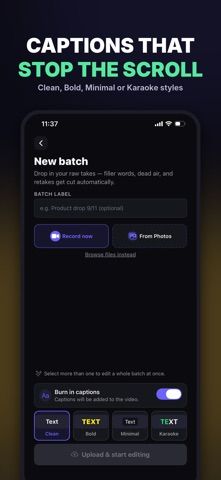
TakeCut is an editing workflow for creators who record themselves speaking to camera. A built-in teleprompter keeps a script visible near the lens, while the app can remove dead air, filler words, and false starts to create a shorter clip. It can suggest opening lines, generate styled captions, add logos and calls to action, and process multiple recordings from a batch session. Exports are listed in 480p, 720p, 1080p, and 4K for social platforms including Instagram, TikTok, and YouTube Shorts. Unlike a traditional editor, TakeCut says users do not need to work on a timeline. The US App Store listing is free to download, but its captured description does not spell out paid tiers, export limits, or usage quotas. This may suit coaches, educators, agents, and consultants who publish short talking-head videos regularly.

TakeCut: AI Video Editor
An AI video editor for talking-head creators with a teleprompter, automatic cuts, captions, brand overlays, and batch processing.
Overview
A closer look at TakeCut: AI Video Editor.
A closer look
App screenshots
Choose with confidence
The useful details.
What it does
- Read scripts with an adjustable on-screen teleprompter while recording to camera.
- Automatically remove pauses, filler words, and false starts from recordings.
- Generate captions, add logos or calls to action, and get suggested opening lines.
- Batch-process recordings and export in resolutions up to 4K.
A good fit for
- Coaches, educators, consultants, and other creators who produce short talking-head videos.
Worth knowing
- The workflow is specialized for talking-head clips rather than general multitrack video editing.
- The captured description does not explain usage limits, pricing, or which export resolutions are included at no cost.
- The US listing is marked free to download; confirm current in-app purchase terms before relying on a production workflow.
Frequently asked questions
Answers based on the app’s official listing and reviewed information.
What is TakeCut: AI Video Editor used for?
An AI video editor for talking-head creators with a teleprompter, automatic cuts, captions, brand overlays, and batch processing.
What can you do with TakeCut: AI Video Editor?
Read scripts with an adjustable on-screen teleprompter while recording to camera. Automatically remove pauses, filler words, and false starts from recordings. Generate captions, add logos or calls to action, and get suggested opening lines. Batch-process recordings and export in resolutions up to 4K.
Who is TakeCut: AI Video Editor designed for?
Coaches, educators, consultants, and other creators who produce short talking-head videos.
What should you know before downloading TakeCut: AI Video Editor?
The workflow is specialized for talking-head clips rather than general multitrack video editing. The captured description does not explain usage limits, pricing, or which export resolutions are included at no cost. The US listing is marked free to download; confirm current in-app purchase terms before relying on a production workflow.
Does TakeCut: AI Video Editor include paid features?
The US App Store listing is marked free to download. The captured description does not specify paid tiers or feature limits; check the live store page.
Which platforms support TakeCut: AI Video Editor?
Greatooly's reviewed app information lists iOS.
Researched from official sources; this is not a hands-on review. Last checked 2026-11-04.
Keep exploring
More apps that might be a good fit.

Dreamy Room: AI Room Design
Dreamy Room uses a photo of a real room to generate AI interior concepts in styles, colors, and furnishing directions you can compare.

Roomture: AI Interior Design
Roomture redesigns interior, exterior and garden photos with AI, then lets users compare, refine and save design ideas.

Verde: AI Backyard Design Plan
Verde turns photos of gardens, balconies, and rooms into AI redesigns that account for existing structures and practical dimensions.