
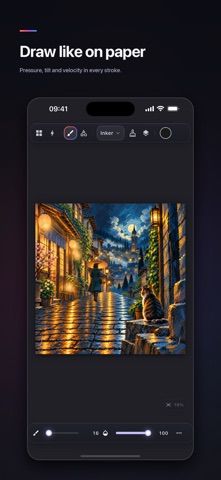
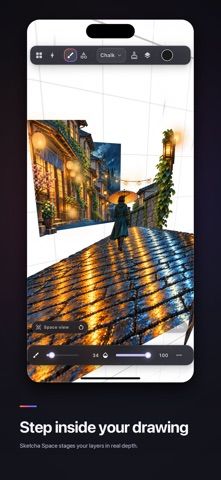
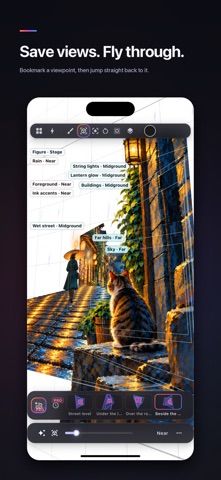
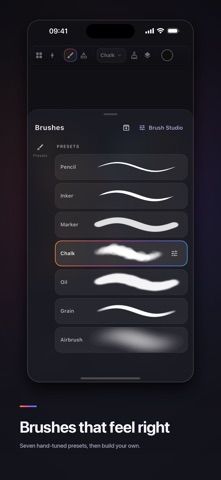
Sketcha is a drawing and animation studio for iPhone and iPad that can stage a layer stack in three-dimensional space. Artists can draw on tilted planes, orbit around the scene, bookmark viewpoints, and make flythroughs. The brush engine responds to pressure, tilt, and stroke speed, while the app supports raster and vector layers, masks, symbols, text, guides, and photo or SVG import. Animation tools include frame-by-frame drawing, keyframes, skeleton rigging, shape tweening, audio tracks, and scene management. Projects can be exported as images, sequences, GIFs, MP4, sprite sheets, or time-lapses. The core app includes substantial drawing features; Sketcha Pro adds selected advanced tools and exports through monthly or yearly plans listed at US prices.

Sketcha: Drawing & Animation
A drawing and animation studio with true 3D layer staging, advanced brushes, keyframes, rigging, and offline exports.
Overview
A closer look at Sketcha: Drawing & Animation.
A closer look
App screenshots
Choose with confidence
The useful details.
What it does
- Stage layers at different depths, orbit the scene, and save 3D viewpoints.
- Draw with customizable pressure-sensitive brushes and raster or vector layers.
- Animate frame by frame or with keyframes, rigging, shape tweening, and audio sync.
- Export PNG, GIF, MP4, sprite sheets, time-lapses, and 3D-scene flythroughs.
A good fit for
- Digital artists and animators who want a deep drawing and motion toolkit on iPhone or iPad.
Worth knowing
- Sketcha has a broad feature set with a learning curve compared with simple sketching apps.
- Pro costs $4.99 monthly or $14.99 yearly in the US; prices may vary by region.
Frequently asked questions
Answers based on the app’s official listing and reviewed information.
What is Sketcha: Drawing & Animation used for?
A drawing and animation studio with true 3D layer staging, advanced brushes, keyframes, rigging, and offline exports.
What can you do with Sketcha: Drawing & Animation?
Stage layers at different depths, orbit the scene, and save 3D viewpoints. Draw with customizable pressure-sensitive brushes and raster or vector layers. Animate frame by frame or with keyframes, rigging, shape tweening, and audio sync. Export PNG, GIF, MP4, sprite sheets, time-lapses, and 3D-scene flythroughs.
Who is Sketcha: Drawing & Animation designed for?
Digital artists and animators who want a deep drawing and motion toolkit on iPhone or iPad.
What should you know before downloading Sketcha: Drawing & Animation?
Sketcha has a broad feature set with a learning curve compared with simple sketching apps. Pro costs $4.99 monthly or $14.99 yearly in the US; prices may vary by region.
Does Sketcha: Drawing & Animation include paid features?
Sketcha Pro is listed at $4.99 per month or $14.99 per year in the US; local prices may differ.
Which platforms support Sketcha: Drawing & Animation?
Greatooly's reviewed app information lists iOS.
Researched from official sources; this is not a hands-on review. Last checked 2026-11-04.
Keep exploring
More apps that might be a good fit.

Dreamy Room: AI Room Design
Dreamy Room uses a photo of a real room to generate AI interior concepts in styles, colors, and furnishing directions you can compare.

Roomture: AI Interior Design
Roomture redesigns interior, exterior and garden photos with AI, then lets users compare, refine and save design ideas.

Verde: AI Backyard Design Plan
Verde turns photos of gardens, balconies, and rooms into AI redesigns that account for existing structures and practical dimensions.