
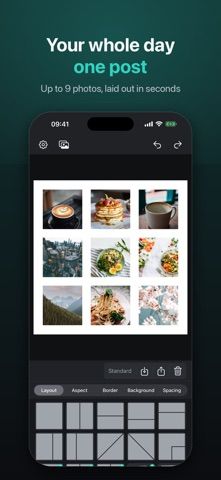
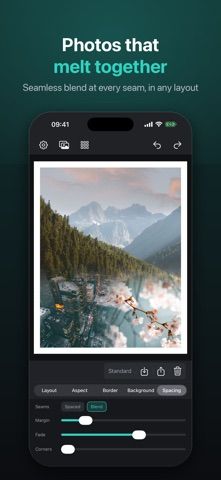
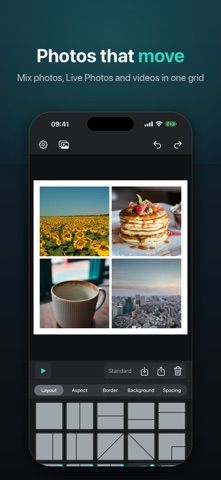
SeloPhoto is a collage editor for arranging up to nine photos or video clips in a chosen order. Users can select a layout, adjust crops, set visible margins, and export square posts, portrait images, or vertical stories. Video slots can be trimmed and can use a selected cover frame and audio source. Collages render on the iPhone, and the developer says photo-library access is optional, with no account, ads, or tracking. SeloPhoto Pro is a one-time purchase that unlocks all layouts, seamless blending, custom backgrounds and export sizes, longer videos, and 1080p output. The listing does not state the current price. Free video imports are limited to five seconds, according to the description. Preview framing and motion before posting, since a crop that looks right on the canvas may appear differently in a social app.

SeloPhoto: Collage Maker
An on-device collage editor for photo grids, video layouts, social posts, and animated exports.
Overview
A closer look at SeloPhoto: Collage Maker.
A closer look
App screenshots
Choose with confidence
The useful details.
What it does
- Arrange up to nine photos in a grid or featured collage layout.
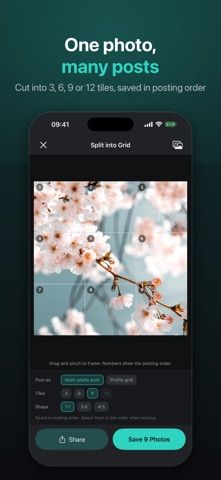
- Create square, 4:5, or 9:16 images and split a design into multiple tiles.
- Add video clips, trim them, select cover frames, and export moving collages.
- Render projects on-device and share without granting full photo-library access.
A good fit for
- iPhone users who want simple photo and video collages with explicit control over spacing and crop.
Worth knowing
- Free video slots are limited to five seconds; longer clips require Pro.
- Pro is a one-time purchase, but the listing does not state its current price.
- Check framing in the destination social app before publishing a multi-tile layout.
Frequently asked questions
Answers based on the app’s official listing and reviewed information.
What is SeloPhoto: Collage Maker used for?
An on-device collage editor for photo grids, video layouts, social posts, and animated exports.
What can you do with SeloPhoto: Collage Maker?
Arrange up to nine photos in a grid or featured collage layout. Create square, 4:5, or 9:16 images and split a design into multiple tiles. Add video clips, trim them, select cover frames, and export moving collages. Render projects on-device and share without granting full photo-library access.
Who is SeloPhoto: Collage Maker designed for?
iPhone users who want simple photo and video collages with explicit control over spacing and crop.
What should you know before downloading SeloPhoto: Collage Maker?
Free video slots are limited to five seconds; longer clips require Pro. Pro is a one-time purchase, but the listing does not state its current price. Check framing in the destination social app before publishing a multi-tile layout.
Does SeloPhoto: Collage Maker include paid features?
SeloPhoto Pro is a one-time lifetime purchase that unlocks extra layouts, blending, backgrounds, and export options. Check the current price in the App Store.
Which platforms support SeloPhoto: Collage Maker?
Greatooly's reviewed app information lists iOS.
Researched from official sources; this is not a hands-on review. Last checked 2026-11-04.
Keep exploring
More apps that might be a good fit.

Dreamy Room: AI Room Design
Dreamy Room uses a photo of a real room to generate AI interior concepts in styles, colors, and furnishing directions you can compare.

Roomture: AI Interior Design
Roomture redesigns interior, exterior and garden photos with AI, then lets users compare, refine and save design ideas.

Verde: AI Backyard Design Plan
Verde turns photos of gardens, balconies, and rooms into AI redesigns that account for existing structures and practical dimensions.