
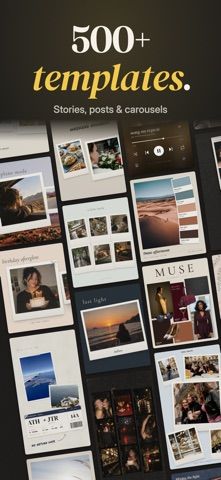
Seamly helps creators turn camera-roll photos into social carousels, collages, and stories. Templates cover formats such as square posts, portrait posts, and vertical stories, with tools for text, fonts, photo cutouts, filters, stickers, layers, and alignment. Multi-slide layouts can connect images and text across swipes, and a preview shows each slide before export. Seamly Pro unlocks additional templates, animation, a photo editor, longer video clips, and a brand kit. The listing offers Pro as a monthly or yearly auto-renewing subscription or a one-time lifetime purchase, but it does not show current prices. Creators should review each slide for crop and text errors before posting, and verify subscription terms before starting a trial.

CreativityAnimation creation appsCollage making appsGraphic design appsLogo design appsPhoto editing appsSocial media post design apps
Seamly Photo Collage Maker
A photo design app for seamless social carousels, story collages, templates, and brand kits.
By EBSM OZEL SAGLIK HIZMETLERI BILGISAYAR YAZILIM BILISIM SANAYI VE TICARET LIMITED SIRKETIReleased 2026/10/20App Store rating 5.0 (2)Official store informationPublished 2026/11/04Checked 2026-11-04
Overview
A closer look at Seamly Photo Collage Maker.
A closer look
App screenshots

Choose with confidence
The useful details.
What it does
- Create multi-slide carousels, photo collages, stories, mood boards, and scrapbook layouts.
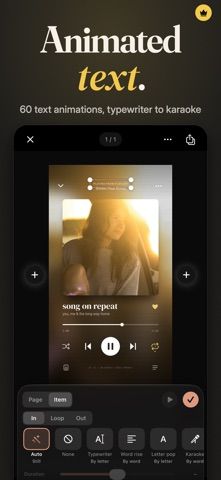
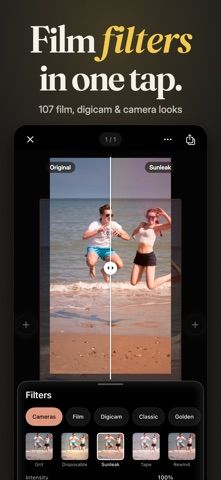
- Add text, fonts, stickers, cutouts, filters, gradients, and video clips.
- Preview and export slides together to the photo library.
- Use Pro for extra templates, animation, editing presets, longer clips, and brand assets.
A good fit for
- Creators and small brands that want to build connected carousel posts from phone photos.
Worth knowing
- Pro templates, animations, advanced photo editing, and brand kits require a paid option.
- Subscription prices are not stated in the listing; check the monthly, yearly, or lifetime offer before buying.
- Review layout and cropping on every slide before publishing.
Frequently asked questions
Answers based on the app’s official listing and reviewed information.
What is Seamly Photo Collage Maker used for?
A photo design app for seamless social carousels, story collages, templates, and brand kits.
What can you do with Seamly Photo Collage Maker?
Create multi-slide carousels, photo collages, stories, mood boards, and scrapbook layouts. Add text, fonts, stickers, cutouts, filters, gradients, and video clips. Preview and export slides together to the photo library. Use Pro for extra templates, animation, editing presets, longer clips, and brand assets.
Who is Seamly Photo Collage Maker designed for?
Creators and small brands that want to build connected carousel posts from phone photos.
What should you know before downloading Seamly Photo Collage Maker?
Pro templates, animations, advanced photo editing, and brand kits require a paid option. Subscription prices are not stated in the listing; check the monthly, yearly, or lifetime offer before buying. Review layout and cropping on every slide before publishing.
Does Seamly Photo Collage Maker include paid features?
Seamly Pro is offered monthly or yearly with automatic renewal. Current prices and any trial terms appear in the App Store. The listing also offers a one-time lifetime purchase of Seamly Pro; verify the current price in the App Store.
Which platforms support Seamly Photo Collage Maker?
Greatooly's reviewed app information lists iOS.
Researched from official sources; this is not a hands-on review. Last checked 2026-11-04.
Keep exploring
More apps that might be a good fit.

Dreamy Room: AI Room Design
Dreamy Room uses a photo of a real room to generate AI interior concepts in styles, colors, and furnishing directions you can compare.

Roomture: AI Interior Design
Roomture redesigns interior, exterior and garden photos with AI, then lets users compare, refine and save design ideas.

Verde: AI Backyard Design Plan
Verde turns photos of gardens, balconies, and rooms into AI redesigns that account for existing structures and practical dimensions.