
ProFuse generates artwork from written prompts or existing photos and gives users editing controls beyond a one-tap filter. The app lists more than 80 styles, separate content and style prompts, brush-based edits to refine parts of an image, custom styles, and seed controls for repeatable compositions. The developer says generation runs on device and does not upload photos or prompts to a server. Basic generations are available for free; Premium subscriptions add further creative features, and the US App Store also lists a lifetime option and a separate watermark-removal purchase. ProFuse requires iOS 26 or later on iPhone or iPad, and its first model setup may take time. Apple’s privacy label says usage and diagnostic data may be collected, so “on-device generation” should not be read as a claim that the app collects no telemetry.

ProFuse: AI Art Generator
An on-device AI art generator for text and photo prompts, with 80-plus styles, brush-based editing, and optional premium tools.
Overview
A closer look at ProFuse: AI Art Generator.
A closer look
App screenshots
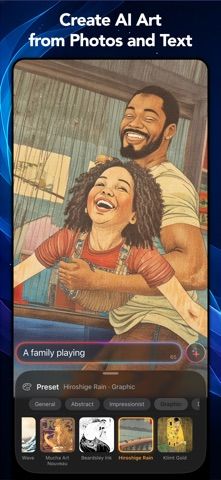
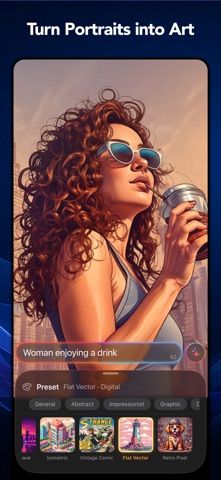
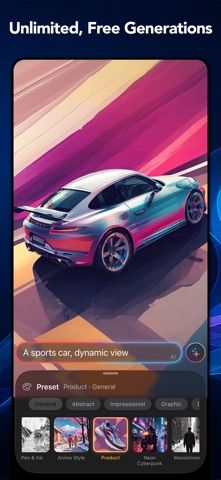
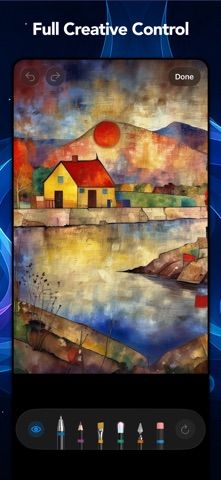
Choose with confidence
The useful details.
What it does
- Generate images from text prompts or existing photos on device.
- Choose from more than 80 art and photography styles.
- Refine image areas with brush tools and adjust style strength.
- Save custom styles and use seed controls for repeatable results.
A good fit for
- Artists and hobbyists who want local AI image generation with hands-on editing controls.
Worth knowing
- Requires iOS/iPadOS 26 or later and an initial model setup; Premium tools and watermark removal have separate paid options, and Apple’s privacy label lists usage and diagnostic data.
Frequently asked questions
Answers based on the app’s official listing and reviewed information.
What is ProFuse: AI Art Generator used for?
An on-device AI art generator for text and photo prompts, with 80-plus styles, brush-based editing, and optional premium tools.
What can you do with ProFuse: AI Art Generator?
Generate images from text prompts or existing photos on device. Choose from more than 80 art and photography styles. Refine image areas with brush tools and adjust style strength. Save custom styles and use seed controls for repeatable results.
Who is ProFuse: AI Art Generator designed for?
Artists and hobbyists who want local AI image generation with hands-on editing controls.
What should you know before downloading ProFuse: AI Art Generator?
Requires iOS/iPadOS 26 or later and an initial model setup; Premium tools and watermark removal have separate paid options, and Apple’s privacy label lists usage and diagnostic data.
Does ProFuse: AI Art Generator include paid features?
ProFuse Premium is offered weekly, monthly, and yearly in the US App Store; current prices appear before purchase. The US App Store lists a lifetime Premium option and a separate one-time watermark-removal purchase.
Which platforms support ProFuse: AI Art Generator?
Greatooly's reviewed app information lists iOS.
Researched from official sources; this is not a hands-on review. Last checked 2026-11-04.
Keep exploring
More apps that might be a good fit.

Dreamy Room: AI Room Design
Dreamy Room uses a photo of a real room to generate AI interior concepts in styles, colors, and furnishing directions you can compare.

Roomture: AI Interior Design
Roomture redesigns interior, exterior and garden photos with AI, then lets users compare, refine and save design ideas.

Verde: AI Backyard Design Plan
Verde turns photos of gardens, balconies, and rooms into AI redesigns that account for existing structures and practical dimensions.