
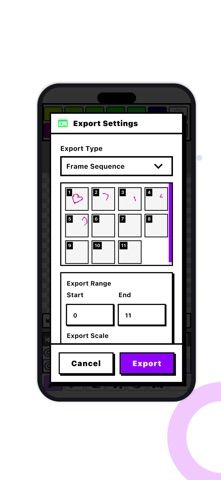
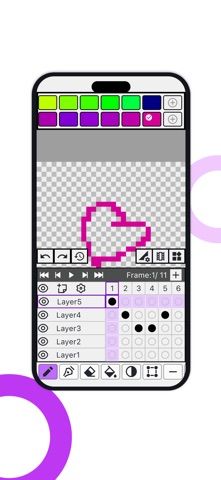
PixelPaw is a pixel-art editor and animation tool for sprite sheets, icons, and retro-style graphics. The listing describes pixel-level drawing, multiple layers, frame-by-frame animation, adjustable frame rates, palette creation, and common drawing tools such as pencil, eraser, fill, picker, and selection. This may suit an indie game artist or hobbyist who wants to make or animate small graphics on an iPhone. The developer says artwork is stored locally and is not uploaded to cloud servers without consent. The listing had no ratings when checked, so there is little public feedback on editing controls, export formats, or project stability. Check whether the supported canvas sizes, animation exports, and input methods fit your workflow before relying on it for a larger game project. The available metadata did not clearly state purchase limits or current price.

PixelPaw - Pixel Art Editor
Draw pixel art and frame-by-frame animations with layers, custom palettes, and precise hard-edge tools.
Overview
A closer look at PixelPaw - Pixel Art Editor.
A closer look
App screenshots


Choose with confidence
The useful details.
What it does
- Draw with hard-edge pixel tools for crisp lines and fills.
- Organize artwork with layers and custom color palettes.
- Create frame-by-frame animations and adjust playback frame rates.
- Keep artwork stored locally, according to the developer.
A good fit for
- Pixel artists and indie game creators who want a mobile editor for sprites and short animations.
Worth knowing
- The metadata does not establish export formats or canvas limits; verify they fit the intended project.
- The listing had no user ratings when checked, so stability and workflow feedback are limited.
- Review privacy and backup settings; the developer says projects stay local unless cloud sharing is chosen.
Frequently asked questions
Answers based on the app’s official listing and reviewed information.
What is PixelPaw - Pixel Art Editor used for?
Draw pixel art and frame-by-frame animations with layers, custom palettes, and precise hard-edge tools.
What can you do with PixelPaw - Pixel Art Editor?
Draw with hard-edge pixel tools for crisp lines and fills. Organize artwork with layers and custom color palettes. Create frame-by-frame animations and adjust playback frame rates. Keep artwork stored locally, according to the developer.
Who is PixelPaw - Pixel Art Editor designed for?
Pixel artists and indie game creators who want a mobile editor for sprites and short animations.
What should you know before downloading PixelPaw - Pixel Art Editor?
The metadata does not establish export formats or canvas limits; verify they fit the intended project. The listing had no user ratings when checked, so stability and workflow feedback are limited. Review privacy and backup settings; the developer says projects stay local unless cloud sharing is chosen.
Does PixelPaw - Pixel Art Editor include paid features?
The reviewed listing does not confirm current in-app purchase options.
Which platforms support PixelPaw - Pixel Art Editor?
Greatooly's reviewed app information lists iOS.
Researched from official sources; this is not a hands-on review. Last checked 2026-11-04.
Keep exploring
More apps that might be a good fit.

Dreamy Room: AI Room Design
Dreamy Room uses a photo of a real room to generate AI interior concepts in styles, colors, and furnishing directions you can compare.

Roomture: AI Interior Design
Roomture redesigns interior, exterior and garden photos with AI, then lets users compare, refine and save design ideas.

Verde: AI Backyard Design Plan
Verde turns photos of gardens, balconies, and rooms into AI redesigns that account for existing structures and practical dimensions.