
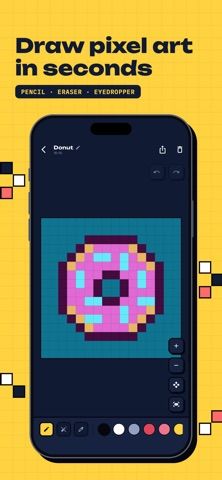
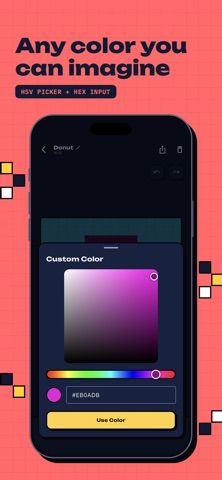
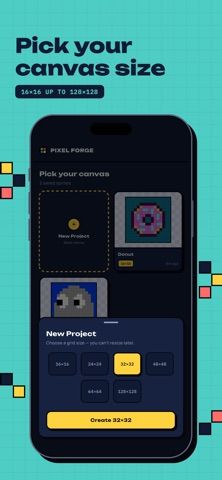
Pixel Forge is a focused pixel-art editor for iPhone. Users can choose a square canvas from 16 by 16 to 128 by 128 pixels, then draw with a pencil, make lines, erase pixels, and sample colors from the canvas. A built-in palette and custom color picker with HEX entry support precise color choices, while zoom, pan, undo, and redo help with detailed work. Projects are stored on the device in a gallery without an account. Finished art can be shared as a stylized card or exported as a transparent PNG for use in games and other projects. The captured App Store description does not state current purchase terms or pricing.

Pixel Forge: Pixel Art Maker
A pixel-art editor for creating sprites and icons with square canvases, color tools, zoom, and transparent PNG export.
By Illia HroshevReleased 2026/09/29No ratings yetOfficial store informationPublished 2026/11/04Checked 2026-11-04
Overview
A closer look at Pixel Forge: Pixel Art Maker.
A closer look
App screenshots

Choose with confidence
The useful details.
What it does
- Create square pixel-art canvases from 16 by 16 to 128 by 128 pixels.
- Draw, erase, sample colors, and undo or redo strokes.
- Choose a palette or enter a custom color with HEX values.
- Export transparent PNG artwork or share a presentation card.
A good fit for
- Game artists and hobbyists who want to draw small sprites, icons, or retro-style art on iPhone.
Worth knowing
- The app focuses on square pixel-art canvases and stores projects locally; cloud sync is not described in the listing.
- Current purchase terms are not stated in the captured App Store description.
Frequently asked questions
Answers based on the app’s official listing and reviewed information.
What is Pixel Forge: Pixel Art Maker used for?
A pixel-art editor for creating sprites and icons with square canvases, color tools, zoom, and transparent PNG export.
What can you do with Pixel Forge: Pixel Art Maker?
Create square pixel-art canvases from 16 by 16 to 128 by 128 pixels. Draw, erase, sample colors, and undo or redo strokes. Choose a palette or enter a custom color with HEX values. Export transparent PNG artwork or share a presentation card.
Who is Pixel Forge: Pixel Art Maker designed for?
Game artists and hobbyists who want to draw small sprites, icons, or retro-style art on iPhone.
What should you know before downloading Pixel Forge: Pixel Art Maker?
The app focuses on square pixel-art canvases and stores projects locally; cloud sync is not described in the listing. Current purchase terms are not stated in the captured App Store description.
Does Pixel Forge: Pixel Art Maker include paid features?
The reviewed listing does not confirm current in-app purchase options.
Which platforms support Pixel Forge: Pixel Art Maker?
Greatooly's reviewed app information lists iOS.
Researched from official sources; this is not a hands-on review. Last checked 2026-11-04.
Keep exploring
More apps that might be a good fit.

Dreamy Room: AI Room Design
Dreamy Room uses a photo of a real room to generate AI interior concepts in styles, colors, and furnishing directions you can compare.

Roomture: AI Interior Design
Roomture redesigns interior, exterior and garden photos with AI, then lets users compare, refine and save design ideas.

Verde: AI Backyard Design Plan
Verde turns photos of gardens, balconies, and rooms into AI redesigns that account for existing structures and practical dimensions.