
PaintSteps turns a reference photo into a sequence a traditional artist can follow on paper or canvas. Users choose a photo, crop it, select a painting order, and create progressive stages that simplify the image into manageable color areas. Numbered colors and an adjustable grid help transfer the composition, while the app offers suggestions for mixing palette colors and includes a line-art view for tracing. A saved project can be exported as a PDF tutorial or as individual images with Pro. The free version allows up to two saved paintings and tutorials with four steps; a one-time $4.99 PaintSteps Pro purchase unlocks more paintings, longer guides, custom palettes, recipe editing, and export. The app cautions that paint-mixing results are estimates and should be tested before use.

PaintSteps
A painting guide that converts a reference photo into progressive color stages, drawing grids, mixing suggestions, and printable line art.
Overview
A closer look at PaintSteps.
A closer look
App screenshots

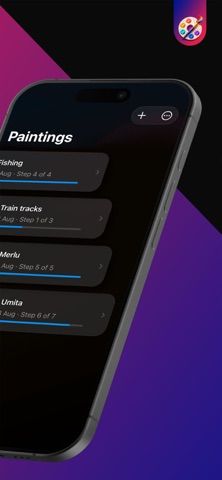
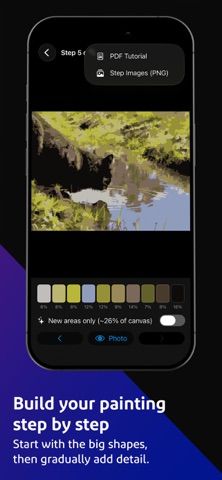
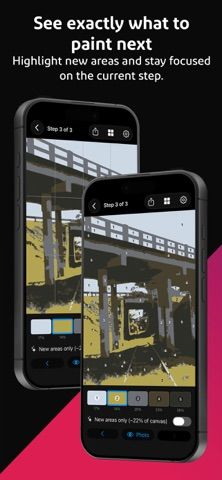
Choose with confidence
The useful details.
What it does
- Convert a photo into progressive painting stages and color-numbered guides.
- Adjust a drawing grid and create line art for tracing onto a canvas.
- View paint-mixing suggestions and use built-in paint sets.
- Save projects and export PDF tutorials or PNG steps with Pro.
A good fit for
- Traditional painters who want a structured guide for transferring a photo to canvas.
Worth knowing
- The free tier limits saved paintings and guide length; paint-mixing results are estimates, and the app recommends testing a small mix first.
Frequently asked questions
Answers based on the app’s official listing and reviewed information.
What is PaintSteps used for?
A painting guide that converts a reference photo into progressive color stages, drawing grids, mixing suggestions, and printable line art.
What can you do with PaintSteps?
Convert a photo into progressive painting stages and color-numbered guides. Adjust a drawing grid and create line art for tracing onto a canvas. View paint-mixing suggestions and use built-in paint sets. Save projects and export PDF tutorials or PNG steps with Pro.
Who is PaintSteps designed for?
Traditional painters who want a structured guide for transferring a photo to canvas.
What should you know before downloading PaintSteps?
The free tier limits saved paintings and guide length; paint-mixing results are estimates, and the app recommends testing a small mix first.
Does PaintSteps include paid features?
The US App Store lists PaintSteps Pro for $4.99 as a one-time purchase, not a subscription.
Which platforms support PaintSteps?
Greatooly's reviewed app information lists iOS.
Researched from official sources; this is not a hands-on review. Last checked 2026-11-04.
Keep exploring
More apps that might be a good fit.

Dreamy Room: AI Room Design
Dreamy Room uses a photo of a real room to generate AI interior concepts in styles, colors, and furnishing directions you can compare.

Roomture: AI Interior Design
Roomture redesigns interior, exterior and garden photos with AI, then lets users compare, refine and save design ideas.

Verde: AI Backyard Design Plan
Verde turns photos of gardens, balconies, and rooms into AI redesigns that account for existing structures and practical dimensions.