
FlowCut is a general-purpose video editor for shaping everyday footage into a finished clip. Its timeline supports trimming, splitting, duplicating, rearranging, and merging clips, along with speed changes, reverse playback, cropping, rotation, resizing, and transitions. Users can adjust color and opacity, add filters and effects, place picture-in-picture overlays, and arrange music or sound effects directly on the timeline. Text, stickers, and graphic elements provide additional ways to personalize a video. The listing describes a preview-and-export workflow for sharing a finished edit or keeping it on the device, but does not specify export resolutions, supported formats, or usage limits. The US App Store page is free to download, and the captured metadata showed no in-app purchase options. This may suit casual editors who want conventional timeline controls without a complex desktop workflow.

FlowCut - Video Editor & Maker
A timeline-based video editor with clip trimming, transitions, color adjustments, audio tools, text, stickers, and overlays.
Overview
A closer look at FlowCut - Video Editor & Maker.
A closer look
App screenshots



Choose with confidence
The useful details.
What it does
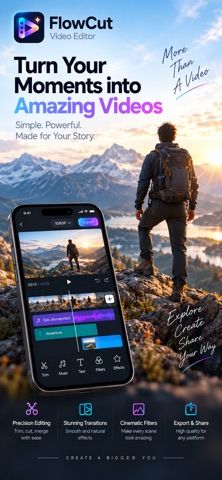
- Trim, split, duplicate, rearrange, or merge clips on a timeline.
- Adjust playback speed, reverse clips, crop, rotate, resize, and add transitions.
- Add filters, visual effects, color adjustments, picture-in-picture, and opacity blending.
- Edit music and sound effects, add text or stickers, and preview before export.
A good fit for
- People who want a straightforward mobile timeline editor for family, travel, pet, or everyday videos.
Worth knowing
- The captured listing does not state export resolutions, file formats, or usage limits.
- It is a general-purpose editor and does not describe the specialized AI workflow of talking-head or automatic editors.
- The US listing is marked free to download; confirm current in-app purchase terms before starting a longer project.
Frequently asked questions
Answers based on the app’s official listing and reviewed information.
What is FlowCut - Video Editor & Maker used for?
A timeline-based video editor with clip trimming, transitions, color adjustments, audio tools, text, stickers, and overlays.
What can you do with FlowCut - Video Editor & Maker?
Trim, split, duplicate, rearrange, or merge clips on a timeline. Adjust playback speed, reverse clips, crop, rotate, resize, and add transitions. Add filters, visual effects, color adjustments, picture-in-picture, and opacity blending. Edit music and sound effects, add text or stickers, and preview before export.
Who is FlowCut - Video Editor & Maker designed for?
People who want a straightforward mobile timeline editor for family, travel, pet, or everyday videos.
What should you know before downloading FlowCut - Video Editor & Maker?
The captured listing does not state export resolutions, file formats, or usage limits. It is a general-purpose editor and does not describe the specialized AI workflow of talking-head or automatic editors. The US listing is marked free to download; confirm current in-app purchase terms before starting a longer project.
Does FlowCut - Video Editor & Maker include paid features?
The US App Store listing is marked free to download. No in-app purchase options appeared in the captured metadata; check the live listing for changes.
Which platforms support FlowCut - Video Editor & Maker?
Greatooly's reviewed app information lists iOS.
Researched from official sources; this is not a hands-on review. Last checked 2026-11-04.
Keep exploring
More apps that might be a good fit.

Dreamy Room: AI Room Design
Dreamy Room uses a photo of a real room to generate AI interior concepts in styles, colors, and furnishing directions you can compare.

Roomture: AI Interior Design
Roomture redesigns interior, exterior and garden photos with AI, then lets users compare, refine and save design ideas.

Verde: AI Backyard Design Plan
Verde turns photos of gardens, balconies, and rooms into AI redesigns that account for existing structures and practical dimensions.