
Editake is a mobile video editor for creators who record themselves speaking to camera. It can remove mistakes, long pauses, and repeated takes from vertical videos, then lets users refine edits manually, add captions, and export. A script and teleprompter support recording two-part split-screen videos, which the app can assemble into a finished layout. The listing also describes automatic language detection and subtitle generation for short-form social video. These tools target TikTok, Instagram Reels, and YouTube Shorts formats. The App Store description does not state editing limits, export quality, watermarks, pricing, or how uploaded recordings are processed. Review those details before using it for client or confidential material, and watch the export preview to catch automated edit errors.

Editake: Auto Video Editor
An AI-assisted vertical video editor that trims talking-head recordings and adds captions.
Overview
A closer look at Editake: Auto Video Editor.
A closer look
App screenshots
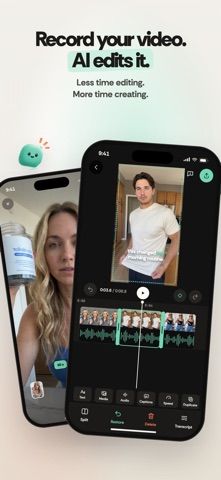
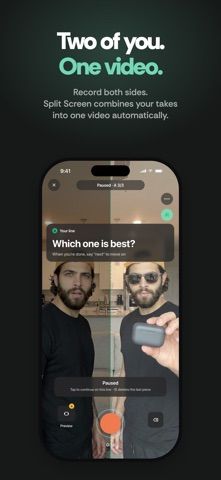
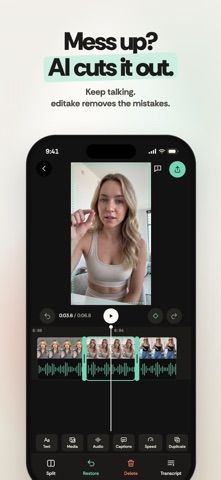
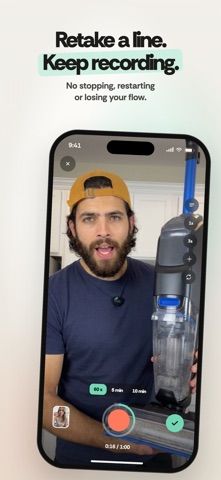
Choose with confidence
The useful details.
What it does
- Automatically cut mistakes, pauses, and repeated takes from talking-head recordings.
- Record split-screen videos with a script and built-in teleprompter.
- Add captions with automatic language detection or a selected language.
- Adjust edits manually and export vertical videos for major short-form platforms.
A good fit for
- Creators who film direct-to-camera clips and want a faster first edit for vertical social videos.
Worth knowing
- Automatic cuts and captions can need manual review before publishing.
- The listing does not state export limits, watermark rules, prices, or recording-processing details; verify them before using sensitive footage.
Frequently asked questions
Answers based on the app’s official listing and reviewed information.
What is Editake: Auto Video Editor used for?
An AI-assisted vertical video editor that trims talking-head recordings and adds captions.
What can you do with Editake: Auto Video Editor?
Automatically cut mistakes, pauses, and repeated takes from talking-head recordings. Record split-screen videos with a script and built-in teleprompter. Add captions with automatic language detection or a selected language. Adjust edits manually and export vertical videos for major short-form platforms.
Who is Editake: Auto Video Editor designed for?
Creators who film direct-to-camera clips and want a faster first edit for vertical social videos.
What should you know before downloading Editake: Auto Video Editor?
Automatic cuts and captions can need manual review before publishing. The listing does not state export limits, watermark rules, prices, or recording-processing details; verify them before using sensitive footage.
Does Editake: Auto Video Editor include paid features?
The reviewed listing does not confirm current in-app purchase options.
Which platforms support Editake: Auto Video Editor?
Greatooly's reviewed app information lists iOS.
Researched from official sources; this is not a hands-on review. Last checked 2026-11-04.
Keep exploring
More apps that might be a good fit.

Dreamy Room: AI Room Design
Dreamy Room uses a photo of a real room to generate AI interior concepts in styles, colors, and furnishing directions you can compare.

Roomture: AI Interior Design
Roomture redesigns interior, exterior and garden photos with AI, then lets users compare, refine and save design ideas.

Verde: AI Backyard Design Plan
Verde turns photos of gardens, balconies, and rooms into AI redesigns that account for existing structures and practical dimensions.