
Drawsy uses the phone camera and augmented reality to place a reference sketch over a sheet of paper on screen. The user chooses an image, positions the phone so the paper is visible, adjusts the overlay, and traces the outline while looking at the display. The listing also describes taking a photo or recording the drawing process to save or share. This makes Drawsy a guided tracing aid for beginners or people practicing a particular outline. The full experience is offered through an auto-renewing subscription, and a free trial may be available; check the in-app price and trial details first. It needs a compatible device, a steady setup, and good lighting, and tracing does not replace drawing instruction.

Drawsy: AR Draw for Sketching
Use an augmented-reality camera overlay to trace a sketch onto paper, then save or share the result.
By EIGEN SOFTWARE LIMITEDApp Store rating 4.7 (2,591)Official store informationPublished 2026/11/03Checked 2026-11-03
Overview
A closer look at Drawsy: AR Draw for Sketching.
A closer look
App screenshots

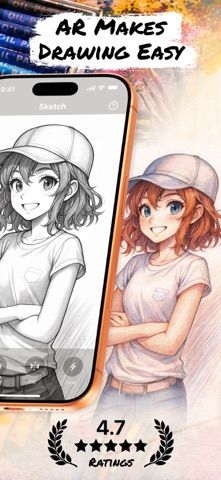
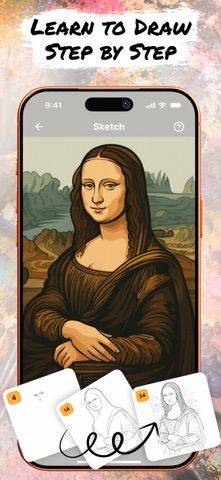

Choose with confidence
The useful details.
What it does
- Choose reference sketches from the app's gallery.
- Align and resize an AR overlay on paper using the camera view.
- Trace the displayed outline by hand.
- Save a photo or video of the finished drawing process.
A good fit for
- Beginners who want a visual guide for sketching outlines on paper.
Worth knowing
- The camera overlay needs suitable lighting and a steady phone position.
- The full experience requires a subscription; confirm trial and renewal terms.
Frequently asked questions
Answers based on the app’s official listing and reviewed information.
What is Drawsy: AR Draw for Sketching used for?
Use an augmented-reality camera overlay to trace a sketch onto paper, then save or share the result.
What can you do with Drawsy: AR Draw for Sketching?
Choose reference sketches from the app's gallery. Align and resize an AR overlay on paper using the camera view. Trace the displayed outline by hand. Save a photo or video of the finished drawing process.
Who is Drawsy: AR Draw for Sketching designed for?
Beginners who want a visual guide for sketching outlines on paper.
What should you know before downloading Drawsy: AR Draw for Sketching?
The camera overlay needs suitable lighting and a steady phone position. The full experience requires a subscription; confirm trial and renewal terms.
Does Drawsy: AR Draw for Sketching include paid features?
A subscription unlocks the full experience. The listing describes a possible free trial but does not state current prices; confirm the selected plan before purchase.
Which platforms support Drawsy: AR Draw for Sketching?
Greatooly's reviewed app information lists iOS.
Researched from official sources; this is not a hands-on review. Last checked 2026-11-03.
Keep exploring
More apps that might be a good fit.

Dreamy Room: AI Room Design
Dreamy Room uses a photo of a real room to generate AI interior concepts in styles, colors, and furnishing directions you can compare.

Roomture: AI Interior Design
Roomture redesigns interior, exterior and garden photos with AI, then lets users compare, refine and save design ideas.

Verde: AI Backyard Design Plan
Verde turns photos of gardens, balconies, and rooms into AI redesigns that account for existing structures and practical dimensions.