
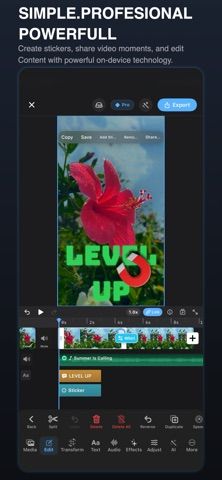
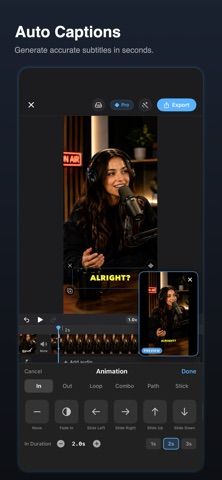
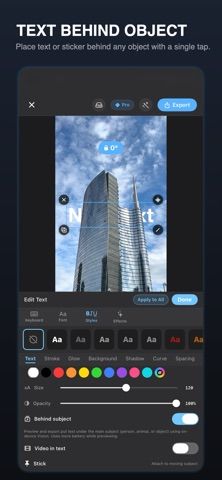
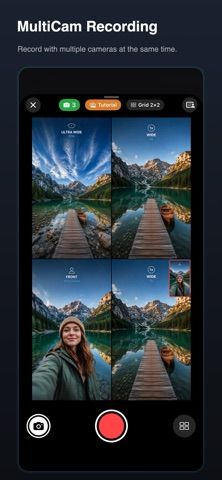
CutFrame is a mobile editor aimed at short vertical videos for social platforms. Its listing describes a multitrack timeline, trims, keyframes, transitions, filters, audio controls, and automatic edits timed to music. Additional tools include caption generation, background removal, reframing, and silence trimming, which the developer says run on device. Free exports are listed at 1080p; CutFrame Pro adds 4K and 60-frame-per-second export, premium effects, and other editing tools. Pro is sold through weekly, monthly, and yearly auto-renewing subscriptions, with prices shown in the app. The developer says videos stay on device and no account is required. Check device support and caption accuracy before using it for a final client deliverable.

CutFrame - AI Video Editor
A mobile video editor for short-form clips, with a multitrack timeline, automatic captions, and on-device editing tools.
Overview
A closer look at CutFrame - AI Video Editor.
A closer look
App screenshots
Choose with confidence
The useful details.
What it does
- Edits clips on a multitrack timeline with speed changes, keyframes, transitions, and audio tools.
- Includes automatic captions, background removal, reframing, and silence trimming.
- Free 1080p export; Pro adds 4K and 60fps export plus additional effects.
A good fit for
- Creators assembling short videos for Reels, TikTok, or YouTube Shorts.
- Mobile editors who want captions and social-ready exports in one app.
Worth knowing
- Pro requires a subscription, with price shown in the app; automated captions and AI edits should be reviewed before publishing.
Frequently asked questions
Answers based on the app’s official listing and reviewed information.
What is CutFrame - AI Video Editor used for?
A mobile video editor for short-form clips, with a multitrack timeline, automatic captions, and on-device editing tools.
What can you do with CutFrame - AI Video Editor?
Edits clips on a multitrack timeline with speed changes, keyframes, transitions, and audio tools. Includes automatic captions, background removal, reframing, and silence trimming. Free 1080p export; Pro adds 4K and 60fps export plus additional effects.
Who is CutFrame - AI Video Editor designed for?
Creators assembling short videos for Reels, TikTok, or YouTube Shorts. Mobile editors who want captions and social-ready exports in one app.
What should you know before downloading CutFrame - AI Video Editor?
Pro requires a subscription, with price shown in the app; automated captions and AI edits should be reviewed before publishing.
Does CutFrame - AI Video Editor include paid features?
CutFrame Pro offers weekly, monthly, and yearly auto-renewing plans; current prices are shown in the app.
Which platforms support CutFrame - AI Video Editor?
Greatooly's reviewed app information lists iOS.
Researched from official sources; this is not a hands-on review. Last checked 2026-11-04.
Keep exploring
More apps that might be a good fit.

Dreamy Room: AI Room Design
Dreamy Room uses a photo of a real room to generate AI interior concepts in styles, colors, and furnishing directions you can compare.

Roomture: AI Interior Design
Roomture redesigns interior, exterior and garden photos with AI, then lets users compare, refine and save design ideas.

Verde: AI Backyard Design Plan
Verde turns photos of gardens, balconies, and rooms into AI redesigns that account for existing structures and practical dimensions.