
Collia helps users turn photos into collages, scrapbook layouts, and multi-page carousel posts. Its template library includes grids, filmstrips, and layered designs that can be edited with text, frames, filters, and paper backgrounds. Users can cut out subjects on device, save projects to revise later, and preview sample layouts as images or a sliding video. Exporting finished projects as high-quality images or a single sliding video requires Collia Membership. The listing says monthly and annual membership plans provide the same export access, with local prices and any eligible trial shown before subscribing. It is designed for people making visual posts or keepsakes without building each layout from scratch.

Collia: Photo Collage Maker
A collage and scrapbook design app with editable templates, multi-page carousels, on-device cutouts, and image or video exports.
By 国鑫 冼Released 2026/09/29App Store rating 5.0 (1)Official store informationPublished 2026/11/04Checked 2026-11-04
Overview
A closer look at Collia: Photo Collage Maker.
A closer look
App screenshots
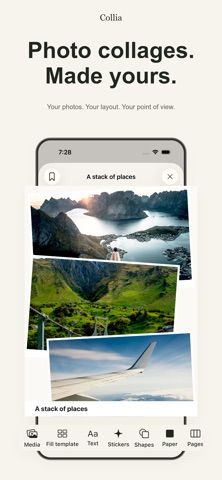
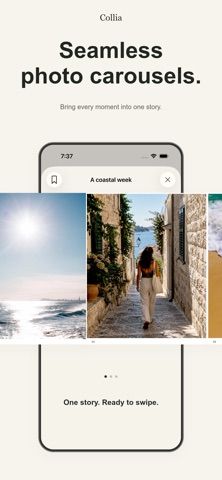
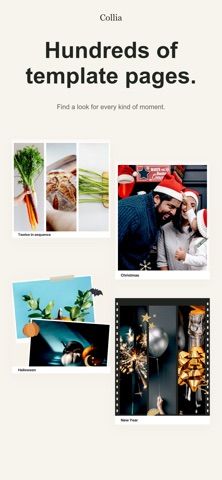
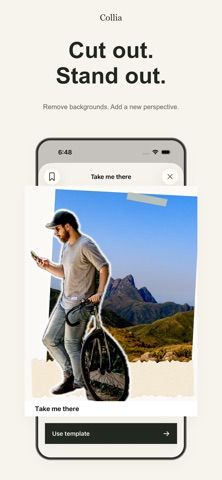
Choose with confidence
The useful details.
What it does
- Build collages, scrapbook pages, and multi-page carousel layouts from templates.
- Add text, frames, filters, and paper backgrounds to a design.
- Cut out photo subjects on device and return to saved projects later.
- Preview sample templates and export finished designs with Membership.
A good fit for
- People who want ready-made layouts for photo collages, scrapbook pages, or social carousels.
Worth knowing
- Exporting personal projects as high-quality images or a sliding video requires Membership.
- Membership renews monthly or annually; current local pricing and any trial are shown in the App Store before purchase.
Frequently asked questions
Answers based on the app’s official listing and reviewed information.
What is Collia: Photo Collage Maker used for?
A collage and scrapbook design app with editable templates, multi-page carousels, on-device cutouts, and image or video exports.
What can you do with Collia: Photo Collage Maker?
Build collages, scrapbook pages, and multi-page carousel layouts from templates. Add text, frames, filters, and paper backgrounds to a design. Cut out photo subjects on device and return to saved projects later. Preview sample templates and export finished designs with Membership.
Who is Collia: Photo Collage Maker designed for?
People who want ready-made layouts for photo collages, scrapbook pages, or social carousels.
What should you know before downloading Collia: Photo Collage Maker?
Exporting personal projects as high-quality images or a sliding video requires Membership. Membership renews monthly or annually; current local pricing and any trial are shown in the App Store before purchase.
Does Collia: Photo Collage Maker include paid features?
Collia Membership is offered monthly or annually. Current local price and any available free trial are shown before subscribing.
Which platforms support Collia: Photo Collage Maker?
Greatooly's reviewed app information lists iOS.
Researched from official sources; this is not a hands-on review. Last checked 2026-11-04.
Keep exploring
More apps that might be a good fit.

Dreamy Room: AI Room Design
Dreamy Room uses a photo of a real room to generate AI interior concepts in styles, colors, and furnishing directions you can compare.

Roomture: AI Interior Design
Roomture redesigns interior, exterior and garden photos with AI, then lets users compare, refine and save design ideas.

Verde: AI Backyard Design Plan
Verde turns photos of gardens, balconies, and rooms into AI redesigns that account for existing structures and practical dimensions.