
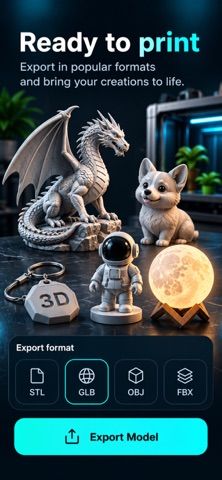
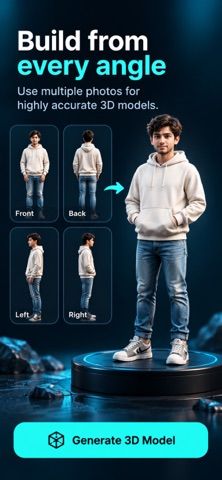
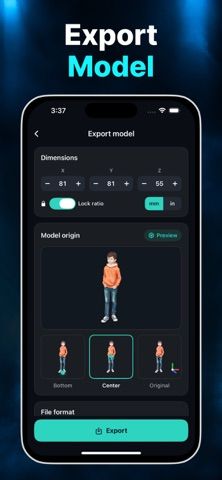
AI 3D Model for MakerWorld is aimed at people who browse printable designs and want creation tools in the same mobile workflow. Its listing describes browsing, viewing, and downloading models through a MakerWorld experience, alongside AI tools to create a model from text, a photo, or several reference angles. Additional tools can analyze, repair, resize, retexture, remesh, or convert a model before it moves into another part of a 3D-printing workflow. The app says Premium unlocks those creation and editing capabilities through a subscription, but does not state the current price. The listing uses the MakerWorld name but does not explain its relationship to the platform, so users should verify account requirements, licensing, and file permissions before relying on connected features or publishing a design.

AI 3d model for makerworld
AI 3D Model for MakerWorld combines model discovery with AI text-to-3D, photo-to-3D, and multi-view generation, plus model analysis, repair, resizing, retexturing, remeshing, and conversion. Premium unlocks creation and editing tools through a subscription; current pricing is not stated in the description.
Overview
A closer look at AI 3d model for makerworld.
A closer look
App screenshots

Choose with confidence
The useful details.
What it does
- Browse and inspect MakerWorld model listings
- AI model generation from text, photos, or multiple views
- Analyze, repair, resize, retexture, and remesh models
- Convert models for other 3D workflows
A good fit for
- 3D-printing hobbyists exploring model discovery and AI creation on mobile
- Makers who want basic model adjustments before using another tool
Worth knowing
- Premium is subscription-based; the listing does not state the price or clarify the app's relationship to MakerWorld.
Frequently asked questions
Answers based on the app’s official listing and reviewed information.
What is AI 3d model for makerworld used for?
AI 3D Model for MakerWorld combines model discovery with AI text-to-3D, photo-to-3D, and multi-view generation, plus model analysis, repair, resizing, retexturing, remeshing, and conversion. Premium unlocks creation and editing tools through a subscription; current pricing is not stated in the description.
What can you do with AI 3d model for makerworld?
Browse and inspect MakerWorld model listings AI model generation from text, photos, or multiple views Analyze, repair, resize, retexture, and remesh models Convert models for other 3D workflows
Who is AI 3d model for makerworld designed for?
3D-printing hobbyists exploring model discovery and AI creation on mobile Makers who want basic model adjustments before using another tool
What should you know before downloading AI 3d model for makerworld?
Premium is subscription-based; the listing does not state the price or clarify the app's relationship to MakerWorld.
Does AI 3d model for makerworld include paid features?
Premium model creation and editing features require a subscription; current prices are not stated in the listing.
Which platforms support AI 3d model for makerworld?
Greatooly's reviewed app information lists iOS.
Researched from official sources; this is not a hands-on review. Last checked 2026-11-04.
Keep exploring
More apps that might be a good fit.

Dreamy Room: AI Room Design
Dreamy Room uses a photo of a real room to generate AI interior concepts in styles, colors, and furnishing directions you can compare.

Roomture: AI Interior Design
Roomture redesigns interior, exterior and garden photos with AI, then lets users compare, refine and save design ideas.

Verde: AI Backyard Design Plan
Verde turns photos of gardens, balconies, and rooms into AI redesigns that account for existing structures and practical dimensions.