
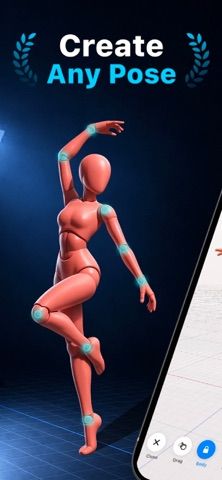
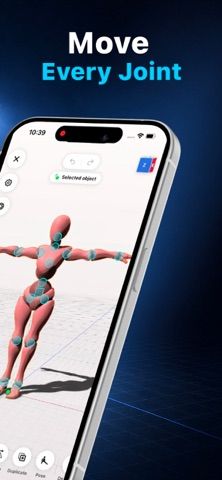
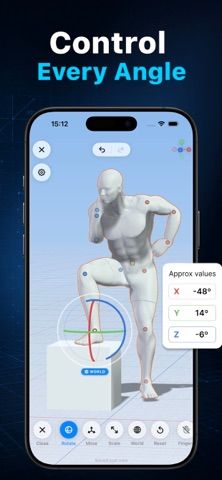
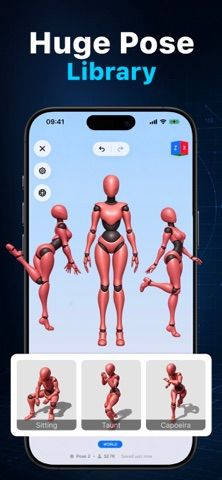
3D Pose Maker is a digital artist mannequin for building custom figure references before drawing. Drag joints in the arms, legs, hands, and spine, or start with a preset pose such as standing, sitting, action, or combat. The camera can orbit, pan, and zoom to explore perspective or foreshortening, while adjustable lighting helps study shadows and form. Male and female models, proportion controls, detailed hands, and props add options for different scenes. When a pose is ready, export a clean PNG reference and save it for later. This can help artists check a pose from an angle they cannot easily photograph, but it remains a reference tool rather than a drawing canvas. The App Store description states that an auto-renewing subscription is available but does not give the current price or trial terms.

3D Pose Maker Easy Model Poser
3D Pose Maker provides a poseable digital artist mannequin for drawing references. Users can pose joints, choose from preset actions, adjust proportions, move lighting, inspect camera angles, and export PNG references. A subscription is offered; the listing does not specify current pricing.
Overview
A closer look at 3D Pose Maker Easy Model Poser.
A closer look
App screenshots
Choose with confidence
The useful details.
What it does
- Pose joints across the body with drag controls
- Preset action, sitting, standing, and combat poses
- Adjust camera angle, lighting, and model proportions
- Export PNG references and save poses
A good fit for
- Artists creating figure or character drawings
- Illustrators who need a custom pose reference from a specific angle
Worth knowing
- The listing does not specify subscription pricing or trial terms; it creates references rather than finished drawings.
Frequently asked questions
Answers based on the app’s official listing and reviewed information.
What is 3D Pose Maker Easy Model Poser used for?
3D Pose Maker provides a poseable digital artist mannequin for drawing references. Users can pose joints, choose from preset actions, adjust proportions, move lighting, inspect camera angles, and export PNG references. A subscription is offered; the listing does not specify current pricing.
What can you do with 3D Pose Maker Easy Model Poser?
Pose joints across the body with drag controls Preset action, sitting, standing, and combat poses Adjust camera angle, lighting, and model proportions Export PNG references and save poses
Who is 3D Pose Maker Easy Model Poser designed for?
Artists creating figure or character drawings Illustrators who need a custom pose reference from a specific angle
What should you know before downloading 3D Pose Maker Easy Model Poser?
The listing does not specify subscription pricing or trial terms; it creates references rather than finished drawings.
Does 3D Pose Maker Easy Model Poser include paid features?
An auto-renewing subscription is listed; current price and trial terms are not specified in the App Store description.
Which platforms support 3D Pose Maker Easy Model Poser?
Greatooly's reviewed app information lists iOS.
Researched from official sources; this is not a hands-on review. Last checked 2026-11-04.
Keep exploring
More apps that might be a good fit.

Dreamy Room: AI Room Design
Dreamy Room uses a photo of a real room to generate AI interior concepts in styles, colors, and furnishing directions you can compare.

Roomture: AI Interior Design
Roomture redesigns interior, exterior and garden photos with AI, then lets users compare, refine and save design ideas.

Verde: AI Backyard Design Plan
Verde turns photos of gardens, balconies, and rooms into AI redesigns that account for existing structures and practical dimensions.