
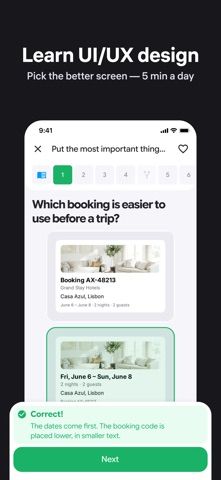
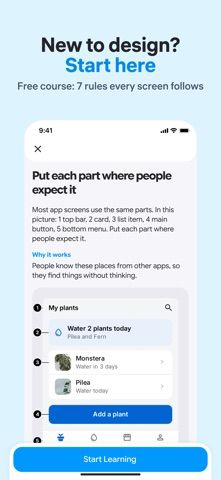
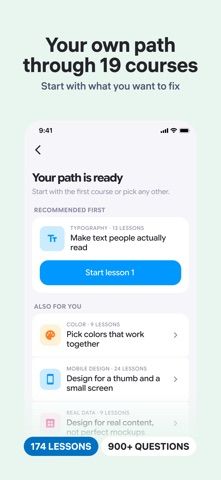
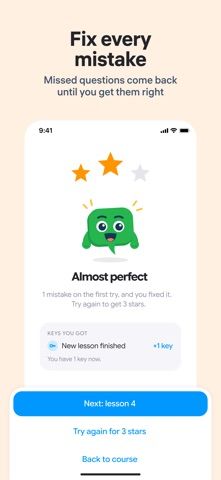
Uxy teaches interface design by asking learners to inspect screens and identify what works or feels confusing. Short visual lessons introduce concepts such as hierarchy, spacing, typography, color, forms, navigation, and checkout patterns; quizzes then ask users to compare examples and explain design choices. The app includes ways to revisit saved questions and mistakes, practice with mixed quizzes, and track progress through its course path. A completion certificate can be shared after finishing the required courses, but it records app activity rather than an accredited professional qualification. Design basics and some lessons are free; Premium unlocks the wider course library and certificate path through a monthly or yearly subscription. The US App Store lists two Premium prices, $9.99 and $49.99, without clearly associating each with a billing period in the page extract. Treat it as guided practice alongside real product work, not a substitute for project experience.

Uxy: UI/UX Design Quiz & Learn
A bite-sized UI and UX learning app built around visual lessons, interface comparisons, quizzes, and practice modes.
Overview
A closer look at Uxy: UI/UX Design Quiz & Learn.
A closer look
App screenshots
Choose with confidence
The useful details.
What it does
- Learn design principles through short lessons and visual before-and-after examples.
- Practice with quizzes, saved questions, mistake review, and mixed-topic sessions.
- Follow a course path covering foundations and common mobile interface patterns.
- Unlock the full lesson library and a completion certificate with Premium.
A good fit for
- New and junior designers who want short, visual practice with common UI patterns.
Worth knowing
- The completion certificate is not an accredited design qualification, and course practice cannot replace portfolio projects. Premium is a subscription; the US App Store lists $9.99 and $49.99 options but the reviewed extract does not label their billing periods.
Frequently asked questions
Answers based on the app’s official listing and reviewed information.
What is Uxy: UI/UX Design Quiz & Learn used for?
A bite-sized UI and UX learning app built around visual lessons, interface comparisons, quizzes, and practice modes.
What can you do with Uxy: UI/UX Design Quiz & Learn?
Learn design principles through short lessons and visual before-and-after examples. Practice with quizzes, saved questions, mistake review, and mixed-topic sessions. Follow a course path covering foundations and common mobile interface patterns. Unlock the full lesson library and a completion certificate with Premium.
Who is Uxy: UI/UX Design Quiz & Learn designed for?
New and junior designers who want short, visual practice with common UI patterns.
What should you know before downloading Uxy: UI/UX Design Quiz & Learn?
The completion certificate is not an accredited design qualification, and course practice cannot replace portfolio projects. Premium is a subscription; the US App Store lists $9.99 and $49.99 options but the reviewed extract does not label their billing periods.
Does Uxy: UI/UX Design Quiz & Learn include paid features?
Uxy Premium is available monthly and yearly. The US App Store lists $9.99 and $49.99 options; confirm the billing period at checkout.
Which platforms support Uxy: UI/UX Design Quiz & Learn?
Greatooly's reviewed app information lists iOS.
Researched from official sources; this is not a hands-on review. Last checked 2026-11-04.
Keep exploring
More apps that might be a good fit.

Plant Care Apps
Plant Care Apps identifies plants from photos, offers basic diagnosis and care guidance, and tracks watering reminders and a plant collection.

Garden Planner: Landscape AI
Garden Planner: Landscape AI redesigns a yard or patio photo in 24 styles, with before-and-after comparison and private local designs.

Homefolio: Home Inventory
Homefolio records household belongings, values, receipts, serial numbers, and warranties, then exports a claim-ready inventory report.