
Homefolio is a private home inventory for documenting belongings room by room. Users can photograph items first and add details later, including brand, model, serial number, quantity, condition, purchase date, value, and replacement cost. Receipts, invoices, appraisals, and manuals can be stored with an item, and local reminders can flag warranties approaching expiration. Homefolio exports a room-by-room PDF with photos, a 35-column CSV, and a full data backup. The developer says the app requires no account, shows no ads, and syncs through the user's own iCloud account rather than its own server. Reports have no page cap or watermark. Homefolio is free to download and has no in-app purchase listed. It requires iOS 26 or later; item values are user estimates and do not determine insurance coverage or claim value.

Homefolio: Home Inventory
Homefolio records household belongings, values, receipts, serial numbers, and warranties, then exports a claim-ready inventory report.
Overview
A closer look at Homefolio: Home Inventory.
A closer look
App screenshots
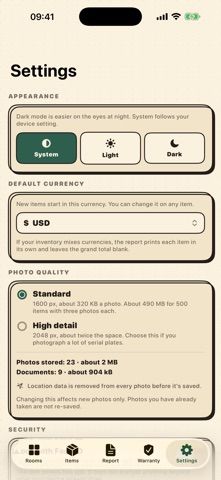
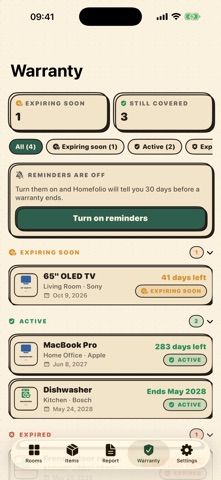
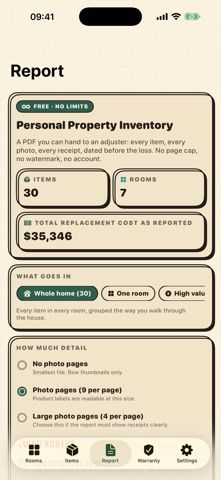
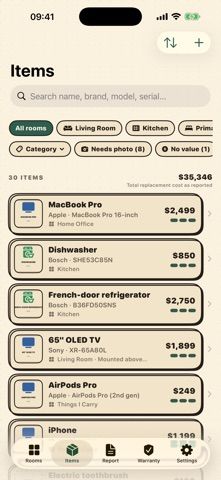
Choose with confidence
The useful details.
What it does
- Photograph and organize belongings by room with details such as serial numbers, condition, and replacement cost.
- Attach receipts, invoices, appraisals, and manuals and track warranty end dates.
- Export an uncapped room-by-room PDF, CSV spreadsheet, or full backup of inventory data.
- Sync across Apple devices using the user's iCloud account, with optional Face ID or Touch ID lock.
A good fit for
- Homeowners and renters who want a photo record for moving, warranties, or insurance documentation.
- People who want to export their inventory and keep it in their own iCloud account.
Worth knowing
- Requires iOS 26 or later; the listing also describes compatible Mac use on macOS 26 or later.
- Homefolio is a record-keeping tool, not an insurer or adjuster; it does not calculate depreciation or determine policy coverage or claim value.
- Inventory sync uses the user's iCloud account and requires the relevant Apple device and account setup.
Frequently asked questions
Answers based on the app’s official listing and reviewed information.
What is Homefolio: Home Inventory used for?
Homefolio records household belongings, values, receipts, serial numbers, and warranties, then exports a claim-ready inventory report.
What can you do with Homefolio: Home Inventory?
Photograph and organize belongings by room with details such as serial numbers, condition, and replacement cost. Attach receipts, invoices, appraisals, and manuals and track warranty end dates. Export an uncapped room-by-room PDF, CSV spreadsheet, or full backup of inventory data. Sync across Apple devices using the user's iCloud account, with optional Face ID or Touch ID lock.
Who is Homefolio: Home Inventory designed for?
Homeowners and renters who want a photo record for moving, warranties, or insurance documentation. People who want to export their inventory and keep it in their own iCloud account.
What should you know before downloading Homefolio: Home Inventory?
Requires iOS 26 or later; the listing also describes compatible Mac use on macOS 26 or later. Homefolio is a record-keeping tool, not an insurer or adjuster; it does not calculate depreciation or determine policy coverage or claim value. Inventory sync uses the user's iCloud account and requires the relevant Apple device and account setup.
What does Homefolio: Home Inventory cost?
Free download with uncapped inventory and exports; no account, ads, or in-app purchases are listed.
Which platforms support Homefolio: Home Inventory?
Greatooly's reviewed app information lists iOS, macOS.
Researched from official sources; this is not a hands-on review. Last checked 2026-11-10.
Keep exploring
More apps that might be a good fit.

Garden Planner: Landscape AI
Garden Planner: Landscape AI redesigns a yard or patio photo in 24 styles, with before-and-after comparison and private local designs.

Reading Log: Nightly Minutes
Reading Log: Nightly Minutes tracks children’s reading minutes or pages, streaks, and weekly summaries for school logs.

Kids Chore Adventure: Rewards
Kids Chore Adventure turns children’s household tasks into missions with stars, an illustrated island, and parent controls.