
Garden Planner: Landscape AI helps users compare landscape ideas using a photo of their own yard, front garden, or patio. Choose from 24 styles, generate a redesign, then drag a slider to compare the concept with the original space. The app is aimed at planning conversations before buying materials, making changes, or discussing a project with a landscaper. It does not require an account. The developer says photos are processed in real time, are not stored on its servers, and have location metadata removed; saved designs stay on the device. The app is free to download, and an auto-renewing subscription unlocks unlimited designs. The US App Store describes subscription access but shows the current price and period in the purchase flow. It is designed for iPhone and requires iOS 16 or later. Generated designs are visual planning aids, so check measurements, drainage, climate, and local rules before starting work.

Garden Planner: Landscape AI
Garden Planner: Landscape AI redesigns a yard or patio photo in 24 styles, with before-and-after comparison and private local designs.
Overview
A closer look at Garden Planner: Landscape AI.
A closer look
App screenshots

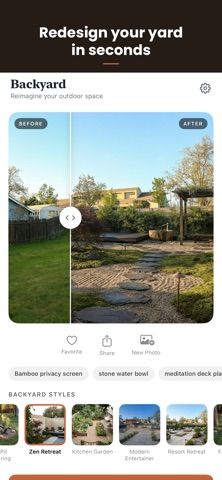
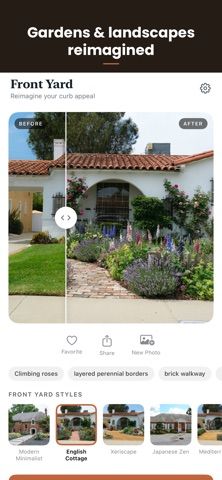
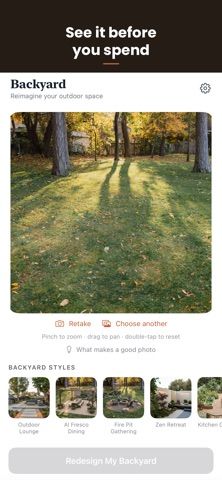
Choose with confidence
The useful details.
What it does
- Create a redesign from a photo of a front yard, backyard, or patio.
- Compare 24 landscape styles using an interactive before-and-after slider.
- Save and share concepts for a planned project or conversation with a landscaper.
- Use the app without an account; the developer says uploaded photos are not stored on its servers.
A good fit for
- Homeowners and renters comparing outdoor design ideas before spending on a project.
- People who want to preview style options using a photo of their actual yard or patio.
Worth knowing
- Designed for iPhone and requires iOS 16 or later.
- Unlimited designs require an auto-renewing subscription; current price and billing period are shown before purchase.
- Generated visual concepts do not replace site measurements or local guidance on plants, drainage, and construction.
Frequently asked questions
Answers based on the app’s official listing and reviewed information.
What is Garden Planner: Landscape AI used for?
Garden Planner: Landscape AI redesigns a yard or patio photo in 24 styles, with before-and-after comparison and private local designs.
What can you do with Garden Planner: Landscape AI?
Create a redesign from a photo of a front yard, backyard, or patio. Compare 24 landscape styles using an interactive before-and-after slider. Save and share concepts for a planned project or conversation with a landscaper. Use the app without an account; the developer says uploaded photos are not stored on its servers.
Who is Garden Planner: Landscape AI designed for?
Homeowners and renters comparing outdoor design ideas before spending on a project. People who want to preview style options using a photo of their actual yard or patio.
What should you know before downloading Garden Planner: Landscape AI?
Designed for iPhone and requires iOS 16 or later. Unlimited designs require an auto-renewing subscription; current price and billing period are shown before purchase. Generated visual concepts do not replace site measurements or local guidance on plants, drainage, and construction.
What does Garden Planner: Landscape AI cost?
Free download provides access to the app; the App Store listing does not specify a free design allowance. An auto-renewing subscription unlocks unlimited designs. The current price and billing period are shown in the App Store purchase flow.
Which platforms support Garden Planner: Landscape AI?
Greatooly's reviewed app information lists iOS.
Researched from official sources; this is not a hands-on review. Last checked 2026-11-10.
Keep exploring
More apps that might be a good fit.

Plant Care Apps
Plant Care Apps identifies plants from photos, offers basic diagnosis and care guidance, and tracks watering reminders and a plant collection.

Homefolio: Home Inventory
Homefolio records household belongings, values, receipts, serial numbers, and warranties, then exports a claim-ready inventory report.

Reading Log: Nightly Minutes
Reading Log: Nightly Minutes tracks children’s reading minutes or pages, streaks, and weekly summaries for school logs.