
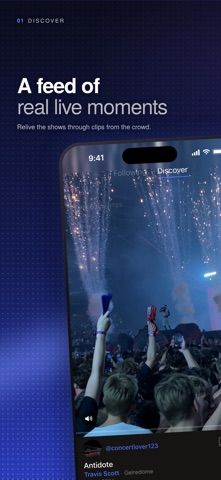
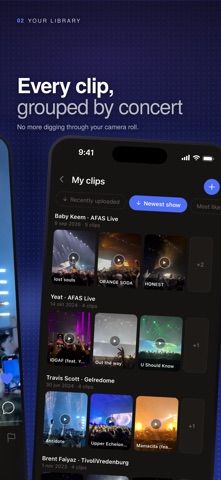
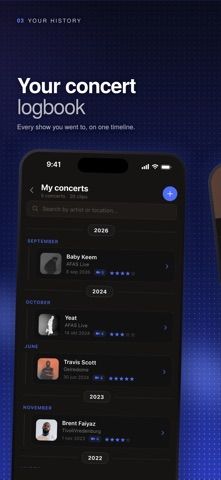
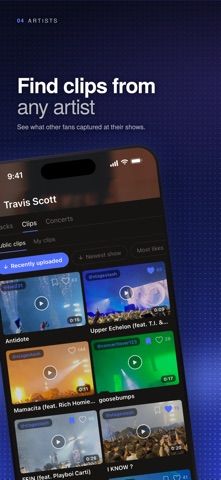
StageStash gives concert clips a place outside the phone's general camera roll. Users add a show with its artist, venue, and date, then upload clips and label songs so videos are grouped under the right concert. A timeline organizes events year by year, and clips can be sorted, filtered by artist, kept private, or shared publicly with other fans. Discover and artist pages connect concert videos with clips, show history, and upcoming tour dates. The listing says videos are stored in the cloud, so they remain available after changing phones. All Access adds unlimited uploads, clips up to 2 minutes 30 seconds, an ad-free feed, and animated profile pictures; weekly, monthly, and yearly auto-renewing plans are available, but captured prices were not stated. This is a social archive for live-music footage, not just a private video folder.

StageStash: Concert Videos
A concert video library that organizes phone clips by artist, venue, date, and song, with private sharing and a live-music feed.
Overview
A closer look at StageStash: Concert Videos.
A closer look
App screenshots
Choose with confidence
The useful details.
What it does
- Group uploaded concert clips by artist, venue, date, and song.
- Browse a year-by-year concert timeline and search past shows.
- Keep clips private or share them in a live-music discovery feed.
- Explore artist pages, fan-shared clips, show histories, and upcoming tour dates.
A good fit for
- Concertgoers who want to organize, revisit, and share phone videos from live shows.
Worth knowing
- Videos are uploaded to cloud storage and can be shared publicly; review privacy settings before posting.
- All Access is required for unlimited uploads, clips up to 2 minutes 30 seconds, and an ad-free feed.
- Weekly, monthly, and yearly auto-renewing plans are listed, but prices were not stated in the captured description.
Frequently asked questions
Answers based on the app’s official listing and reviewed information.
What is StageStash: Concert Videos used for?
A concert video library that organizes phone clips by artist, venue, date, and song, with private sharing and a live-music feed.
What can you do with StageStash: Concert Videos?
Group uploaded concert clips by artist, venue, date, and song. Browse a year-by-year concert timeline and search past shows. Keep clips private or share them in a live-music discovery feed. Explore artist pages, fan-shared clips, show histories, and upcoming tour dates.
Who is StageStash: Concert Videos designed for?
Concertgoers who want to organize, revisit, and share phone videos from live shows.
What should you know before downloading StageStash: Concert Videos?
Videos are uploaded to cloud storage and can be shared publicly; review privacy settings before posting. All Access is required for unlimited uploads, clips up to 2 minutes 30 seconds, and an ad-free feed. Weekly, monthly, and yearly auto-renewing plans are listed, but prices were not stated in the captured description.
Does StageStash: Concert Videos include paid features?
StageStash All Access is an auto-renewing weekly, monthly, or yearly subscription. The captured listing did not state prices; check the App Store for current terms.
Which platforms support StageStash: Concert Videos?
Greatooly's reviewed app information lists iOS.
Researched from official sources; this is not a hands-on review. Last checked 2026-11-04.
Keep exploring
More apps that might be a good fit.

Verde: AI Backyard Design Plan
Verde turns photos of gardens, balconies, and rooms into AI redesigns that account for existing structures and practical dimensions.

RoomMakeover: AI Room Design
RoomMakeover previews AI interior-design ideas from room photos, with style controls, credit packs, and Pro plans.

Zu3D
Zu3D combines stop-motion capture, drawing, video editing, green-screen effects, sound, and export tools for animated films.