
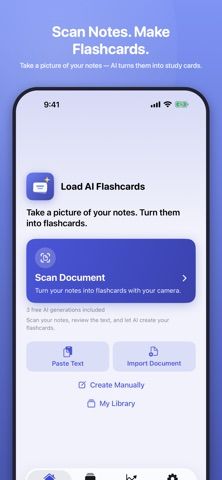
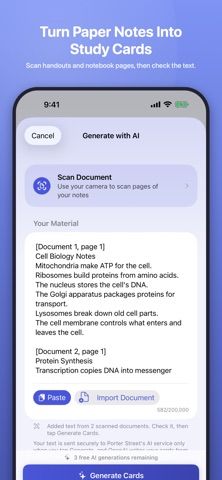
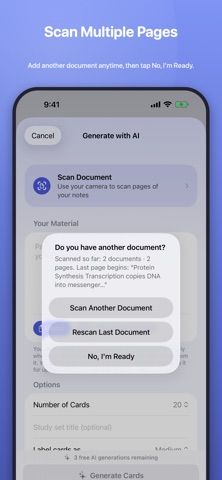
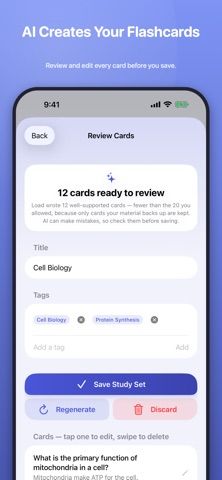
Load turns study notes into flashcards, starting with a camera scan. Students can photograph one or multiple pages, review and edit the text Load reads, and ask AI to generate question-and-answer cards. Notes can also be pasted or imported from a PDF or text file. Users review each card before saving, then study with quizzes and use freeform card creation without a subscription. The free plan includes three AI generations; Load Pro allows continued AI card creation under fair-use limits. Pro is a monthly or annual auto-renewing subscription, and the annual plan includes a one-week free trial for new subscribers. The captured listing did not state prices. This may help students turn class materials into active recall prompts, but generated cards should be reviewed for missing context or errors before relying on them for exam preparation.

Load: AI Flashcard Maker
An AI flashcard maker that turns photos, PDFs, and notes into editable question-and-answer cards for study and quizzes.
Overview
A closer look at Load: AI Flashcard Maker.
A closer look
App screenshots
Choose with confidence
The useful details.
What it does
- Scan notes, handouts, or textbook pages and review recognized text before generating cards.
- Create question-and-answer flashcards from scanned pages, pasted notes, PDFs, or text files.
- Edit generated cards before saving and study with quizzes.
- Use three AI generations free, then continue generating with Pro under fair-use limits.
A good fit for
- Students who want to turn paper notes or study documents into review cards.
Worth knowing
- The free plan includes three AI generations; continued AI generation requires Load Pro.
- Pro is an auto-renewing monthly or annual subscription; the annual plan includes a one-week trial for new subscribers.
- Generated flashcards may need user review for completeness and accuracy.
Frequently asked questions
Answers based on the app’s official listing and reviewed information.
What is Load: AI Flashcard Maker used for?
An AI flashcard maker that turns photos, PDFs, and notes into editable question-and-answer cards for study and quizzes.
What can you do with Load: AI Flashcard Maker?
Scan notes, handouts, or textbook pages and review recognized text before generating cards. Create question-and-answer flashcards from scanned pages, pasted notes, PDFs, or text files. Edit generated cards before saving and study with quizzes. Use three AI generations free, then continue generating with Pro under fair-use limits.
Who is Load: AI Flashcard Maker designed for?
Students who want to turn paper notes or study documents into review cards.
What should you know before downloading Load: AI Flashcard Maker?
The free plan includes three AI generations; continued AI generation requires Load Pro. Pro is an auto-renewing monthly or annual subscription; the annual plan includes a one-week trial for new subscribers. Generated flashcards may need user review for completeness and accuracy.
Does Load: AI Flashcard Maker include paid features?
Load Pro is offered monthly or annually; new annual subscribers get a one-week free trial. Prices were not stated in the captured listing, and fair-use limits apply.
Which platforms support Load: AI Flashcard Maker?
Greatooly's reviewed app information lists iOS.
Researched from official sources; this is not a hands-on review. Last checked 2026-11-04.
Keep exploring
More apps that might be a good fit.

Plant Care Apps
Plant Care Apps identifies plants from photos, offers basic diagnosis and care guidance, and tracks watering reminders and a plant collection.

Garden Planner: Landscape AI
Garden Planner: Landscape AI redesigns a yard or patio photo in 24 styles, with before-and-after comparison and private local designs.

Homefolio: Home Inventory
Homefolio records household belongings, values, receipts, serial numbers, and warranties, then exports a claim-ready inventory report.