
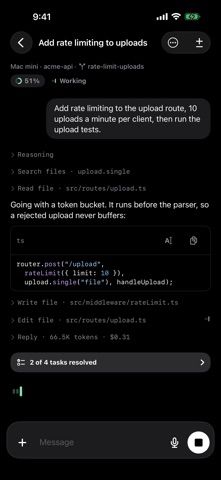
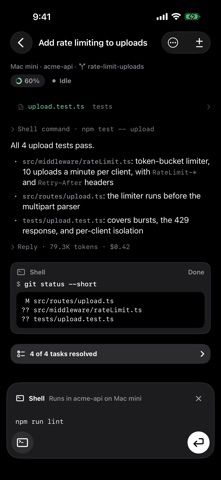
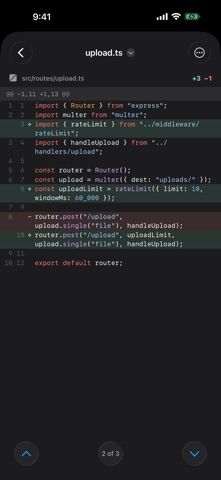
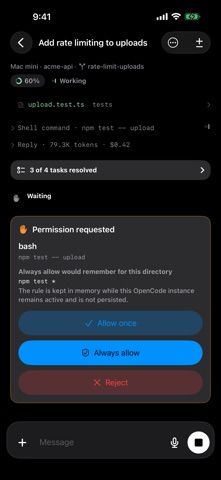
BYOT is a mobile companion for developers who already run an OpenCode coding-agent server. Connect to a server reachable over HTTPS, browse projects and sessions, and send prompts with text, photos, or files from an iPhone or iPad. The app streams assistant responses and tool activity, shows tool inputs and results, and lets users respond to permission requests or follow-up questions. Choose among models exposed by the server, queue additional prompts, and inspect session diffs when the server version supports them. An optional desktop companion enables notifications and a computer-side queue; the computer must remain awake for queued work. BYOT has no account requirement, but it does not host or run the coding agent itself. Users must configure and secure their own OpenCode server and model providers. BYOT is an independent client and is not affiliated with the OpenCode project.

BYOT Coding Agent
An iPhone and iPad client for managing sessions on a self-hosted OpenCode coding-agent server.
Overview
A closer look at BYOT Coding Agent.
A closer look
App screenshots
Choose with confidence
The useful details.
What it does
- Browse OpenCode projects and sessions from an iPhone or iPad
- Send prompts with files or photos and follow streamed tool activity
- Respond to server permission requests and choose available models
- Queue follow-up work and inspect session diffs when supported
A good fit for
- Developers who want to monitor and steer their own OpenCode sessions from mobile
- OpenCode users who need to review agent progress away from their workstation
Worth knowing
- Requires a self-operated OpenCode server reachable over HTTPS; notifications and the computer queue also require the BYOT desktop companion.
Frequently asked questions
Answers based on the app’s official listing and reviewed information.
What is BYOT Coding Agent used for?
An iPhone and iPad client for managing sessions on a self-hosted OpenCode coding-agent server.
What can you do with BYOT Coding Agent?
Browse OpenCode projects and sessions from an iPhone or iPad Send prompts with files or photos and follow streamed tool activity Respond to server permission requests and choose available models Queue follow-up work and inspect session diffs when supported
Who is BYOT Coding Agent designed for?
Developers who want to monitor and steer their own OpenCode sessions from mobile OpenCode users who need to review agent progress away from their workstation
What should you know before downloading BYOT Coding Agent?
Requires a self-operated OpenCode server reachable over HTTPS; notifications and the computer queue also require the BYOT desktop companion.
Does BYOT Coding Agent include paid features?
The US App Store lists a free download and the listing says no BYOT account is required.
Which platforms support BYOT Coding Agent?
Greatooly's reviewed app information lists iOS.
Researched from official sources; this is not a hands-on review. Last checked 2026-11-04.
Keep exploring
More apps that might be a good fit.

Plant Care Apps
Plant Care Apps identifies plants from photos, offers basic diagnosis and care guidance, and tracks watering reminders and a plant collection.

Garden Planner: Landscape AI
Garden Planner: Landscape AI redesigns a yard or patio photo in 24 styles, with before-and-after comparison and private local designs.

Homefolio: Home Inventory
Homefolio records household belongings, values, receipts, serial numbers, and warranties, then exports a claim-ready inventory report.