
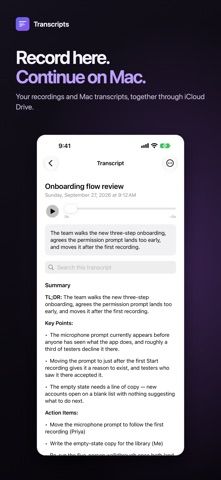
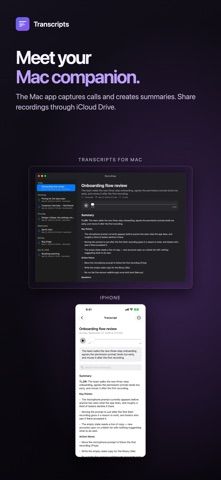
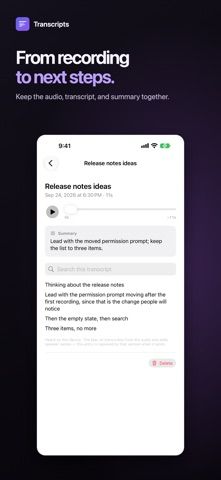
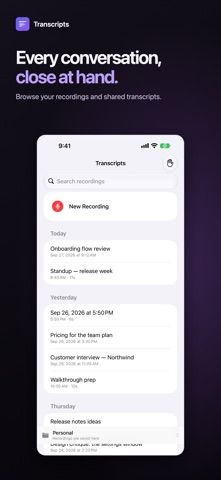
Transcripts records audio on iPhone or iPad and displays speech recognition as a live transcript. The listing says recordings and transcription stay on the device, with no account or server upload, and files can be saved to iCloud Drive, OneDrive, Dropbox, or local storage. Each recording is kept as an ordinary audio file with a text transcript beside it. An optional Mac companion can process recordings into meeting notes with speaker names and summaries, but the mobile app also works on its own. The developer says it is open source under the MIT license. Recording rules differ by location, so get consent where required.

Transcripts
An on-device audio recorder and transcription app that saves recordings and plain-text transcripts to folders you choose.
By DOUGLAS HATCHERReleased 2026/09/27App Store rating 5.0 (1)Official store informationPublished 2026/11/04Checked 2026-11-04
Overview
A closer look at Transcripts.
A closer look
App screenshots
Choose with confidence
The useful details.
What it does
- Record audio and view on-device speech recognition live
- Save audio files with plain-text transcripts in a chosen folder
- Continue recording while switching apps or locking the screen
- Pair with an optional Mac app for speaker labels and summaries
A good fit for
- People who want recordings saved as files they can open elsewhere
- Users who prefer on-device transcription and an optional Mac workflow
Worth knowing
- Speaker labels and meeting summaries are described as part of the optional Mac companion workflow.
Frequently asked questions
Answers based on the app’s official listing and reviewed information.
What is Transcripts used for?
An on-device audio recorder and transcription app that saves recordings and plain-text transcripts to folders you choose.
What can you do with Transcripts?
Record audio and view on-device speech recognition live Save audio files with plain-text transcripts in a chosen folder Continue recording while switching apps or locking the screen Pair with an optional Mac app for speaker labels and summaries
Who is Transcripts designed for?
People who want recordings saved as files they can open elsewhere Users who prefer on-device transcription and an optional Mac workflow
What should you know before downloading Transcripts?
Speaker labels and meeting summaries are described as part of the optional Mac companion workflow.
Does Transcripts include paid features?
The App Store lists a free download.
Which platforms support Transcripts?
Greatooly's reviewed app information lists iOS.
Researched from official sources; this is not a hands-on review. Last checked 2026-11-04.
Keep exploring
More apps that might be a good fit.

CleanHaus: Airbnb Turnovers
CleanHaus automates short-term rental turnovers by connecting booking calendars with cleaners, schedules and property tasks.

GoalStar: Daily Goal Tracker
GoalStar makes daily goals visible with a gold-star chart, streaks, reminders, widgets and optional NFC tap tags.

Accessbox - Password Manager
Accessbox stores passwords, passkeys and verification codes in encrypted Accesscards with AutoFill, breach alerts and optional iCloud sync.