
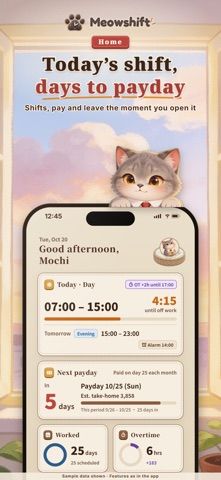
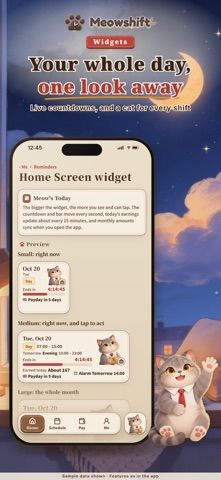
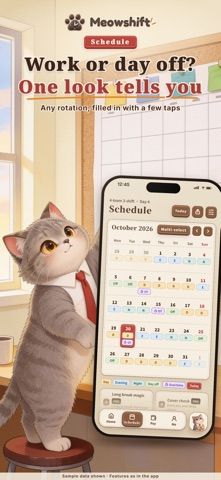
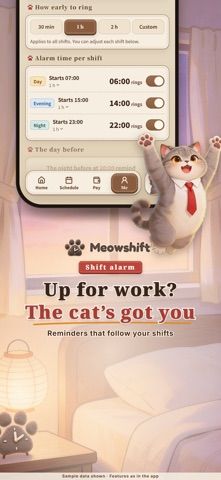
Meowshift is designed for people with rotating work schedules, including nurses, caregivers, retail teams, and hospitality staff. Users can set up day, evening, night, and rest shifts, save repeating rotations, and sync their schedule to Apple Calendar, including calendars connected through Google. The app can also estimate monthly pay and overtime from rates and allowances entered by the user, track leave balances, and show shift alarms and widgets. A Premium tier adds features such as cloud sync, pay history, schedule sharing, AI-assisted edits, and report exports. The listing says subscriptions renew automatically but does not state the available prices in the captured description. Pay figures are estimates for personal reference; the developer says an employer's payslip is authoritative.

Meowshift: Shift Work Calendar
A shift calendar for rotating schedules with overtime estimates, leave balances, calendar sync, shift alerts, and pay reports.
Overview
A closer look at Meowshift: Shift Work Calendar.
A closer look
App screenshots
Choose with confidence
The useful details.
What it does
- Create color-coded shifts and repeating rotations, then sync them to Apple Calendar.
- Estimate monthly pay and overtime using user-entered rates, allowances, and deductions.
- Track annual, sick, and personal leave balances alongside a shift calendar.
- Use shift alarms and widgets; Premium adds cloud sync, sharing, and pay-report tools.
A good fit for
- Shift workers who want a rota, leave tracker, and personal pay estimates together.
Worth knowing
- Pay and overtime figures are estimates, not payroll records; check them against the employer's payslip.
- Several features, including cloud sync and pay reports, are listed under Premium.
- The captured description does not state subscription prices or plan lengths.
Frequently asked questions
Answers based on the app’s official listing and reviewed information.
What is Meowshift: Shift Work Calendar used for?
A shift calendar for rotating schedules with overtime estimates, leave balances, calendar sync, shift alerts, and pay reports.
What can you do with Meowshift: Shift Work Calendar?
Create color-coded shifts and repeating rotations, then sync them to Apple Calendar. Estimate monthly pay and overtime using user-entered rates, allowances, and deductions. Track annual, sick, and personal leave balances alongside a shift calendar. Use shift alarms and widgets; Premium adds cloud sync, sharing, and pay-report tools.
Who is Meowshift: Shift Work Calendar designed for?
Shift workers who want a rota, leave tracker, and personal pay estimates together.
What should you know before downloading Meowshift: Shift Work Calendar?
Pay and overtime figures are estimates, not payroll records; check them against the employer's payslip. Several features, including cloud sync and pay reports, are listed under Premium. The captured description does not state subscription prices or plan lengths.
Does Meowshift: Shift Work Calendar include paid features?
Meowshift Premium is an auto-renewing subscription. The captured listing did not state prices or billing periods; check the App Store before subscribing.
Which platforms support Meowshift: Shift Work Calendar?
Greatooly's reviewed app information lists iOS.
Researched from official sources; this is not a hands-on review. Last checked 2026-11-04.
Keep exploring
More apps that might be a good fit.

HomeKeep Home Inventory
HomeKeep stores a private home inventory on iPhone, tracking item values and warranties with free CSV export and paid PDF reports.

Hold My Juice
Hold My Juice connects family email and calendars to surface school forms, activity changes, deadlines, and schedule conflicts.

Timen - Time Tracking
Timen tracks billable and non-billable work offline, then syncs hours to its web app for invoices, exports, and team reports.