
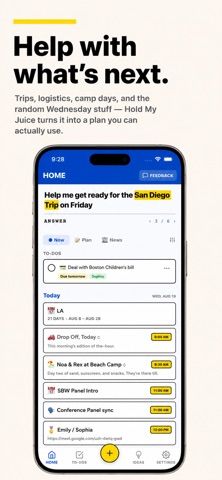
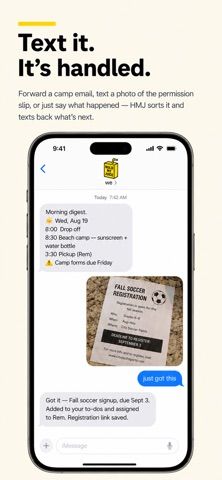
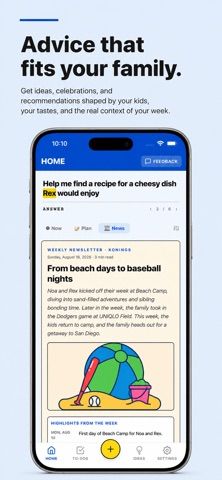
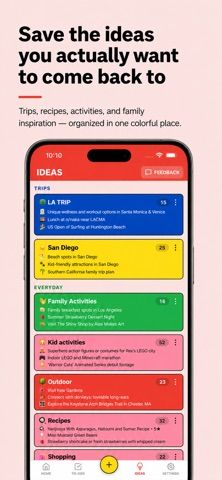
Hold My Juice is a family logistics assistant designed to notice important details scattered across school messages, camp updates, forms, and calendars. After connecting email and calendar sources, it looks for actions and dates that may need a parent’s attention, such as a form to sign, an upcoming deadline, or a schedule conflict. The app is intended to reduce the need to maintain yet another manually updated family calendar or task system. Its description also accounts for multiple caregivers and households, so family information can be shared with the people who need it. Hold My Juice is free to download, and the current US App Store listing shows no in-app purchases. It requires iOS 16.4 or later on iPhone or iPad. Because the service can process email, calendar, contact, and family activity details, review its permissions and privacy policy before connecting personal accounts.

Hold My Juice
Hold My Juice connects family email and calendars to surface school forms, activity changes, deadlines, and schedule conflicts.
Overview
A closer look at Hold My Juice.
A closer look
App screenshots
Choose with confidence
The useful details.
What it does
- Connect email and calendar sources to find family dates, tasks, and schedule conflicts.
- Surface reminders for forms, deadlines, school events, and activity changes.
- Help co-parents and other caregivers share information across complex family schedules.
- Reduce manual calendar entry by working with messages and events families already receive.
A good fit for
- Parents and caregivers managing school, camp, and extracurricular information from many sources.
- Families with multiple caregivers or households that need to keep key logistics visible.
Worth knowing
- Requires iOS 16.4 or later on iPhone or iPad.
- It needs access to selected email and calendar information to find relevant events and tasks; review privacy terms before connecting accounts.
- The app is an assistant for family logistics, not a replacement for the connected email or calendar services.
Frequently asked questions
Answers based on the app’s official listing and reviewed information.
What is Hold My Juice used for?
Hold My Juice connects family email and calendars to surface school forms, activity changes, deadlines, and schedule conflicts.
What can you do with Hold My Juice?
Connect email and calendar sources to find family dates, tasks, and schedule conflicts. Surface reminders for forms, deadlines, school events, and activity changes. Help co-parents and other caregivers share information across complex family schedules. Reduce manual calendar entry by working with messages and events families already receive.
Who is Hold My Juice designed for?
Parents and caregivers managing school, camp, and extracurricular information from many sources. Families with multiple caregivers or households that need to keep key logistics visible.
What should you know before downloading Hold My Juice?
Requires iOS 16.4 or later on iPhone or iPad. It needs access to selected email and calendar information to find relevant events and tasks; review privacy terms before connecting accounts. The app is an assistant for family logistics, not a replacement for the connected email or calendar services.
What does Hold My Juice cost?
Free to download. Free to download; no in-app purchases are listed on the current US App Store page.
Which platforms support Hold My Juice?
Greatooly's reviewed app information lists iOS.
Researched from official sources; this is not a hands-on review. Last checked 2026-11-10.
Keep exploring
More apps that might be a good fit.

CleanHaus: Airbnb Turnovers
CleanHaus automates short-term rental turnovers by connecting booking calendars with cleaners, schedules and property tasks.

GoalStar: Daily Goal Tracker
GoalStar makes daily goals visible with a gold-star chart, streaks, reminders, widgets and optional NFC tap tags.

Accessbox - Password Manager
Accessbox stores passwords, passkeys and verification codes in encrypted Accesscards with AutoFill, breach alerts and optional iCloud sync.