
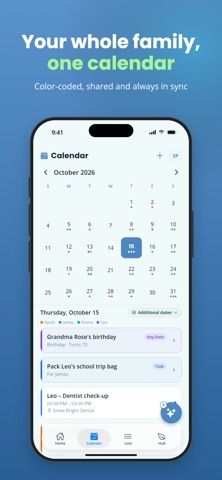
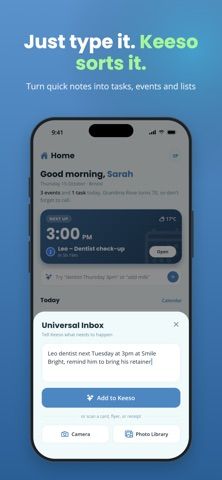
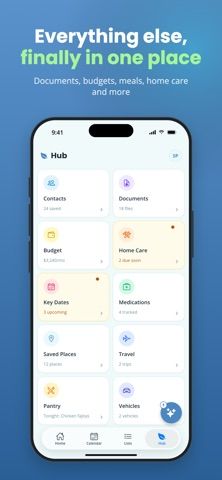
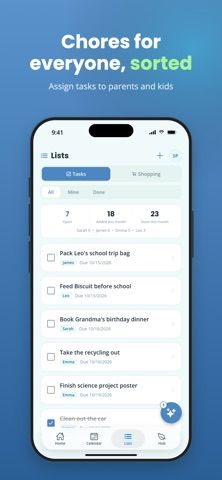
Keeso brings family schedules, tasks, shopping lists, and household information into one shared app. Its Smart Inbox accepts a short typed request such as an appointment or grocery item, then suggests whether it should become an event, task, or list entry for the user to review. Family members can see color-coded calendar events, assign chores, update shared shopping lists, and access a home hub for meal planning or maintenance. Parent and child roles tailor what each member sees. The free plan includes the calendar, tasks, and shopping lists, with limited Smart Inbox and hub access. Premium adds unlimited inbox use, more storage, and expanded hub features after a 14-day trial. The listing does not show prices; review privacy and family-sharing settings before adding children's schedules or documents.
Keeso - Family Organizer
A family organizer with a shared calendar, chores, shopping lists, and a natural-language inbox.
Overview
A closer look at Keeso - Family Organizer.
A closer look
App screenshots
Choose with confidence
The useful details.
What it does
- Turn a typed request into a suggested calendar event, task, or shopping-list item.
- Share color-coded calendars, chores, due dates, and shopping lists with a household.
- Arrange meal planning, budgets, home maintenance, and documents in a family hub.
- Set parent and child roles and reminders for dates and appointments.
A good fit for
- Families who want one shared place for calendars, chores, shopping, and household reminders.
Worth knowing
- The free plan limits Smart Inbox use, storage, and some hub features; Premium is offered after a 14-day trial.
- The listing does not state Premium prices; confirm billing terms before starting the trial.
- Review privacy and access settings before storing children's schedules or household documents.
Frequently asked questions
Answers based on the app’s official listing and reviewed information.
What is Keeso - Family Organizer used for?
A family organizer with a shared calendar, chores, shopping lists, and a natural-language inbox.
What can you do with Keeso - Family Organizer?
Turn a typed request into a suggested calendar event, task, or shopping-list item. Share color-coded calendars, chores, due dates, and shopping lists with a household. Arrange meal planning, budgets, home maintenance, and documents in a family hub. Set parent and child roles and reminders for dates and appointments.
Who is Keeso - Family Organizer designed for?
Families who want one shared place for calendars, chores, shopping, and household reminders.
What should you know before downloading Keeso - Family Organizer?
The free plan limits Smart Inbox use, storage, and some hub features; Premium is offered after a 14-day trial. The listing does not state Premium prices; confirm billing terms before starting the trial. Review privacy and access settings before storing children's schedules or household documents.
Does Keeso - Family Organizer include paid features?
Keeso Premium adds unlimited Smart Inbox use, more storage, and expanded hub features, with a 14-day free trial. Check current pricing and renewal terms in the app.
Which platforms support Keeso - Family Organizer?
Greatooly's reviewed app information lists iOS.
Researched from official sources; this is not a hands-on review. Last checked 2026-11-04.
Keep exploring
More apps that might be a good fit.

CleanHaus: Airbnb Turnovers
CleanHaus automates short-term rental turnovers by connecting booking calendars with cleaners, schedules and property tasks.

GoalStar: Daily Goal Tracker
GoalStar makes daily goals visible with a gold-star chart, streaks, reminders, widgets and optional NFC tap tags.

Accessbox - Password Manager
Accessbox stores passwords, passkeys and verification codes in encrypted Accesscards with AutoFill, breach alerts and optional iCloud sync.