
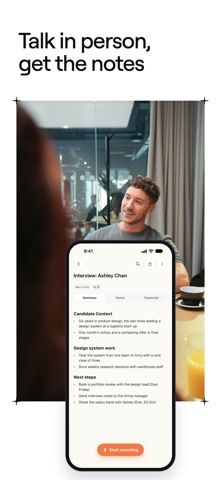
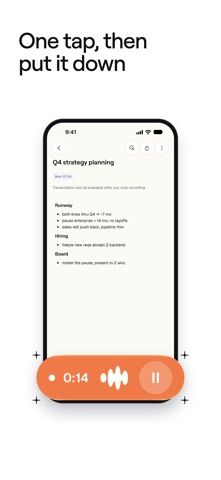
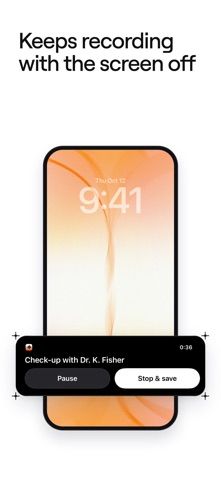
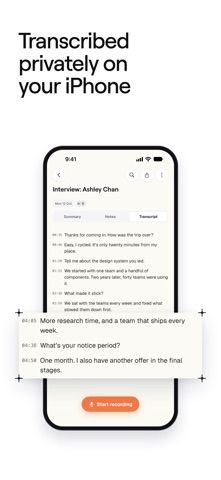
Goodmeet is designed for conversations that happen in a room, such as interviews, client visits, one-to-ones, and appointments. An iPhone can record in one tap, continue while locked, and create a transcript on the device without uploading the audio. Users can add their own notes, then generate a summary and next steps in Goodmeet's cloud. Meetings keep their notes, transcript, and summary together, with search and password-protected sharing links. Calendar connections can surface upcoming meetings and reminders. A Mac companion handles online calls on Apple silicon Macs. The App Store listing is free, but does not clearly describe any paid tiers.

Goodmeet: AI Meeting Notes
An in-person meeting recorder that transcribes on iPhone, creates summaries and action items, and organizes notes across devices.
By Good Systems, Inc.Released 2026/10/14No ratings yetOfficial store informationPublished 2026/11/04Checked 2026-11-04
Overview
A closer look at Goodmeet: AI Meeting Notes.
A closer look
App screenshots
Choose with confidence
The useful details.
What it does
- Record an in-person meeting from iPhone, including from a reminder or Apple Watch.
- Create on-device transcripts with automatic language detection and add rich-text notes.
- Generate a cloud summary with next steps and search across past meetings.
- Connect Google, Outlook, or Apple Calendar and share notes with revocable password-protected links.
A good fit for
- People who want searchable notes and action items from in-person meetings.
Worth knowing
- Audio transcription is on-device, but summaries are generated in Goodmeet's cloud.
- The Mac companion requires Apple silicon, and users are responsible for consent and local recording laws.
- The App Store description does not specify paid plans or pricing.
Frequently asked questions
Answers based on the app’s official listing and reviewed information.
What is Goodmeet: AI Meeting Notes used for?
An in-person meeting recorder that transcribes on iPhone, creates summaries and action items, and organizes notes across devices.
What can you do with Goodmeet: AI Meeting Notes?
Record an in-person meeting from iPhone, including from a reminder or Apple Watch. Create on-device transcripts with automatic language detection and add rich-text notes. Generate a cloud summary with next steps and search across past meetings. Connect Google, Outlook, or Apple Calendar and share notes with revocable password-protected links.
Who is Goodmeet: AI Meeting Notes designed for?
People who want searchable notes and action items from in-person meetings.
What should you know before downloading Goodmeet: AI Meeting Notes?
Audio transcription is on-device, but summaries are generated in Goodmeet's cloud. The Mac companion requires Apple silicon, and users are responsible for consent and local recording laws. The App Store description does not specify paid plans or pricing.
Does Goodmeet: AI Meeting Notes include paid features?
The reviewed listing does not confirm current in-app purchase options.
Which platforms support Goodmeet: AI Meeting Notes?
Greatooly's reviewed app information lists iOS.
Researched from official sources; this is not a hands-on review. Last checked 2026-11-04.
Keep exploring
More apps that might be a good fit.

CleanHaus: Airbnb Turnovers
CleanHaus automates short-term rental turnovers by connecting booking calendars with cleaners, schedules and property tasks.

GoalStar: Daily Goal Tracker
GoalStar makes daily goals visible with a gold-star chart, streaks, reminders, widgets and optional NFC tap tags.

Accessbox - Password Manager
Accessbox stores passwords, passkeys and verification codes in encrypted Accesscards with AutoFill, breach alerts and optional iCloud sync.