GreatoolyGreatooly
Zencastr app icon

Zencastr

Record remote podcasts with separate audio and video tracks, then edit, clean up, clip, publish, and livestream from a mobile production workspace.

By Zencastr, Inc.App Store rating 4.9 (721)Official store informationPublished 2026/11/03Checked 2026-11-03

Overview

A closer look at Zencastr.

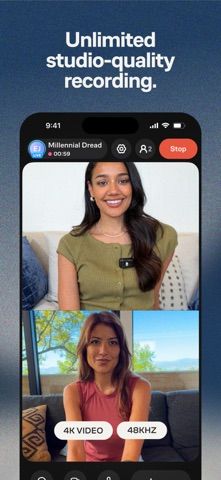
Zencastr is a podcast recording and production service with an iOS app for creators. The listing describes remote sessions with up to six participants, separate audio and video tracks, local recording, and real-time cloud backup. It supports audio up to 48 kHz WAV and video up to 4K, with recording and storage described as unlimited in the current listing.

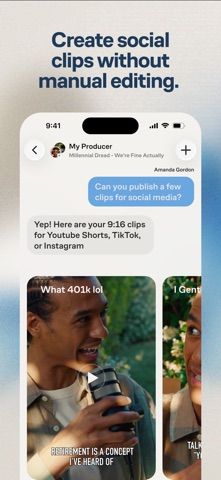
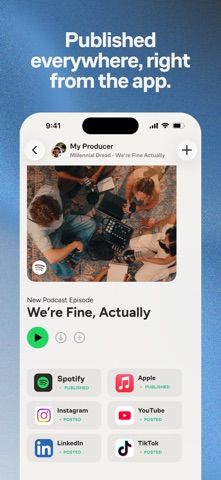
After recording, the app's AI-assisted Producer can clean up audio, remove pauses or filler words, create chapters and show notes, make social clips, and prepare episodes for publishing. Zencastr also describes livestreaming, team permissions, and tools for managing sponsorship or advertising.

The app is free to download, but account, plan, and monetization requirements may apply to particular production features. Check the current service terms before recording sensitive interviews or relying on storage claims. We have not tested recording quality, AI edits, or publishing integrations.

A closer look

App screenshots

Zencastr official iOS screenshot 1Zencastr official iOS screenshot 2Official iOS store screenshotOfficial iOS store screenshot

Choose with confidence

The useful details.

What it does

  • Record remote audio and video with up to six participants
  • Capture separate tracks and back up recordings to the cloud
  • Use AI tools for cleanup, show notes, chapters, and social clips
  • Publish episodes, schedule clips, or livestream from the service

A good fit for

  • Podcast creators who want remote recording and post-production tools in one service

Worth knowing

  • The App Store description does not make account and plan requirements for every feature clear.
  • Review consent, storage, and cloud-backup settings before recording private conversations.
  • AI-edited audio, transcripts, and show notes should be reviewed before publishing.

Frequently asked questions

Answers based on the app’s official listing and reviewed information.

What is Zencastr used for?

Record remote podcasts with separate audio and video tracks, then edit, clean up, clip, publish, and livestream from a mobile production workspace.

What can you do with Zencastr?

Record remote audio and video with up to six participants Capture separate tracks and back up recordings to the cloud Use AI tools for cleanup, show notes, chapters, and social clips Publish episodes, schedule clips, or livestream from the service

Who is Zencastr designed for?

Podcast creators who want remote recording and post-production tools in one service

What should you know before downloading Zencastr?

The App Store description does not make account and plan requirements for every feature clear. Review consent, storage, and cloud-backup settings before recording private conversations. AI-edited audio, transcripts, and show notes should be reviewed before publishing.

Does Zencastr include paid features?

The reviewed listing does not confirm current in-app purchase options.

Which platforms support Zencastr?

Greatooly's reviewed app information lists iOS.

Researched from official sources; this is not a hands-on review. Last checked 2026-11-03.

Keep exploring

More apps that might be a good fit.

Syntheremin: Theremin Synth

Syntheremin uses iPhone hand tracking to turn air gestures into continuous pitch, volume, filter changes and layered harmony without touching the screen.

Title Card: Media Diary

Title Card is an on-device media diary for movies, TV, books and podcasts, with notes, ratings, annual top tens, imports and backup exports.

Groupiez: Local Concerts

Groupiez logs concert memories and upcoming shows, discovers nearby events and fans, and supports taste matching, chats and live-music recaps.