
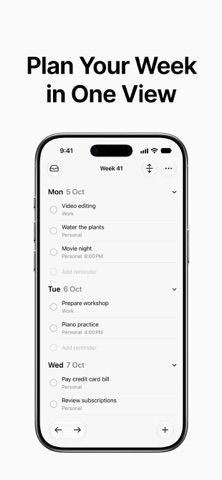
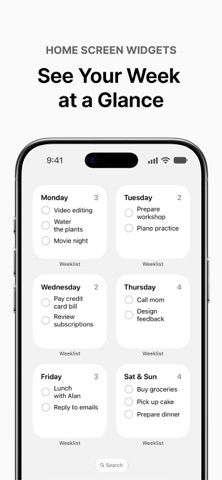
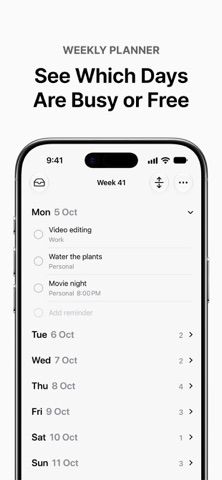
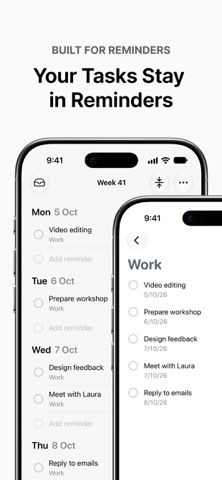
Weeklist gives Apple Reminders a one-page weekly layout. Users can view tasks across the week, move them between days, and check them off from Home Screen widgets. The listing says tasks remain in Reminders, so people can continue using Apple’s app as usual; Weeklist says it does not collect or send task data. This can help users who already rely on Reminders but want a clearer week-at-a-glance view. It is a companion rather than a replacement task database, and it does not describe its own project management or collaboration system. Check Apple Reminders availability and permissions on your device before adopting the weekly view. The listing does not clearly state pricing or purchase terms.
Weeklist: Weekly Planner
A weekly view for Apple Reminders that arranges tasks by day and adds interactive Home Screen widgets.
By THE DIGITAL MINIMALIST PTE. LTD.Released 2026/09/25No ratings yetOfficial store informationPublished 2026/11/04Checked 2026-11-04
Overview
A closer look at Weeklist: Weekly Planner.
A closer look
App screenshots
Choose with confidence
The useful details.
What it does
- Shows the full week of Apple Reminders tasks in one layout.
- Moves tasks between days and offers a widget for each day.
- Keeps task data in Apple Reminders, according to the developer.
A good fit for
- People who already use Apple Reminders and want a weekly planning view.
- Users who want to check off daily tasks from a Home Screen widget.
Worth knowing
- Requires Apple Reminders and is a companion view rather than a separate project manager; pricing is not clearly stated in the listing.
Frequently asked questions
Answers based on the app’s official listing and reviewed information.
What is Weeklist: Weekly Planner used for?
A weekly view for Apple Reminders that arranges tasks by day and adds interactive Home Screen widgets.
What can you do with Weeklist: Weekly Planner?
Shows the full week of Apple Reminders tasks in one layout. Moves tasks between days and offers a widget for each day. Keeps task data in Apple Reminders, according to the developer.
Who is Weeklist: Weekly Planner designed for?
People who already use Apple Reminders and want a weekly planning view. Users who want to check off daily tasks from a Home Screen widget.
What should you know before downloading Weeklist: Weekly Planner?
Requires Apple Reminders and is a companion view rather than a separate project manager; pricing is not clearly stated in the listing.
Does Weeklist: Weekly Planner include paid features?
The reviewed listing does not confirm current in-app purchase options.
Which platforms support Weeklist: Weekly Planner?
Greatooly's reviewed app information lists iOS.
Researched from official sources; this is not a hands-on review. Last checked 2026-11-04.
Keep exploring
More apps that might be a good fit.

CleanHaus: Airbnb Turnovers
CleanHaus automates short-term rental turnovers by connecting booking calendars with cleaners, schedules and property tasks.

GoalStar: Daily Goal Tracker
GoalStar makes daily goals visible with a gold-star chart, streaks, reminders, widgets and optional NFC tap tags.

Accessbox - Password Manager
Accessbox stores passwords, passkeys and verification codes in encrypted Accesscards with AutoFill, breach alerts and optional iCloud sync.