
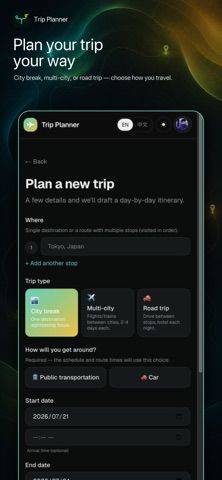
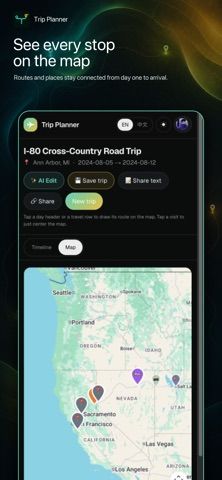
Trip Planner: AI Itinerary turns a destination, travel dates, interests, and pasted notes into a day-by-day schedule. Travelers can open activities on a map, see travel time between stops, and choose car or public transportation. The itinerary remains editable: activities can be added, moved, changed, or removed, and users can ask the AI to revise only part of a plan. Trips can be saved to an account and shared as a link or compact text schedule. The US App Store lists the app as free with no in-app purchase shown. AI generation, maps, routes, place details, and cloud saving require an internet connection, so this is not an offline navigation app.

TravelCamping trip planning appsHiking navigation appsPacking lists appsPublic transit navigation appsTravel itinerary planning apps
Trip Planner: AI Itinerary
An AI travel planner that turns destinations, dates, and interests into an editable daily itinerary with maps and travel times.
By YUAN-CHENG FUReleased 2026/09/02No ratings yetOfficial store informationPublished 2026/11/04Checked 2026-11-04
Overview
A closer look at Trip Planner: AI Itinerary.
A closer look
App screenshots


Choose with confidence
The useful details.
What it does
- Generate a daily itinerary from destinations, dates, interests, or pasted notes.
- View activities on a map and compare car or transit travel times.
- Edit activities or ask the AI to revise a selected part of a trip.
- Save a trip to an account and share it by link or text.
A good fit for
- Travelers who want a draft itinerary they can edit and share with companions.
Worth knowing
- AI planning, maps, routes, place details, and cloud saving need internet access; saved trips require an account.
Frequently asked questions
Answers based on the app’s official listing and reviewed information.
What is Trip Planner: AI Itinerary used for?
An AI travel planner that turns destinations, dates, and interests into an editable daily itinerary with maps and travel times.
What can you do with Trip Planner: AI Itinerary?
Generate a daily itinerary from destinations, dates, interests, or pasted notes. View activities on a map and compare car or transit travel times. Edit activities or ask the AI to revise a selected part of a trip. Save a trip to an account and share it by link or text.
Who is Trip Planner: AI Itinerary designed for?
Travelers who want a draft itinerary they can edit and share with companions.
What should you know before downloading Trip Planner: AI Itinerary?
AI planning, maps, routes, place details, and cloud saving need internet access; saved trips require an account.
Does Trip Planner: AI Itinerary include paid features?
The reviewed listing reports no in-app purchases.
Which platforms support Trip Planner: AI Itinerary?
Greatooly's reviewed app information lists iOS.
Researched from official sources; this is not a hands-on review. Last checked 2026-11-04.
Keep exploring
More apps that might be a good fit.

Tripdrobe: Outfit Packing List
Plan outfits and packing lists by trip date, with premium weather, baggage, wardrobe, and group tools.

SkyFlight Tracker
A flight companion with live status, gate countdowns, route maps, layover risk alerts, airport weather, and travel statistics.

FLITx・Live Flight Tracker Map
A live flight map for searching aircraft and routes, checking flight status, and viewing nearby airport activity.