
TooTask is a task manager designed to keep the next chosen task visible without constantly interrupting the user. Timed tasks can appear on the Lock Screen with a countdown, while untimed work stays in a backlog until it is claimed. Reusable routines lay out steps across the day, and repeatable checklists record each run. The app also supports widgets, streaks, daily review, and two-way synchronization with Apple Reminders; calendar sync can send selected tasks and routines to Apple Calendar. Free use includes unlimited one-off tasks, one routine, one checklist template, basic widgets, streaks, and review. TooTask Pro adds unlimited routines and checklist templates, persistent reminders, CSV export, and Mac menu-bar tools. The US App Store lists weekly $4.99, monthly $9.99, yearly $24.99, or lifetime $39.99. It requires iOS 17 or later, with Mac support requiring macOS 14 or later.

TooTask·Checklist&Task Manager
TooTask organizes timed tasks, untimed backlog, routines, and repeatable checklists, then keeps the current task visible on Apple devices.
Overview
A closer look at TooTask·Checklist&Task Manager.
A closer look
App screenshots
Choose with confidence
The useful details.
What it does
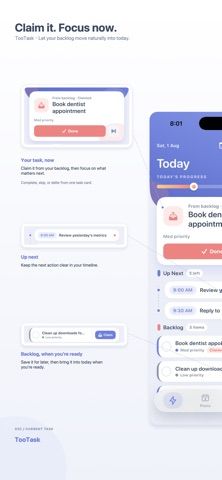
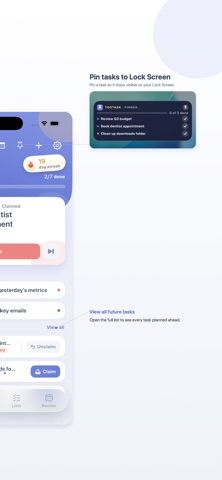
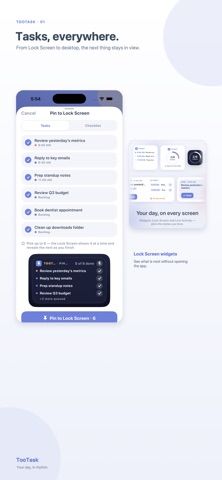
- Separate timed tasks from an untimed backlog, then keep the current task visible with Lock Screen and Home Screen widgets.
- Build recurring routines with timed steps and run reusable checklists that record each round.
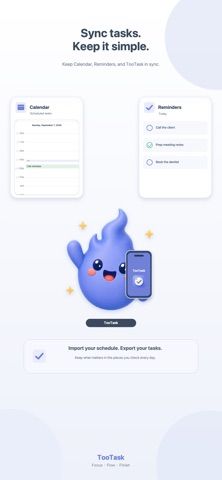
- Sync tasks with Apple Reminders and send selected routines or timed tasks to Calendar.
- Use a free core plan or unlock additional routines, templates, reminders, exports, and Mac tools with Pro.
A good fit for
- People who want one clear current task on the Lock Screen instead of a long undifferentiated list.
- Workers who repeat opening, closing, inspection, handover, or daily routines.
Worth knowing
- Requires iOS 17 or later; the Mac app requires macOS 14 or later.
- The free plan includes one routine and one checklist template; TooTask Pro ranges from $4.99 weekly to $39.99 lifetime in the US App Store.
- Calendar and Reminders syncing are optional integrations that require user permission.
Frequently asked questions
Answers based on the app’s official listing and reviewed information.
What is TooTask·Checklist&Task Manager used for?
TooTask organizes timed tasks, untimed backlog, routines, and repeatable checklists, then keeps the current task visible on Apple devices.
What can you do with TooTask·Checklist&Task Manager?
Separate timed tasks from an untimed backlog, then keep the current task visible with Lock Screen and Home Screen widgets. Build recurring routines with timed steps and run reusable checklists that record each round. Sync tasks with Apple Reminders and send selected routines or timed tasks to Calendar. Use a free core plan or unlock additional routines, templates, reminders, exports, and Mac tools with Pro.
Who is TooTask·Checklist&Task Manager designed for?
People who want one clear current task on the Lock Screen instead of a long undifferentiated list. Workers who repeat opening, closing, inspection, handover, or daily routines.
What should you know before downloading TooTask·Checklist&Task Manager?
Requires iOS 17 or later; the Mac app requires macOS 14 or later. The free plan includes one routine and one checklist template; TooTask Pro ranges from $4.99 weekly to $39.99 lifetime in the US App Store. Calendar and Reminders syncing are optional integrations that require user permission.
What does TooTask·Checklist&Task Manager cost?
Free to download. Free plan includes unlimited one-off tasks, one routine, one checklist template, core widgets, streaks, review, and sync. TooTask Pro is listed at $4.99 weekly, $9.99 monthly, or $24.99 yearly in the US App Store; it adds unlimited routines and templates, persistent reminders, CSV export, and additional widgets and styles. A one-time Lifetime Pro purchase is listed at $39.99 in the US App Store.
Which platforms support TooTask·Checklist&Task Manager?
Greatooly's reviewed app information lists iOS, macOS.
Researched from official sources; this is not a hands-on review. Last checked 2026-11-10.
Keep exploring
More apps that might be a good fit.

CleanHaus: Airbnb Turnovers
CleanHaus automates short-term rental turnovers by connecting booking calendars with cleaners, schedules and property tasks.

GoalStar: Daily Goal Tracker
GoalStar makes daily goals visible with a gold-star chart, streaks, reminders, widgets and optional NFC tap tags.

Accessbox - Password Manager
Accessbox stores passwords, passkeys and verification codes in encrypted Accesscards with AutoFill, breach alerts and optional iCloud sync.