
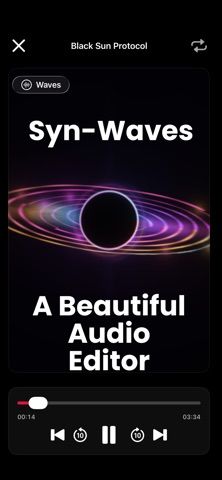
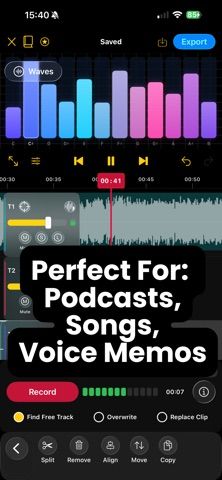
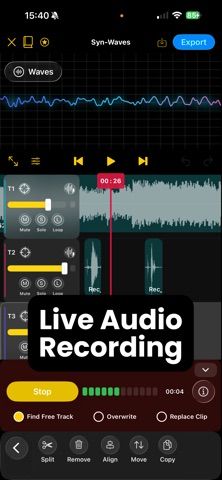
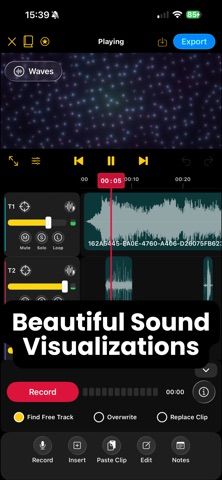
Syn-Waves is a mobile audio workstation for recording and editing songs, podcasts, voiceovers, interviews, and other audio. Build projects on a multitrack waveform timeline, record or import clips, trim and rearrange sections, adjust volume, mute or solo tracks, and preview the mix. Voice Enhance tools include EQ, rumble reduction, compression, and limiting. Projects are stored locally, and exports support M4A, WAV, or AIFF with selectable sample rates and mono or stereo output. The US App Store offers Syn-Waves Pro at $5.99 monthly or $29.99 yearly. Pro is a subscription, and the listing says it renews automatically unless canceled through Apple account settings. It requires iOS 15 or later and is rated 13+. Syn-Waves is a focused mobile editor, not a full desktop DAW replacement for every production workflow.

Syn-Waves: Audio Editor
A multitrack audio editor for recording, mixing, enhancing voices, and exporting mobile projects.
Overview
A closer look at Syn-Waves: Audio Editor.
A closer look
App screenshots
Choose with confidence
The useful details.
What it does
- Record or import audio into a multitrack waveform timeline.
- Trim, split, move, copy, and mix clips with track controls.
- Enhance speech with EQ, rumble reduction, compression, and limiting.
- Export M4A, WAV, or AIFF in mono or stereo at selectable sample rates.
A good fit for
- Musicians, podcasters, and voice creators who want to record and edit audio on iPhone or iPad.
Worth knowing
- Pro is an auto-renewing subscription: US App Store prices are $5.99/month or $29.99/year. The app is a mobile editor and may not replace a desktop DAW for complex production.
Frequently asked questions
Answers based on the app’s official listing and reviewed information.
What is Syn-Waves: Audio Editor used for?
A multitrack audio editor for recording, mixing, enhancing voices, and exporting mobile projects.
What can you do with Syn-Waves: Audio Editor?
Record or import audio into a multitrack waveform timeline. Trim, split, move, copy, and mix clips with track controls. Enhance speech with EQ, rumble reduction, compression, and limiting. Export M4A, WAV, or AIFF in mono or stereo at selectable sample rates.
Who is Syn-Waves: Audio Editor designed for?
Musicians, podcasters, and voice creators who want to record and edit audio on iPhone or iPad.
What should you know before downloading Syn-Waves: Audio Editor?
Pro is an auto-renewing subscription: US App Store prices are $5.99/month or $29.99/year. The app is a mobile editor and may not replace a desktop DAW for complex production.
Does Syn-Waves: Audio Editor include paid features?
US App Store: Syn-Waves Pro is $5.99 monthly or $29.99 yearly; subscriptions auto-renew unless canceled in Apple account settings.
Which platforms support Syn-Waves: Audio Editor?
Greatooly's reviewed app information lists iOS.
Researched from official sources; this is not a hands-on review. Last checked 2026-11-04.
Keep exploring
More apps that might be a good fit.

Syntheremin: Theremin Synth
Syntheremin uses iPhone hand tracking to turn air gestures into continuous pitch, volume, filter changes and layered harmony without touching the screen.

Title Card: Media Diary
Title Card is an on-device media diary for movies, TV, books and podcasts, with notes, ratings, annual top tens, imports and backup exports.

Groupiez: Local Concerts
Groupiez logs concert memories and upcoming shows, discovers nearby events and fans, and supports taste matching, chats and live-music recaps.