
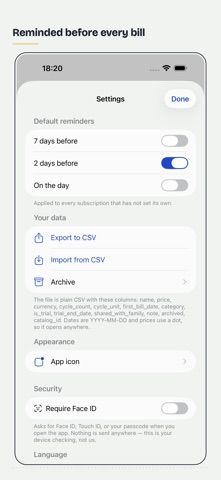
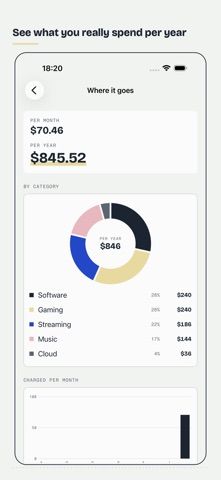
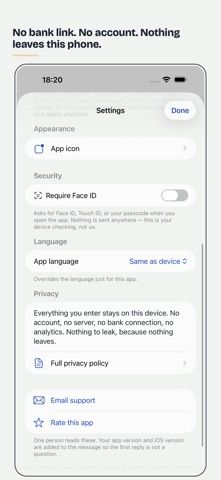
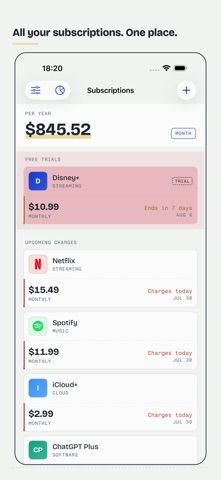
Sub Ledger is a subscription tracker for people who want to see recurring charges and free trials in one list. Add a service, review what is due next, and compare monthly and yearly totals to understand the overall cost. Trial reminders can arrive three days, one day, and the morning before a trial converts, while reminders for regular charges can include the amount. The app provides a catalog of more than 300 services, step-by-step cancellation instructions, and a direct link to the service's cancellation page. It does not cancel anything on the user's behalf. The developer says no bank connection, account, server, or analytics are involved and that data stays on the device. The free tier supports up to five subscriptions; a one-time purchase unlocks unlimited records, export/import, widgets, breakdowns, and Face ID lock.

Sub Ledger: Bill Reminder
Sub Ledger tracks subscriptions and bills, totals monthly and yearly costs, and reminds users before charges or free trials convert. It includes a service catalog, cancellation instructions, savings archive, CSV import/export, and widgets. The developer says records stay on-device; the full feature unlock is a one-time purchase.
Overview
A closer look at Sub Ledger: Bill Reminder.
A closer look
App screenshots
Choose with confidence
The useful details.
What it does
- Track subscriptions and bills with monthly and yearly totals
- Three-stage reminders before free trials convert
- Cancellation instructions and direct service links
- CSV import/export, widgets, and Face ID lock with the one-time unlock
A good fit for
- People reviewing recurring subscriptions and trial dates
- Users who want an on-device subscription ledger without bank linking
Worth knowing
- It provides cancellation instructions but cannot cancel services for the user; full features require a one-time purchase.
Frequently asked questions
Answers based on the app’s official listing and reviewed information.
What is Sub Ledger: Bill Reminder used for?
Sub Ledger tracks subscriptions and bills, totals monthly and yearly costs, and reminds users before charges or free trials convert. It includes a service catalog, cancellation instructions, savings archive, CSV import/export, and widgets. The developer says records stay on-device; the full feature unlock is a one-time purchase.
What can you do with Sub Ledger: Bill Reminder?
Track subscriptions and bills with monthly and yearly totals Three-stage reminders before free trials convert Cancellation instructions and direct service links CSV import/export, widgets, and Face ID lock with the one-time unlock
Who is Sub Ledger: Bill Reminder designed for?
People reviewing recurring subscriptions and trial dates Users who want an on-device subscription ledger without bank linking
What should you know before downloading Sub Ledger: Bill Reminder?
It provides cancellation instructions but cannot cancel services for the user; full features require a one-time purchase.
Does Sub Ledger: Bill Reminder include paid features?
Free access supports up to five subscriptions, one reminder each, and a monthly total; trial reminders are included. One-time unlock adds unlimited subscriptions, additional reminders, spending breakdowns, CSV tools, widgets, and Face ID; check the app for current price.
Which platforms support Sub Ledger: Bill Reminder?
Greatooly's reviewed app information lists iOS.
Researched from official sources; this is not a hands-on review. Last checked 2026-11-04.
Keep exploring
More apps that might be a good fit.

Jars: Savings Goal Tracker
Jars tracks user-entered savings goals, deposits, and withdrawal plans without holding or moving money.

Coal - Gift List & Budget
Budget for gifts by recipient and track each purchase through delivery, wrapping, and returns.

Budget Planner App: Tally
A personal budget app with voice expense entry, automatic category suggestions, spending limits, and charts.