
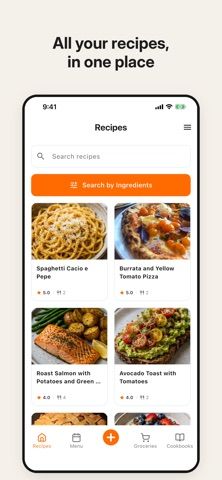
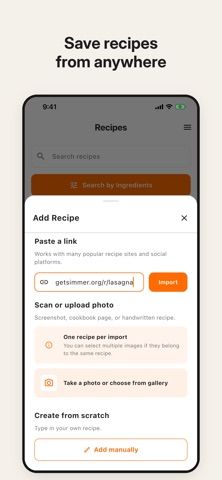
Simmer gathers recipes from websites, Instagram, TikTok, Facebook, Pinterest, YouTube, photos, and screenshots into a personal collection. Each saved recipe can keep a link to its original source, and users can organize cookbooks, adjust servings, translate recipes, or switch between US and metric measurements. The app also connects recipes to a weekly menu and lets users add ingredients directly to a shopping list. The listing describes nutrition information and meal planning for breakfast, lunch, dinner, and snacks. Simmer may suit cooks who save recipes from social media and want to bring them into a consistent format before using them. The US App Store listing is free to download, and the captured description does not state subscription or paid-feature details; check the current in-app terms before importing a large collection.

Simmer: Recipe Organizer
A recipe organizer that imports links, social posts, and photos, then connects saved recipes to meal plans and shopping lists.
Overview
A closer look at Simmer: Recipe Organizer.
A closer look
App screenshots
Choose with confidence
The useful details.
What it does
- Import recipes from websites, social media links, photos, and screenshots.
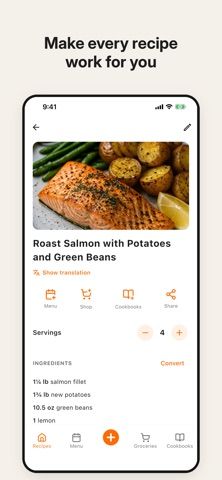
- Keep source links, organize digital cookbooks, and adjust serving sizes.
- Translate recipes and switch between US and metric measurements.
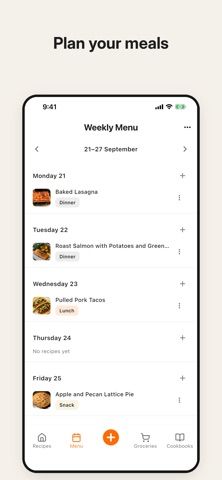
- Add saved recipes to a weekly menu and send ingredients to a shopping list.
A good fit for
- Home cooks who collect recipes from websites and social media and want to plan meals from them.
Worth knowing
- The captured listing does not state recipe-count limits, paid features, or subscription pricing.
- Nutrition values may depend on the recipe source and ingredient details.
- The US App Store listing is marked free to download; confirm current terms before relying on specific features.
Frequently asked questions
Answers based on the app’s official listing and reviewed information.
What is Simmer: Recipe Organizer used for?
A recipe organizer that imports links, social posts, and photos, then connects saved recipes to meal plans and shopping lists.
What can you do with Simmer: Recipe Organizer?
Import recipes from websites, social media links, photos, and screenshots. Keep source links, organize digital cookbooks, and adjust serving sizes. Translate recipes and switch between US and metric measurements. Add saved recipes to a weekly menu and send ingredients to a shopping list.
Who is Simmer: Recipe Organizer designed for?
Home cooks who collect recipes from websites and social media and want to plan meals from them.
What should you know before downloading Simmer: Recipe Organizer?
The captured listing does not state recipe-count limits, paid features, or subscription pricing. Nutrition values may depend on the recipe source and ingredient details. The US App Store listing is marked free to download; confirm current terms before relying on specific features.
Does Simmer: Recipe Organizer include paid features?
The US App Store listing is marked free to download. The captured description does not specify paid plans or limits; confirm current terms in the store.
Which platforms support Simmer: Recipe Organizer?
Greatooly's reviewed app information lists iOS.
Researched from official sources; this is not a hands-on review. Last checked 2026-11-04.
Keep exploring
More apps that might be a good fit.

GroceryGret: Grocery List
Share a grocery list, scan recipe ingredients, and compare nearby stores using community receipt prices.

Clean Plate Meal Prep
A local meal-prep ordering app for checking menus, finding nearby locations, ordering ahead, and collecting loyalty rewards.

The Bento Co.
A meal-ordering app for browsing menu items, checking nutrition and allergen details, and managing meal subscriptions.