
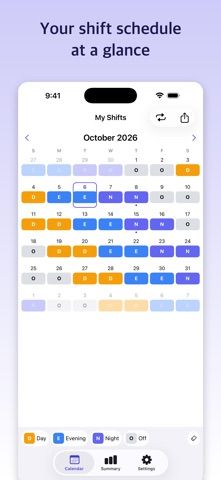
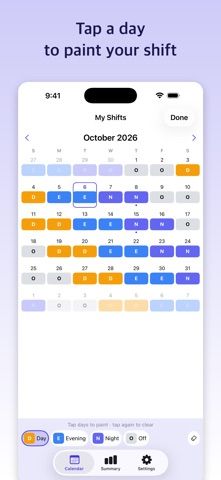
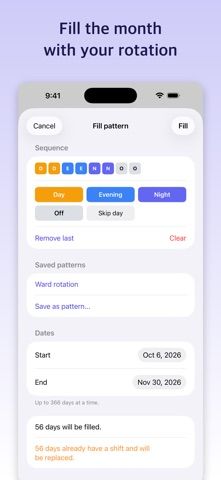
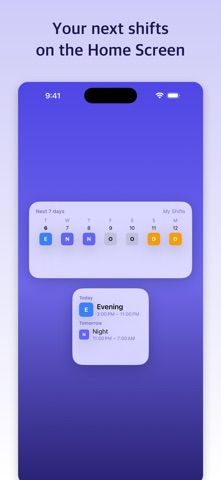
Shift Calendar is designed for people who work rotating schedules and want to see workdays and days off in one place. Users can create shift types, paint them onto a calendar, and fill a repeating pattern across many dates. The listing describes reminders, day notes, widgets, iCloud backup, and image export. The free version includes ads and one calendar; Pro removes ads and adds multiple calendars and other display tools. Pro is available as monthly or yearly subscriptions or a one-time lifetime purchase, with current prices shown in the app. Reminders are scheduled locally, and the developer says users should reopen the app periodically to keep later reminders scheduled. Check the next shift after editing a pattern.

Shift Calendar: Hours & Widget
A shift calendar for rotating schedules, with reusable work patterns, shift reminders, widgets, and calendar export.
By Deokhyeon KimReleased 2026/10/05No ratings yetOfficial store informationPublished 2026/11/04Checked 2026-11-04
Overview
A closer look at Shift Calendar: Hours & Widget.
A closer look
App screenshots
Choose with confidence
The useful details.
What it does
- Creates reusable rotations for day, evening, night, and off shifts.
- Adds shift reminders, day notes, widgets, and iCloud backup.
- Pro unlocks multiple calendars and additional exports and widgets.
A good fit for
- Workers with repeating shifts who need a calendar built around their roster.
- People comparing monthly, yearly, and one-time purchase options for a schedule app.
Worth knowing
- The free version includes ads and one calendar; later reminders may need the app reopened to stay scheduled, according to the listing.
Frequently asked questions
Answers based on the app’s official listing and reviewed information.
What is Shift Calendar: Hours & Widget used for?
A shift calendar for rotating schedules, with reusable work patterns, shift reminders, widgets, and calendar export.
What can you do with Shift Calendar: Hours & Widget?
Creates reusable rotations for day, evening, night, and off shifts. Adds shift reminders, day notes, widgets, and iCloud backup. Pro unlocks multiple calendars and additional exports and widgets.
Who is Shift Calendar: Hours & Widget designed for?
Workers with repeating shifts who need a calendar built around their roster. People comparing monthly, yearly, and one-time purchase options for a schedule app.
What should you know before downloading Shift Calendar: Hours & Widget?
The free version includes ads and one calendar; later reminders may need the app reopened to stay scheduled, according to the listing.
Does Shift Calendar: Hours & Widget include paid features?
Shift Calendar Pro offers monthly and yearly auto-renewing plans; current prices are shown in the app. Shift Calendar Pro also offers a one-time lifetime purchase; current price is shown in the app.
Which platforms support Shift Calendar: Hours & Widget?
Greatooly's reviewed app information lists iOS.
Researched from official sources; this is not a hands-on review. Last checked 2026-11-04.
Keep exploring
More apps that might be a good fit.

CleanHaus: Airbnb Turnovers
CleanHaus automates short-term rental turnovers by connecting booking calendars with cleaners, schedules and property tasks.

GoalStar: Daily Goal Tracker
GoalStar makes daily goals visible with a gold-star chart, streaks, reminders, widgets and optional NFC tap tags.

Accessbox - Password Manager
Accessbox stores passwords, passkeys and verification codes in encrypted Accesscards with AutoFill, breach alerts and optional iCloud sync.