
Recipe Keeper & Food Planner combines a personal recipe box with weekly meal planning and shopping lists. Recipes can be imported from websites, videos, screenshots, shared links, notes, or PDFs, and the app organizes ingredients and steps into a readable format. AI can sort recipes by cuisine, meal type, diet, or cooking time. A calendar helps plan meals across the week, and the shopping list groups ingredients from selected recipes. Users can scale servings, switch between metric and imperial measurements, follow a step-by-step cooking view, and share recipes with family or friends. Premium subscriptions add unlimited imports and scans, advanced planning, nutrition insights, unlimited collections, and cross-device backup. Review extracted ingredients and instructions after import, especially when a recipe came from a video or image.

Recipe Keeper & Food Planner
Recipe Keeper & Food Planner saves recipes from websites, videos, screenshots, and documents, then organizes them into collections and weekly meal plans. It creates grocery lists, scales ingredients, converts measurements, and includes cooking mode. Premium subscriptions unlock unlimited imports, AI scans, planning tools, nutrition insights, and cloud sync.
Overview
A closer look at Recipe Keeper & Food Planner.
A closer look
App screenshots

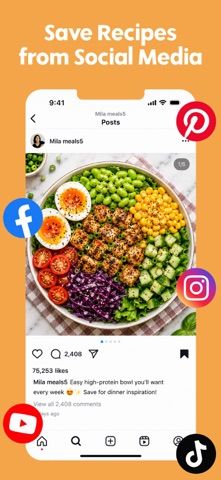
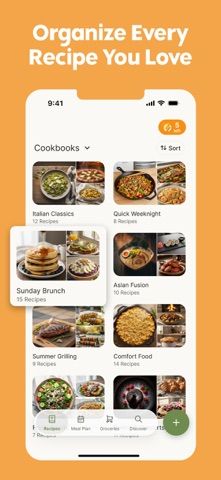
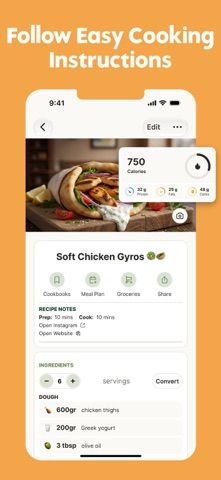
Choose with confidence
The useful details.
What it does
- Import recipes from links, videos, screenshots, notes, or PDFs
- Organize recipes and plan meals in a weekly calendar
- Generate grouped grocery lists and scale servings
- Premium AI scans, nutrition insights, collections, and cloud sync
A good fit for
- Home cooks collecting recipes from websites and social media
- Households planning meals and shopping from a shared recipe library
Worth knowing
- Unlimited imports, AI scans, and cross-device sync require Premium; review extracted recipe details for errors.
Frequently asked questions
Answers based on the app’s official listing and reviewed information.
What is Recipe Keeper & Food Planner used for?
Recipe Keeper & Food Planner saves recipes from websites, videos, screenshots, and documents, then organizes them into collections and weekly meal plans. It creates grocery lists, scales ingredients, converts measurements, and includes cooking mode. Premium subscriptions unlock unlimited imports, AI scans, planning tools, nutrition insights, and cloud sync.
What can you do with Recipe Keeper & Food Planner?
Import recipes from links, videos, screenshots, notes, or PDFs Organize recipes and plan meals in a weekly calendar Generate grouped grocery lists and scale servings Premium AI scans, nutrition insights, collections, and cloud sync
Who is Recipe Keeper & Food Planner designed for?
Home cooks collecting recipes from websites and social media Households planning meals and shopping from a shared recipe library
What should you know before downloading Recipe Keeper & Food Planner?
Unlimited imports, AI scans, and cross-device sync require Premium; review extracted recipe details for errors.
Does Recipe Keeper & Food Planner include paid features?
Premium is an auto-renewing subscription billed weekly; current pricing and any trial are shown in the app.
Which platforms support Recipe Keeper & Food Planner?
Greatooly's reviewed app information lists iOS.
Researched from official sources; this is not a hands-on review. Last checked 2026-11-04.
Keep exploring
More apps that might be a good fit.

GroceryGret: Grocery List
Share a grocery list, scan recipe ingredients, and compare nearby stores using community receipt prices.
Clean Plate Meal Prep
A local meal-prep ordering app for checking menus, finding nearby locations, ordering ahead, and collecting loyalty rewards.

The Bento Co.
A meal-ordering app for browsing menu items, checking nutrition and allergen details, and managing meal subscriptions.