
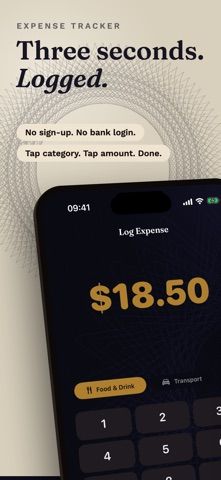
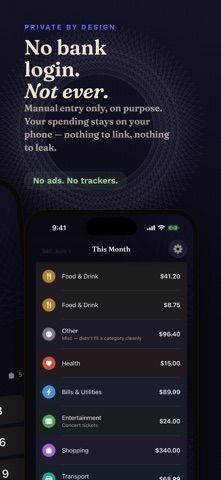
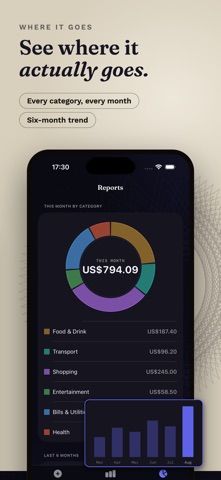
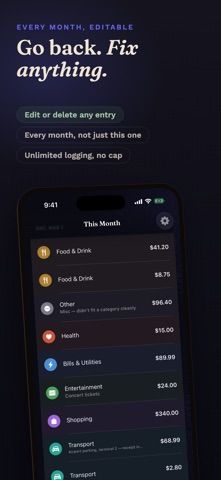
Quick Expense Tracker is a private, manual spending log for people who prefer to enter purchases themselves rather than connect a bank account. Add an expense, choose one of seven built-in categories, and review the current month's spending. The developer says the free core allows unlimited logging, works without a bank link, and keeps data on the device. A new install includes 21 days of Pro access; afterward, the free features remain available and existing records are not locked. Pro adds custom categories, advanced reports and trends, a home-screen widget, extra themes, and spreadsheet export through a one-time purchase. This is a good fit for users who value local control and quick entries, but it does not automate transaction imports. Check the in-app offer for the current Pro price.
Quick Expense Tracker: Private
Quick Expense Tracker is a manual spending log with unlimited expense entry, seven built-in categories, and a monthly overview. The developer says records stay on-device and are not linked to a bank or sent to a server. A 21-day Pro trial unlocks custom categories, reports, widgets, themes, and spreadsheet export; Pro is a one-time purchase.
Overview
A closer look at Quick Expense Tracker: Private.
A closer look
App screenshots
Choose with confidence
The useful details.
What it does
- Unlimited manual expense logging in the free core
- Seven built-in categories and a monthly spending view
- Pro reports, custom categories, widget, themes, and spreadsheet export
- Developer says data stays on-device without bank linking
A good fit for
- People who want a fast manual expense tracker
- Users who prefer not to connect bank credentials to a budget app
Worth knowing
- Transactions must be entered manually; Pro features require a one-time purchase after the trial.
Frequently asked questions
Answers based on the app’s official listing and reviewed information.
What is Quick Expense Tracker: Private used for?
Quick Expense Tracker is a manual spending log with unlimited expense entry, seven built-in categories, and a monthly overview. The developer says records stay on-device and are not linked to a bank or sent to a server. A 21-day Pro trial unlocks custom categories, reports, widgets, themes, and spreadsheet export; Pro is a one-time purchase.
What can you do with Quick Expense Tracker: Private?
Unlimited manual expense logging in the free core Seven built-in categories and a monthly spending view Pro reports, custom categories, widget, themes, and spreadsheet export Developer says data stays on-device without bank linking
Who is Quick Expense Tracker: Private designed for?
People who want a fast manual expense tracker Users who prefer not to connect bank credentials to a budget app
What should you know before downloading Quick Expense Tracker: Private?
Transactions must be entered manually; Pro features require a one-time purchase after the trial.
Does Quick Expense Tracker: Private include paid features?
Free core includes unlimited expense logging, seven categories, and a monthly overview. Pro is a one-time purchase for extra categories, reports, widgets, themes, and spreadsheet export; check the app for the current price.
Which platforms support Quick Expense Tracker: Private?
Greatooly's reviewed app information lists iOS.
Researched from official sources; this is not a hands-on review. Last checked 2026-11-04.
Keep exploring
More apps that might be a good fit.

Jars: Savings Goal Tracker
Jars tracks user-entered savings goals, deposits, and withdrawal plans without holding or moving money.

Coal - Gift List & Budget
Budget for gifts by recipient and track each purchase through delivery, wrapping, and returns.

Budget Planner App: Tally
A personal budget app with voice expense entry, automatic category suggestions, spending limits, and charts.