
Punch time clock - Flexishift is a personal time tracker for shift workers, freelancers, and people managing multiple gigs. Users can start a timer or enter shifts manually, track breaks, add tips or bonuses, and estimate earnings from an hourly rate. The listing describes overtime calculations, schedules, time off, geofence-based clock-in, Apple Watch controls, Live Activities, and timesheet exports. The free version supports up to three jobs and five shift entries at a time; Flexishift Pro unlocks unlimited entries and full exports. Location automation can involve sensitive permissions, and pay estimates may not match local rules, so compare reports with official workplace records.
Punch time clock - Flexishift
Clock in, log breaks and tips, estimate overtime pay, and export timesheets with Punch time clock - Flexishift.
By Dawid DrechnyApp Store rating 4.7 (2,995)Official store informationPublished 2026/11/03Checked 2026-11-03
Overview
A closer look at Punch time clock - Flexishift.
A closer look
App screenshots
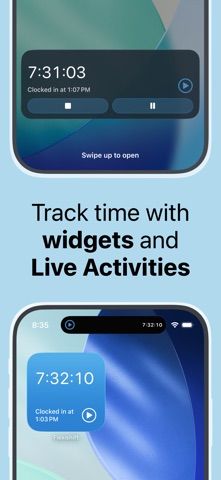
Choose with confidence
The useful details.
What it does
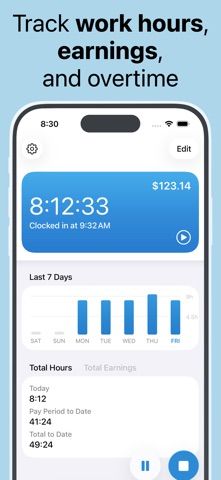
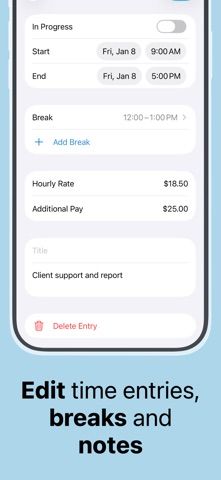
- Start timers or add shifts manually, with break tracking.
- Organize work by employer, client, or gig and estimate earnings.
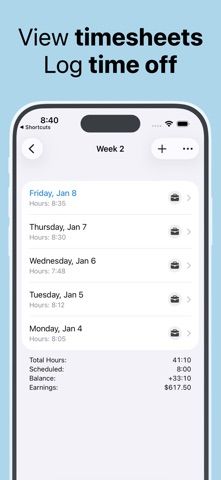
- Set schedules, overtime rules, time-off entries, and reminders.
- Use optional location automation and export timesheets with Pro.
A good fit for
- Shift workers or freelancers who need a personal clock-in log across several jobs.
Worth knowing
- The free version is limited to three jobs and five shift entries; Pro unlocks more and exports.
- Location automation requires location permissions and may not suit every workplace.
- Overtime estimates may not reflect local law or employer policy; verify pay with official records.
Frequently asked questions
Answers based on the app’s official listing and reviewed information.
What is Punch time clock - Flexishift used for?
Clock in, log breaks and tips, estimate overtime pay, and export timesheets with Punch time clock - Flexishift.
What can you do with Punch time clock - Flexishift?
Start timers or add shifts manually, with break tracking. Organize work by employer, client, or gig and estimate earnings. Set schedules, overtime rules, time-off entries, and reminders. Use optional location automation and export timesheets with Pro.
Who is Punch time clock - Flexishift designed for?
Shift workers or freelancers who need a personal clock-in log across several jobs.
What should you know before downloading Punch time clock - Flexishift?
The free version is limited to three jobs and five shift entries; Pro unlocks more and exports. Location automation requires location permissions and may not suit every workplace. Overtime estimates may not reflect local law or employer policy; verify pay with official records.
Does Punch time clock - Flexishift include paid features?
The reviewed listing does not confirm current in-app purchase options.
Which platforms support Punch time clock - Flexishift?
Greatooly's reviewed app information lists iOS.
Researched from official sources; this is not a hands-on review. Last checked 2026-11-03.
Keep exploring
More apps that might be a good fit.

CleanHaus: Airbnb Turnovers
CleanHaus automates short-term rental turnovers by connecting booking calendars with cleaners, schedules and property tasks.

GoalStar: Daily Goal Tracker
GoalStar makes daily goals visible with a gold-star chart, streaks, reminders, widgets and optional NFC tap tags.

Accessbox - Password Manager
Accessbox stores passwords, passkeys and verification codes in encrypted Accesscards with AutoFill, breach alerts and optional iCloud sync.