
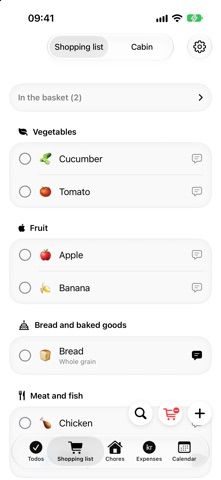
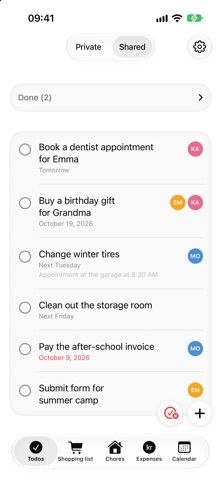
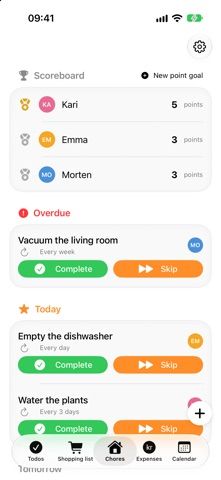
OneHome puts recurring household jobs and plans in a shared space. Members can keep a shopping list, assign chores, create private or shared to-dos, record who paid household expenses, and check a common calendar. Repeating tasks and due-date or location reminders help people remember routine errands, while widgets, Siri Shortcuts, and an Apple Watch app make lists easier to reach. The developer says household data stays in the users’ iCloud accounts and that no separate OneHome account is needed. New users can try the features for 14 days; continued editing requires a one-time purchase, while an unpurchased account retains read-only access.
OneHome – Household Planner
A shared household organizer for shopping, chores, tasks, expenses, and a family calendar, with iCloud sync and Apple Watch support.
By Morten RosenlundReleased 2026/10/13No ratings yetOfficial store informationPublished 2026/11/04Checked 2026-11-04
Overview
A closer look at OneHome – Household Planner.
A closer look
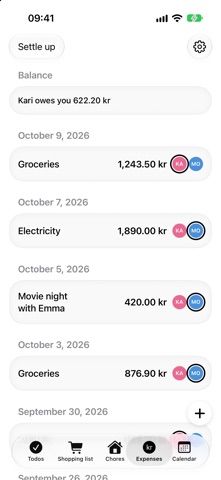
App screenshots
Choose with confidence
The useful details.
What it does
- Share shopping lists, household chores, to-dos, and a family calendar.
- Track shared expenses and see how household costs are split.
- Set repeating tasks and due-date or location reminders.
- Use widgets, Siri Shortcuts, Apple Watch, and Family Sharing.
A good fit for
- Households that want shopping, chores, expenses, and plans in one shared organizer.
Worth knowing
- The free trial lasts 14 days; a one-time purchase is needed for continued editing, and the app requires iOS 18 or later.
Frequently asked questions
Answers based on the app’s official listing and reviewed information.
What is OneHome – Household Planner used for?
A shared household organizer for shopping, chores, tasks, expenses, and a family calendar, with iCloud sync and Apple Watch support.
What can you do with OneHome – Household Planner?
Share shopping lists, household chores, to-dos, and a family calendar. Track shared expenses and see how household costs are split. Set repeating tasks and due-date or location reminders. Use widgets, Siri Shortcuts, Apple Watch, and Family Sharing.
Who is OneHome – Household Planner designed for?
Households that want shopping, chores, expenses, and plans in one shared organizer.
What should you know before downloading OneHome – Household Planner?
The free trial lasts 14 days; a one-time purchase is needed for continued editing, and the app requires iOS 18 or later.
Does OneHome – Household Planner include paid features?
After a 14-day trial, OneHome offers a one-time purchase; the current price is shown in the App Store.
Which platforms support OneHome – Household Planner?
Greatooly's reviewed app information lists iOS.
Researched from official sources; this is not a hands-on review. Last checked 2026-11-04.
Keep exploring
More apps that might be a good fit.

CleanHaus: Airbnb Turnovers
CleanHaus automates short-term rental turnovers by connecting booking calendars with cleaners, schedules and property tasks.

GoalStar: Daily Goal Tracker
GoalStar makes daily goals visible with a gold-star chart, streaks, reminders, widgets and optional NFC tap tags.

Accessbox - Password Manager
Accessbox stores passwords, passkeys and verification codes in encrypted Accesscards with AutoFill, breach alerts and optional iCloud sync.