
NestBoard brings calendars, chores, meal plans, lists, and routines into one shared household space. It can bring in Google and Outlook calendars and subscribe to iCloud, school, or sports feeds, with views color-coded by family member. Kids can have profiles managed by a parent without needing their own email address, and chores can rotate or contribute to agreed screen-time rewards. Families can plan meals, import recipes, maintain a pantry, and create grocery lists that update as everyone shops. The app also includes household messages, pet care, school assignments, carpools, medication reminders, savings goals, and a dashboard that can be shown on an iPad. NestBoard works on iPhone, iPad, and the web. A two-week trial leads to one household subscription covering unlimited members; pricing is shown in the app.

NestBoard: Family Calendar
A shared family calendar and household hub for chores, meals, lists, routines, child profiles, and family coordination.
Overview
A closer look at NestBoard: Family Calendar.
A closer look
App screenshots
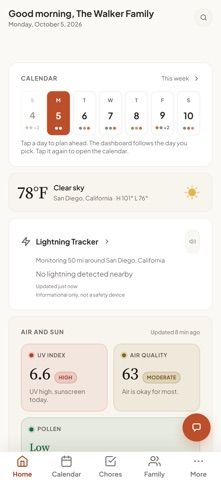
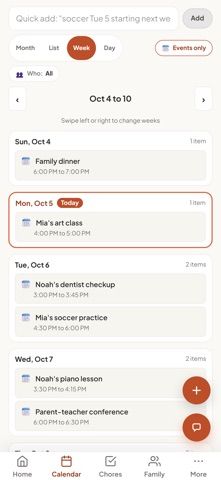
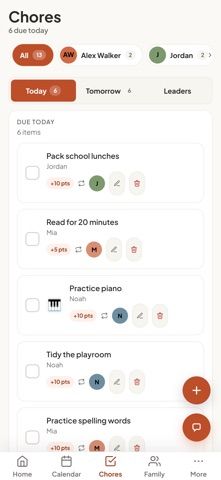
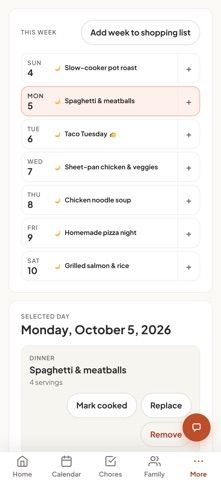
Choose with confidence
The useful details.
What it does
- Combine family events from Google, Outlook, Apple, school, and sports calendars.
- Manage rotating chores, child profiles, routines, and household screen-time agreements.
- Plan dinners, import recipes, track pantry items, and share grocery lists.
- Coordinate school tasks, pet care, reminders, family notes, and shared savings goals.
A good fit for
- Households that want a shared family dashboard for schedules, chores, meals, and routines.
Worth knowing
- Premium requires a household subscription after a two-week trial; local pricing is shown in the app.
- The app has many modules and works best when family members maintain shared schedules and lists.
Frequently asked questions
Answers based on the app’s official listing and reviewed information.
What is NestBoard: Family Calendar used for?
A shared family calendar and household hub for chores, meals, lists, routines, child profiles, and family coordination.
What can you do with NestBoard: Family Calendar?
Combine family events from Google, Outlook, Apple, school, and sports calendars. Manage rotating chores, child profiles, routines, and household screen-time agreements. Plan dinners, import recipes, track pantry items, and share grocery lists. Coordinate school tasks, pet care, reminders, family notes, and shared savings goals.
Who is NestBoard: Family Calendar designed for?
Households that want a shared family dashboard for schedules, chores, meals, and routines.
What should you know before downloading NestBoard: Family Calendar?
Premium requires a household subscription after a two-week trial; local pricing is shown in the app. The app has many modules and works best when family members maintain shared schedules and lists.
Does NestBoard: Family Calendar include paid features?
One Premium subscription covers unlimited household members and begins with a two-week trial; current prices are shown in the app.
Which platforms support NestBoard: Family Calendar?
Greatooly's reviewed app information lists iOS.
Researched from official sources; this is not a hands-on review. Last checked 2026-11-04.
Keep exploring
More apps that might be a good fit.

Listful: Smart Shopping List
Listful turns typed or spoken meal plans into sorted, shareable shopping lists, with on-device Apple Intelligence and private iCloud syncing.

Plant Doctor: Dying Plant Care
Plant Doctor: Dying Plant Care uses a plant photo to suggest likely causes of visible problems and provide step-by-step care guidance.

CarryHalf: Chore Tracker
CarryHalf tracks recurring household chores, ownership, reminders, and progress privately on one phone.