
Lichy is an expense tracker built around quick natural-language entry. A user can type or dictate a line such as a purchase and amount, scan a receipt for totals and line items, or set up an Apple Pay Shortcut to bring in card purchases. Reports summarize activity by day, week, month, or year, and the app supports multiple currencies, recurring bills, income, and separate lists for work, home, or travel. Entries are saved on-device first and sync when the phone is back online. Lichy Plus is a monthly or yearly auto-renewing subscription that raises the monthly AI limit for text and receipt recognition; pricing is shown in the app before purchase. The listing does not say that Lichy connects directly to a bank, and users should review its privacy terms before handling transaction details.

Money & Expense Tracker: Lichy
An expense tracker that turns typed or dictated sentences and receipt photos into entries, with multi-currency reports and recurring bills.
Overview
A closer look at Money & Expense Tracker: Lichy.
A closer look
App screenshots



Choose with confidence
The useful details.
What it does
- Add expenses by typing or dictating a sentence, or scanning a receipt.
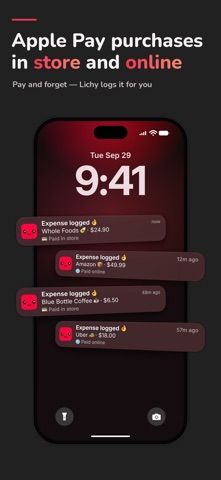
- Use an Apple Pay Shortcut to bring card purchases into the tracker.
- Review reports across time periods and currencies, with both transaction and settlement amounts.
- Track recurring bills, income, and separate lists for different parts of life.
A good fit for
- People who want faster expense entry and reports across multiple currencies.
Worth knowing
- Lichy Plus is required to raise the monthly AI recognition limit; prices are shown in-app and vary by region.
- The captured listing describes an Apple Pay Shortcut, not a direct bank-account connection.
- The app handles detailed financial records; review the developer's privacy terms before use.
Frequently asked questions
Answers based on the app’s official listing and reviewed information.
What is Money & Expense Tracker: Lichy used for?
An expense tracker that turns typed or dictated sentences and receipt photos into entries, with multi-currency reports and recurring bills.
What can you do with Money & Expense Tracker: Lichy?
Add expenses by typing or dictating a sentence, or scanning a receipt. Use an Apple Pay Shortcut to bring card purchases into the tracker. Review reports across time periods and currencies, with both transaction and settlement amounts. Track recurring bills, income, and separate lists for different parts of life.
Who is Money & Expense Tracker: Lichy designed for?
People who want faster expense entry and reports across multiple currencies.
What should you know before downloading Money & Expense Tracker: Lichy?
Lichy Plus is required to raise the monthly AI recognition limit; prices are shown in-app and vary by region. The captured listing describes an Apple Pay Shortcut, not a direct bank-account connection. The app handles detailed financial records; review the developer's privacy terms before use.
Does Money & Expense Tracker: Lichy include paid features?
Lichy Plus is offered monthly or yearly and raises the monthly AI limit for text and receipt recognition. Price is shown in the app and varies by region; subscriptions auto-renew unless canceled in time.
Which platforms support Money & Expense Tracker: Lichy?
Greatooly's reviewed app information lists iOS.
Researched from official sources; this is not a hands-on review. Last checked 2026-11-04.
Keep exploring
More apps that might be a good fit.

Jars: Savings Goal Tracker
Jars tracks user-entered savings goals, deposits, and withdrawal plans without holding or moving money.

Coal - Gift List & Budget
Budget for gifts by recipient and track each purchase through delivery, wrapping, and returns.

Budget Planner App: Tally
A personal budget app with voice expense entry, automatic category suggestions, spending limits, and charts.