
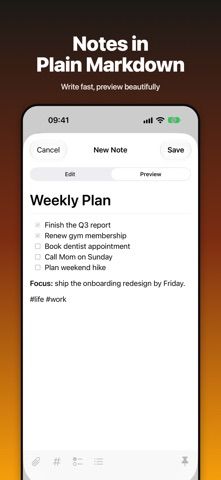
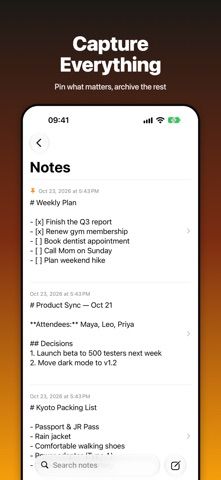
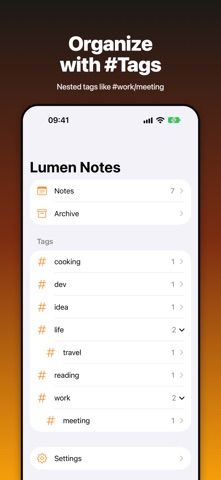
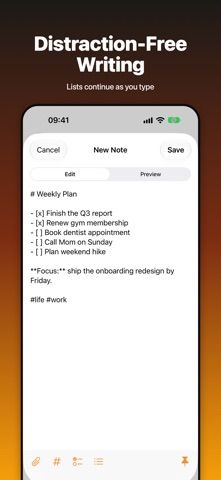
Lumen Editor is a private Markdown notebook for people who want plain text, a formatted preview, and local storage. Drafts save as users type, and common Markdown elements such as headings, lists, quotes, and code blocks receive a clean rendered view. Notes can be organized with flat or nested tags, pinned, archived, searched, and supplemented with photos or files. The developer says the app works offline without an account, advertising, or tracking. A ZIP export backs up the full library, and the backup can be checked before restoration on another device. The US App Store listing is marked free to download, with no in-app purchase options in the captured metadata. The listing does not describe automatic sync, so moving between devices depends on the backup and restore workflow.

Markdown Notes - Lumen Editor
An offline Markdown notebook with a clean preview, nested tags, attachments, full-text search, and ZIP backup and restore.
Overview
A closer look at Markdown Notes - Lumen Editor.
A closer look
App screenshots
Choose with confidence
The useful details.
What it does
- Write Markdown with automatic draft saving and switch between editing and formatted preview.
- Organize notes with tags, nested tag groups, pins, and archives.
- Search the full notebook and attach photos or files to notes.
- Export the library as a ZIP backup and restore it on another device.
A good fit for
- People who want a small, offline Markdown notebook with tags and a portable backup workflow.
Worth knowing
- The listing does not describe automatic cloud sync; moving notes between devices relies on backup and restore.
- The captured US listing is marked free to download; check its current store page for any pricing or feature changes.
Frequently asked questions
Answers based on the app’s official listing and reviewed information.
What is Markdown Notes - Lumen Editor used for?
An offline Markdown notebook with a clean preview, nested tags, attachments, full-text search, and ZIP backup and restore.
What can you do with Markdown Notes - Lumen Editor?
Write Markdown with automatic draft saving and switch between editing and formatted preview. Organize notes with tags, nested tag groups, pins, and archives. Search the full notebook and attach photos or files to notes. Export the library as a ZIP backup and restore it on another device.
Who is Markdown Notes - Lumen Editor designed for?
People who want a small, offline Markdown notebook with tags and a portable backup workflow.
What should you know before downloading Markdown Notes - Lumen Editor?
The listing does not describe automatic cloud sync; moving notes between devices relies on backup and restore. The captured US listing is marked free to download; check its current store page for any pricing or feature changes.
Does Markdown Notes - Lumen Editor include paid features?
The US App Store listing is marked free to download. No in-app purchase options appeared in the captured listing metadata; confirm current terms in the store.
Which platforms support Markdown Notes - Lumen Editor?
Greatooly's reviewed app information lists iOS.
Researched from official sources; this is not a hands-on review. Last checked 2026-11-04.
Keep exploring
More apps that might be a good fit.

CleanHaus: Airbnb Turnovers
CleanHaus automates short-term rental turnovers by connecting booking calendars with cleaners, schedules and property tasks.

GoalStar: Daily Goal Tracker
GoalStar makes daily goals visible with a gold-star chart, streaks, reminders, widgets and optional NFC tap tags.

Accessbox - Password Manager
Accessbox stores passwords, passkeys and verification codes in encrypted Accesscards with AutoFill, breach alerts and optional iCloud sync.