
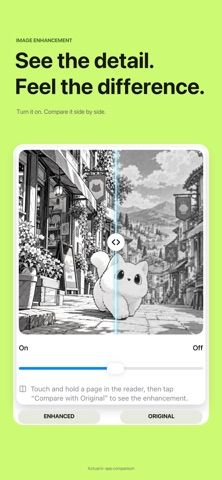
Manul is a comic and manga reader for files users already own or host. The listing names CBZ, CBR, ZIP, RAR, PDF, EPUB, and image folders, along with remote libraries through SMB, WebDAV, Komga, Kavita, and OPDS. Reading tools include right-to-left manga mode, vertical scrolling, panel-by-panel navigation, and an on-device translation option using Apple's built-in Translation. It also advertises local image enhancement and exports no comics or books of its own; users provide their own content. Manul Pro is offered as an auto-renewing monthly subscription or a one-time lifetime purchase, with a free trial for eligible users. Confirm supported file formats, server setup, device requirements, and current Pro price before moving a library. The US listing had one rating when reviewed, so feedback is still sparse.

Manul - Comic & Manga Reader
Read personal comic and manga files from your device or compatible servers, with panel navigation and translation tools.
Overview
A closer look at Manul - Comic & Manga Reader.
A closer look
App screenshots
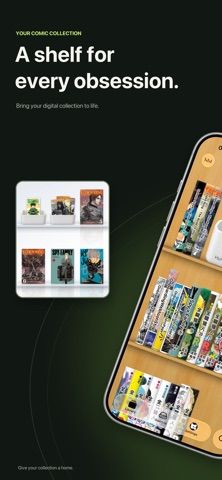


Choose with confidence
The useful details.
What it does
- Open supported comic, manga, ebook, PDF, archive, and image-folder formats.
- Connect to supported self-hosted sources such as SMB, WebDAV, Komga, Kavita, or OPDS.
- Use right-to-left, left-to-right, continuous scroll, and panel-by-panel reading modes.
- Try on-device translation and image enhancement features described in the listing.
A good fit for
- Readers who maintain their own comic or manga files or self-hosted library.
Worth knowing
- The app does not provide or host copyrighted comics; users supply and are responsible for their content.
- Remote libraries require compatible server or network configuration.
- Manul Pro has subscription and lifetime purchase options; verify eligibility, price, and current terms.
Frequently asked questions
Answers based on the app’s official listing and reviewed information.
What is Manul - Comic & Manga Reader used for?
Read personal comic and manga files from your device or compatible servers, with panel navigation and translation tools.
What can you do with Manul - Comic & Manga Reader?
Open supported comic, manga, ebook, PDF, archive, and image-folder formats. Connect to supported self-hosted sources such as SMB, WebDAV, Komga, Kavita, or OPDS. Use right-to-left, left-to-right, continuous scroll, and panel-by-panel reading modes. Try on-device translation and image enhancement features described in the listing.
Who is Manul - Comic & Manga Reader designed for?
Readers who maintain their own comic or manga files or self-hosted library.
What should you know before downloading Manul - Comic & Manga Reader?
The app does not provide or host copyrighted comics; users supply and are responsible for their content. Remote libraries require compatible server or network configuration. Manul Pro has subscription and lifetime purchase options; verify eligibility, price, and current terms.
Does Manul - Comic & Manga Reader include paid features?
The reviewed listing does not confirm current in-app purchase options.
Which platforms support Manul - Comic & Manga Reader?
Greatooly's reviewed app information lists iOS.
Researched from official sources; this is not a hands-on review. Last checked 2026-11-04.
Keep exploring
More apps that might be a good fit.

Reading Log XL — Book Tracker
Reading Log XL records reading time, pages, goals and streaks, organizes a three-shelf book list, and exports school-friendly reading reports.

MyBookShelf: Reading Log
MyBookShelf is a private reading catalog for scanning, organizing and tracking books, notes, ratings and reading progress.

Siftivo: What to Read Next
Siftivo suggests books from a reader’s taste and combines daily picks with reading shelves, reviews, reader follows, and a journal.