
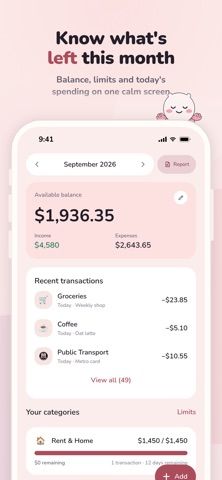
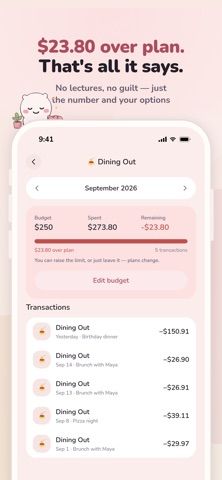
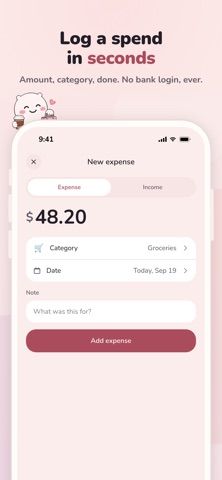
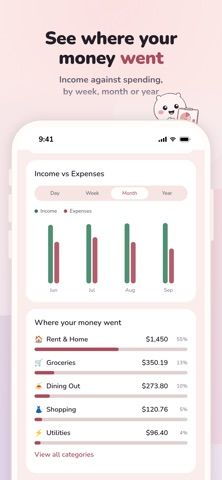
Lunira is a manual budgeting app for people who do not want to connect a bank account. It records income and expenses, supports flexible category limits, and shows how much remains in a monthly budget, with comparisons to the previous month. Reports break spending down by day, week, month, year, and category; recurring expenses and bills can also be organized. Users can set savings goals, create custom categories, choose from six themes and ten currencies, and configure reminders and quiet hours. The developer says budget data stays on the iPhone, with no account or cloud sync. Full access requires an auto-renewing weekly, monthly, or yearly subscription; current prices were not included in the captured listing details. Deleting the app removes its local data, and the developer explicitly says it is not financial advice.

Lunira: Budget Planner
A private, manual budget planner for tracking spending, setting category limits, organizing bills, and working toward savings goals without a bank connection.
Overview
A closer look at Lunira: Budget Planner.
A closer look
App screenshots
Choose with confidence
The useful details.
What it does
- Manually record income and expenses without linking a bank account.
- Set category limits and compare current spending with the previous month.
- Review reports by period and category, and organize recurring bills.
- Track savings goals, custom categories, multiple currencies, and reminder preferences.
A good fit for
- People who prefer private, manual expense tracking and savings goals over automatic bank syncing.
Worth knowing
- Full access requires a weekly, monthly, or yearly auto-renewing subscription; the captured listing did not state prices.
- Data is stored locally without cloud backup or sync, so deleting the app also deletes the budget records.
- The developer describes Lunira as a budgeting tool, not financial advice.
Frequently asked questions
Answers based on the app’s official listing and reviewed information.
What is Lunira: Budget Planner used for?
A private, manual budget planner for tracking spending, setting category limits, organizing bills, and working toward savings goals without a bank connection.
What can you do with Lunira: Budget Planner?
Manually record income and expenses without linking a bank account. Set category limits and compare current spending with the previous month. Review reports by period and category, and organize recurring bills. Track savings goals, custom categories, multiple currencies, and reminder preferences.
Who is Lunira: Budget Planner designed for?
People who prefer private, manual expense tracking and savings goals over automatic bank syncing.
What should you know before downloading Lunira: Budget Planner?
Full access requires a weekly, monthly, or yearly auto-renewing subscription; the captured listing did not state prices. Data is stored locally without cloud backup or sync, so deleting the app also deletes the budget records. The developer describes Lunira as a budgeting tool, not financial advice.
Does Lunira: Budget Planner include paid features?
Full access is offered through weekly, monthly, or yearly auto-renewing subscriptions. The captured listing did not state prices; check the App Store for current regional pricing.
Which platforms support Lunira: Budget Planner?
Greatooly's reviewed app information lists iOS.
Researched from official sources; this is not a hands-on review. Last checked 2026-11-04.
Keep exploring
More apps that might be a good fit.

Jars: Savings Goal Tracker
Jars tracks user-entered savings goals, deposits, and withdrawal plans without holding or moving money.

Coal - Gift List & Budget
Budget for gifts by recipient and track each purchase through delivery, wrapping, and returns.

Budget Planner App: Tally
A personal budget app with voice expense entry, automatic category suggestions, spending limits, and charts.