
LevelUp! Kids helps parents manage chores and rewards across a family. A parent creates missions for each child, reviews completed work, and awards points; the family can set a point-to-screen-time rate or create rewards such as a movie night or later bedtime. Children see their own points and missions, while a parent dashboard shows activity, approval requests, and active screen timers. Kids join with a simple name and PIN, without needing an email address of their own. LevelUp Family is free to download, but using the family service requires an auto-renewing subscription. The US App Store lists $9.99 per month or $79.99 per year, with one plan covering the family. The app requires iOS 15.1 or later on iPhone or iPad. Screen Time controls need the appropriate Apple permissions and compatible devices.

LevelUp! Kids
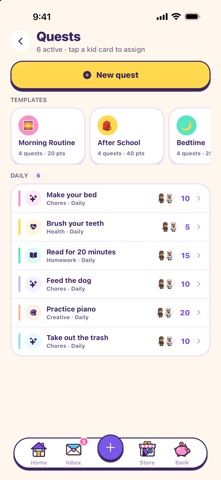
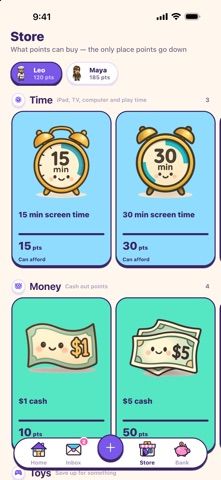
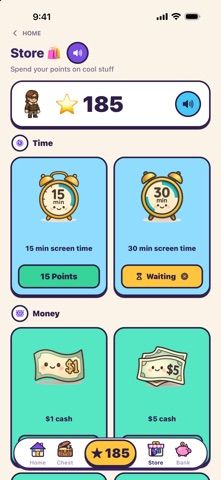
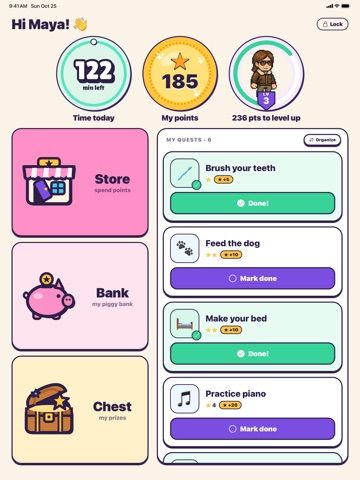
LevelUp! Kids turns family chores into quests, letting children earn points for screen time or rewards that parents approve.
Overview
A closer look at LevelUp! Kids.
A closer look
App screenshots
Choose with confidence
The useful details.
What it does
- Create recurring or one-time chores and review each child’s completed missions.
- Award points that children can redeem for screen time or family-defined rewards.
- Use parent and child profiles, approval requests, daily caps, and live screen-time timers.
- Add children using a name and PIN instead of requiring a child email address.
A good fit for
- Parents who want children to earn screen time or privileges through household tasks.
- Families that need shared parent controls and separate profiles for multiple children.
Worth knowing
- An active LevelUp Family subscription is required; US App Store pricing is $9.99 monthly or $79.99 yearly.
- Requires iOS 15.1 or later, and screen-time controls depend on Apple Screen Time permissions and supported devices.
- The app handles child profiles and family activity, so parents should review the privacy policy and account setup.
Frequently asked questions
Answers based on the app’s official listing and reviewed information.
What is LevelUp! Kids used for?
LevelUp! Kids turns family chores into quests, letting children earn points for screen time or rewards that parents approve.
What can you do with LevelUp! Kids?
Create recurring or one-time chores and review each child’s completed missions. Award points that children can redeem for screen time or family-defined rewards. Use parent and child profiles, approval requests, daily caps, and live screen-time timers. Add children using a name and PIN instead of requiring a child email address.
Who is LevelUp! Kids designed for?
Parents who want children to earn screen time or privileges through household tasks. Families that need shared parent controls and separate profiles for multiple children.
What should you know before downloading LevelUp! Kids?
An active LevelUp Family subscription is required; US App Store pricing is $9.99 monthly or $79.99 yearly. Requires iOS 15.1 or later, and screen-time controls depend on Apple Screen Time permissions and supported devices. The app handles child profiles and family activity, so parents should review the privacy policy and account setup.
What does LevelUp! Kids cost?
Free to download. LevelUp Family is listed at $9.99 per month or $79.99 per year in the US App Store. One subscription covers the family; it renews automatically unless canceled in Apple Account settings.
Which platforms support LevelUp! Kids?
Greatooly's reviewed app information lists iOS.
Researched from official sources; this is not a hands-on review. Last checked 2026-11-10.
Keep exploring
More apps that might be a good fit.

VIP Pet: Care Concierge
VIP Pet organizes pet care plans and records, offers AI concierge guidance, and helps find local pet-care providers.

Curate: Your Personal Stylist
Curate builds a digital closet from selected photos and uses AI styling suggestions to plan outfits from clothes you already own.
Houselle: Home Maintenance
Houselle creates a home-specific maintenance calendar with seasonal reminders, homeowner guidance and an organized record of repairs.